Visit reports and visit details
Review visits, customer history, forms, orders and verification.
Choose a visit view
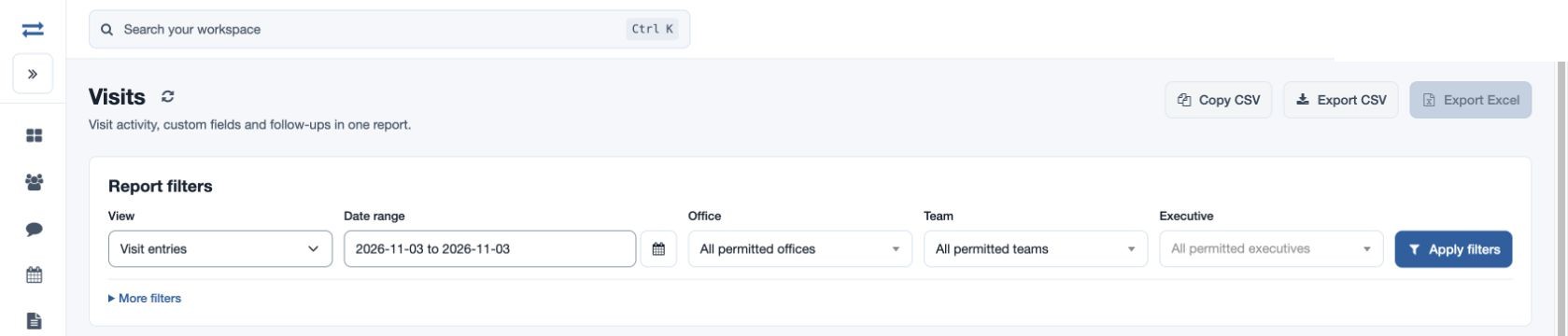
Open Reports → Visits. In View choose Visit entries, Extended fields, Company history, Visits with a form or Visits with orders. These views use the same Visits workspace with different detail.
Filter and review
- Choose From and To, Office, Team and Executive. Optionally choose a Custom form, Verification (All visits, Verified or Unverified), exact company name, or search employee, company, contact, remarks or reference. Select Apply filters.
- For Company history enter the exact customer company name; workspace search can also locate company history. For a form view choose the relevant form. A beat-plan link may apply a plan reference; use Clear plan filter to remove it.
- Inspect charts and records. Open a visit to review contact information, submitted forms, orders and supporting images. Where authorized, verify the visit after reviewing the evidence; the verification filter can distinguish verified from unverified records.
- Use Copy CSV, Export CSV or Export Excel when permitted. The exported selection follows the filters.
Example and troubleshooting
For example, search exact company “Acme Traders” and a fictional date range to review its visit history, then open one record. If no results appear, check spelling, dates, form, verification and plan filters, and confirm your access. A visit without recorded distance should not be treated as proof of no travel.
Charts and report limits
Review Visits, Productive, Verified and Recorded distance totals, activity by date and visit-type charts. Expand All chart values or Distance and conveyance by employee for more detail where shown. Direct report exports contain data rather than photo and signature files; open a visit for available evidence. Narrow the date range or employee scope if more than 2,000 visits match.