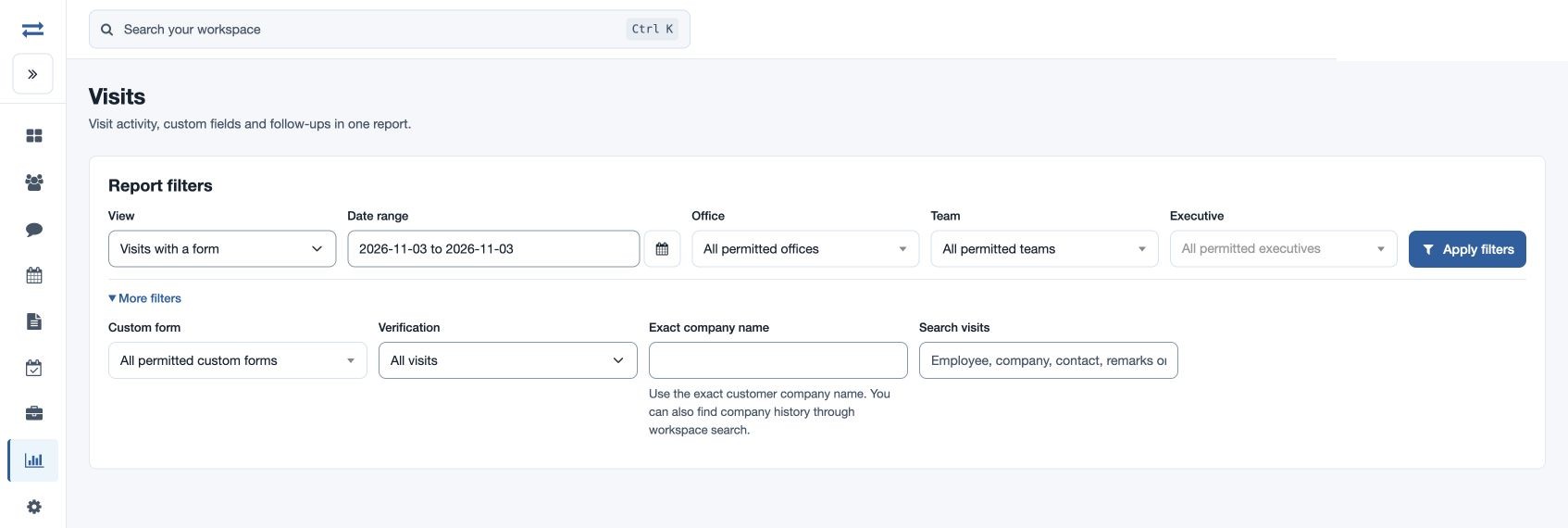
Visits with a form
Find visits that include a chosen custom form.
Find visits that include a chosen custom form. Visit reports require visit-report access and show only employees in your scope.
Filter and run
- Open Reports → Visits and choose the named View. Set the Date range, Office, Team and Executive.
- Expand More filters to choose Custom form; Verification as All visits, Verified or Unverified; Exact company name; or Search visits by employee, company, contact, remarks or reference. Complete any required selection for this view, then select Apply filters.
- Review charts and sortable, pageable records. Open a Visit ID to see details, photos, signatures, forms and orders where available. With report download permission, use Copy CSV, Export CSV or Export Excel for the same selection. Refresh report data to reload.
Read this view
In More filters, choose a specific Custom form; the selection is required. The report returns visits with a submission of that form. Open a Visit ID to inspect the submitted answers. For a field-by-field report of repeated and historical form submissions, use Custom form submissions.
Example and troubleshooting
For a fictional Acme Traders visit, select the date and team, then open the matching Visit ID. If nothing matches, verify the date, employee scope, exact company spelling, form and verification filters. A plan reference from Beat Plan also narrows results; choose Clear plan filter to remove it.
Columns and selection
Select a custom form to run this view. Matching visit rows identify the visit and employee, employee email, team and office, visit date, company, contact details, address and remarks, visit type and product or service, meeting status and times, follow-up, recorded distance and travel minutes, verification, reference and coordinates. Open a visit to review its form and available images or signatures. Direct report exports contain data rather than photo or signature files. Narrow filters if more than 2,000 visits match.