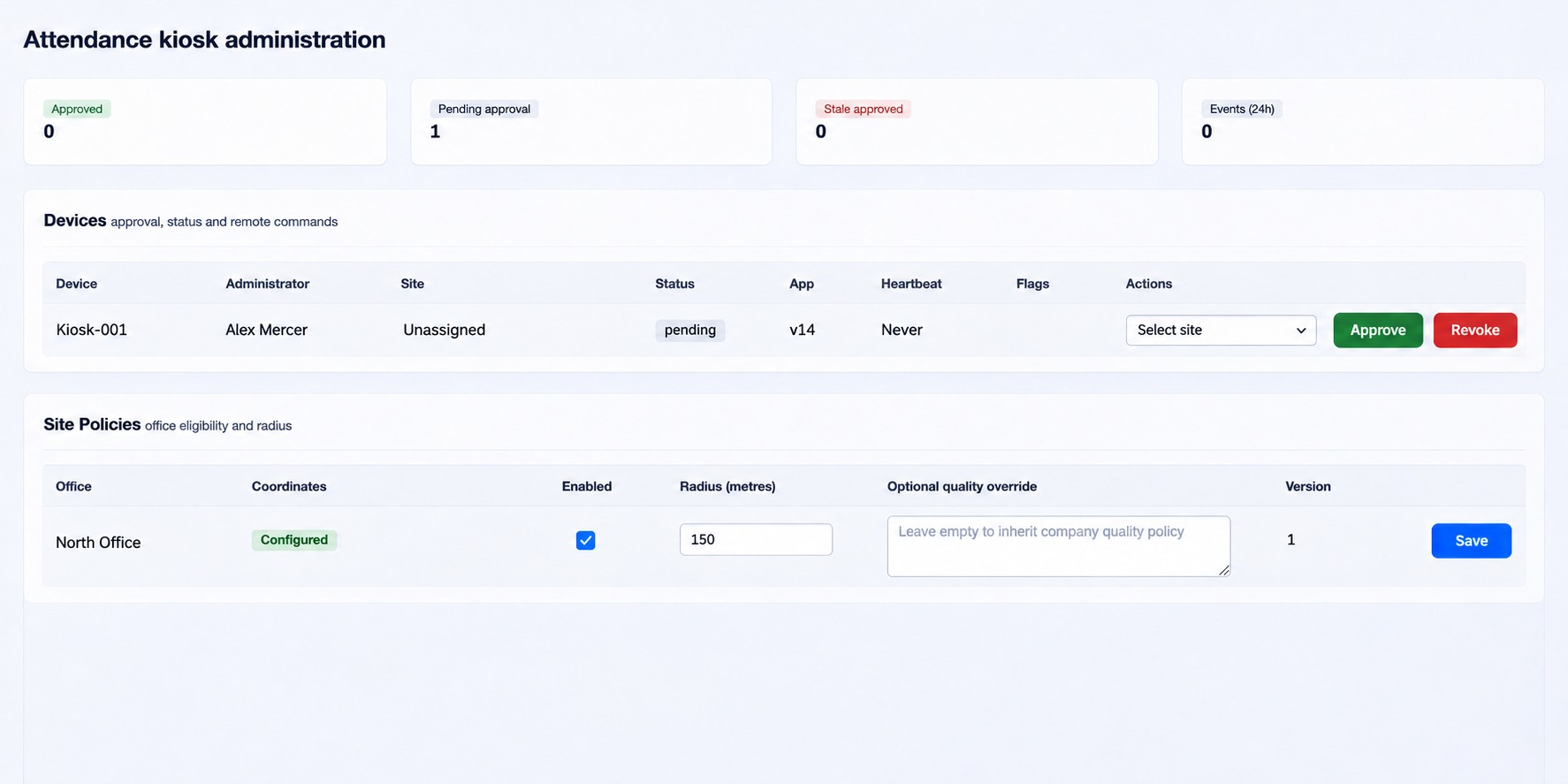
Attendance kiosk administration
Manage kiosk devices, site policies and enrollment notices.
Open Organization → Attendance kiosk as a full administrator. Coordinate kiosk setup, site coordinates and the approved privacy notice with the people responsible for your organization’s device and privacy policies.
Devices
The Devices table shows Device, Administrator, Site, Status, App, Heartbeat, Flags and Actions. For a pending device, select its site and choose Approve. Approved devices can be blocked; blocked or revoked devices can be restored to pending, then approved again. Revoke removes approval. For an approved device, the command choices are Full sync, Refresh policy, Purge cache and Force logout; maintenance can be enabled or disabled. Check device status, heartbeat and flags after the action.
Site and company policies
In Site Policies, each office shows coordinate readiness, Enabled, Radius (metres), Optional quality override and Version. Enter a radius from 10 to 10,000 metres; leave quality override empty to inherit the company quality policy. Save the office row. In Company Policy, provide the complete validated policy JSON, save it while disabled, then enable the company kiosk when ready. The page can roll back one version where available. Review validation messages before retrying.
Privacy Notices
Enter Notice version, Locale, Minimum seconds (1–3600), Default locale, Require scroll and Active as appropriate. For a default notice, optionally list allowed requested locales separated by commas. Paste the exact approved notice JSON bytes and choose Create immutable notice. Version and locale cannot be overwritten; use a new version for any content or presentation-rule change. The table shows version, locale, hash, rules, status and creation time, with activation controls.
Security Events lists the latest 100 received events. If a fictional device at North is not ready, review its approval, site coordinates, enabled policy, heartbeat and notice; do not assume an old heartbeat alone explains the cause.
Operational checks
- Set up office coordinates and the site policy. Review the company policy while disabled, then validate and save it before enabling the kiosk.
- Publish an approved privacy notice for the intended locale and verify its active status. If a change to notice content or display rules is needed, create a new version.
- After a device registers, select its site and approve it. Check its application version and heartbeat, and use Full sync or Refresh policy when a verified change needs to reach the device.
- Review Security Events and device flags when an issue occurs. Refresh the page if the page security token expires; check the stated error and current version before retrying a policy save.
Enable maintenance and Disable maintenance are separate device commands. Purge cache and Force logout have immediate operational effects on the selected approved kiosk; verify the target and purpose before sending them. A site quality override must be a valid supported JSON policy; leave it empty to inherit company settings.
Company policy JSON
The complete policy object requires offline, manager_mode, recognition, quality, liveness, location, attendance, application and privacy sections. Unsupported sections or fields are rejected. Work with the kiosk administrator to supply the approved model and measurement configuration rather than guessing values.
- Offline: allowed plus authorization, roster, template, shift and event maximum ages in minutes. When enabled, each lifetime must be positive and at most 43,200 minutes.
- Manager mode: auto-lock seconds (10–3,600), PIN maximum attempts (1–20), PIN lock seconds (1–86,400) and fresh-auth maximum age (30–900 seconds).
- Recognition and quality: identify the model, version, hash, preprocessing, embedding dimension and score contract; set match, ambiguity and duplicate thresholds, stable frames and presence cooldown. Quality defines its own version, measurement contract, analysis dimensions and separate enrollment and attendance sample, pose, light, sharpness, landmark, motion and failure rules. The model and preprocessing values must agree with recognition; a quality policy ID/version cannot be reused with different content.
- Liveness: model identity, version and hash, algorithm and result-schema versions, passive and active-challenge settings, challenge lifetime and supported types. Enabled active challenges require at least one type; disabled challenges require none.
- Location: required, maximum age and accuracy, reject mock locations and site-geofence requirement. Attendance: required selfie, early-checkout reauthentication, no-shift behavior (block or legacy fallback), check-in and check-out windows, grace and overtime minutes. Window open values cannot exceed their corresponding close values.
- Application: minimum version, managed-mode requirement, integrity mode and optional sunset version. Privacy: notice version, retention policy ID and terminal-result retention. A retention ID cannot be reused with different retention semantics.
If validation rejects a policy, read the displayed field error and check JSON types, required sections, allowed values, model compatibility and version. Reload before retrying if another administrator changed the version. Integrity enforcement requires an approved verifier; the page rejects it when that verifier is unavailable.
Privacy notice document
The exact notice JSON requires schema_version, locale, title, sections and acknowledgment_label. The locale must match the form. Schema version is 1 and the six ordered section IDs are data_collected, purposes, access_processing, retention_deletion, revocation_alternative and grievance_corrections; each section has an ID, heading and body. Use the organization’s approved notice text. Default-locale fallbacks are configured only for a default notice.
Policy field reference
Within each section, use these exact JSON field names:
offline:allowed,authorization_minutes,roster_max_age_minutes,template_max_age_minutes,shift_max_age_minutes,event_max_age_minutes.manager_mode:auto_lock_seconds,pin_max_attempts,pin_lock_seconds,fresh_auth_max_age_seconds.recognition:model_id,model_version,model_sha256,preprocessing_version,embedding_dimension,score_metric,higher_score_is_better,match_threshold,ambiguity_margin,duplicate_threshold,stable_frames,presence_cooldown_seconds.quality:schema_version,policy_id,policy_version,model_id,model_version,preprocessing_version,measurement_algorithm,analysis_width_px,analysis_height_px,luma_sampling_step_px,face_occupancy_unit,pose_unit,luminance_unit,contrast_metric,sharpness_metric,motion_metric,illumination_uniformity_metric,backlight_metric,landmark_metric,enrollmentandattendance.liveness:model_id,model_version,model_sha256,algorithm_version,result_schema_version,passive_required,active_challenge_on_risk,active_challenge_ttl_seconds,active_challenge_types.location:required,max_age_ms,max_accuracy_m,reject_mock,site_geofence_required.attendance:selfie_required,early_checkout_requires_reauth,no_shift_behavior,check_in_open_minutes,check_in_close_minutes,check_out_open_minutes,check_out_close_minutes,grace_minutes,overtime_after_minutes.application:minimum_version_code,managed_mode_required,integrity_mode, and optionalsunset_version_code.privacy:notice_version,retention_policy_id,terminal_result_retention.
The quality enrollment and attendance objects each require sample-count and interval limits, capture duration, minimum face dimensions and occupancy, maximum yaw/pitch/roll, luminance and contrast limits, sharpness, uniformity, backlight and motion thresholds, landmark and occlusion requirements, and quality and liveness failure actions. Use the approved full configuration for the deployed kiosk model; the validator rejects incomplete or incompatible values.