Compare and choose a plan
Compare billing cycles, features and license quantities before starting checkout.
Open plan comparison
Open Billing → Plans, or select Compare plans on Billing overview. You need administrator billing access and plan changes must be enabled for the company.
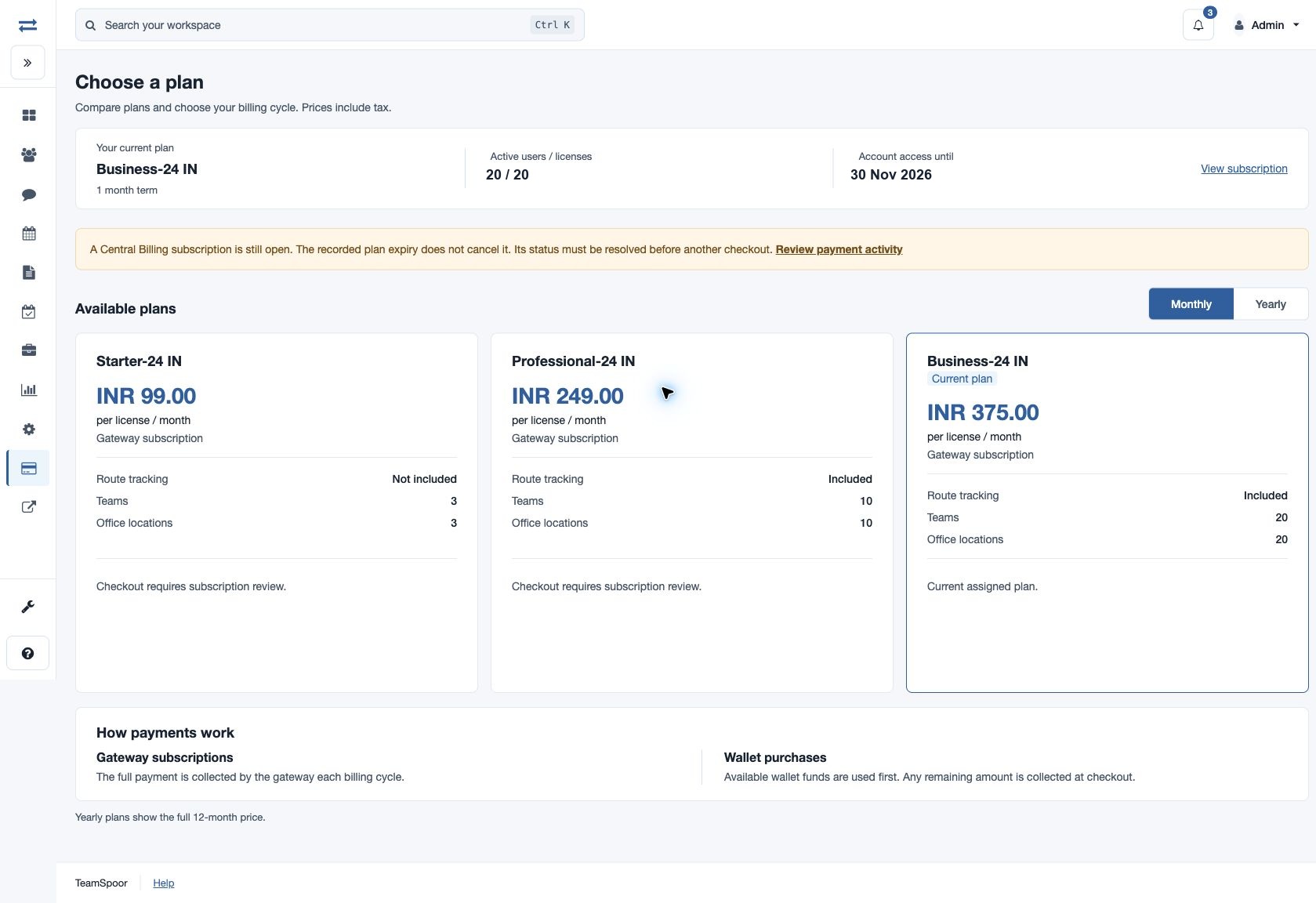
Compare the options
- Check Your current plan, active users, licenses and account access date.
- Select Monthly or Yearly. Yearly prices show the full 12-month amount, rather than a monthly equivalent.
- For each plan, read the currency, whether the price is per license or per plan, payment type, team limit and office-location limit. Per-license plans show route-tracking inclusion; unlimited-user plans show Users: Unlimited. Prices include tax.
- Choose a suitable license quantity when the Licenses field is available. It must be at least the active-user count, with a minimum of one. Self-service per-user checkout supports up to 200 licenses. Unlimited-user plans use one plan purchase.
- Select Continue to subscription for a gateway subscription or Review wallet purchase for a prepaid plan.
- Review the payment summary and recurring terms before confirming on the checkout page. After payment, verify the result in Billing overview and Payment activity.
Understand the payment type
| Type | How it works |
|---|---|
| Gateway subscription | The gateway collects the full recurring payment each billing cycle. Wallet balance does not reduce that subscription payment. |
| Prepaid · wallet | Eligible available wallet funds are applied first. Checkout collects any shortfall. Review the displayed term, total and renewal information before confirmation. |
| Current assigned plan | The selected plan is already assigned. Use subscription management or wallet renewal, as appropriate, rather than starting a duplicate checkout. |
Example
For a fictional plan priced at INR 150 per license for one month, 20 licenses cost INR 3,000 for that term. Use the actual displayed quote for payment; do not multiply a full-year price by 12 again.
When checkout is unavailable
- Open subscription or payment attempt: open Payment activity and resolve it before creating another checkout.
- Changing an active subscription: review eligibility in Manage subscription, cancel its renewal when appropriate, and choose the next plan after the paid period ends and the subscription closes.
- Subscription not configured or plan not yet eligible: read the displayed availability message or eligibility date. Use View subscription when offered, or contact billing support if the plan cannot be selected.
- Plan changes disabled: ask the company’s billing administrator or support about the account restriction.
- More than 200 active users: contact support for a larger per-user checkout.
- No plans for the selected cycle: try the other cycle. Available plans depend on country and currency.
- Expired checkout form: reopen Plans and make the selection again.