Payroll Anomalies Report
Find payroll exceptions that need attention.
Find setup exceptions
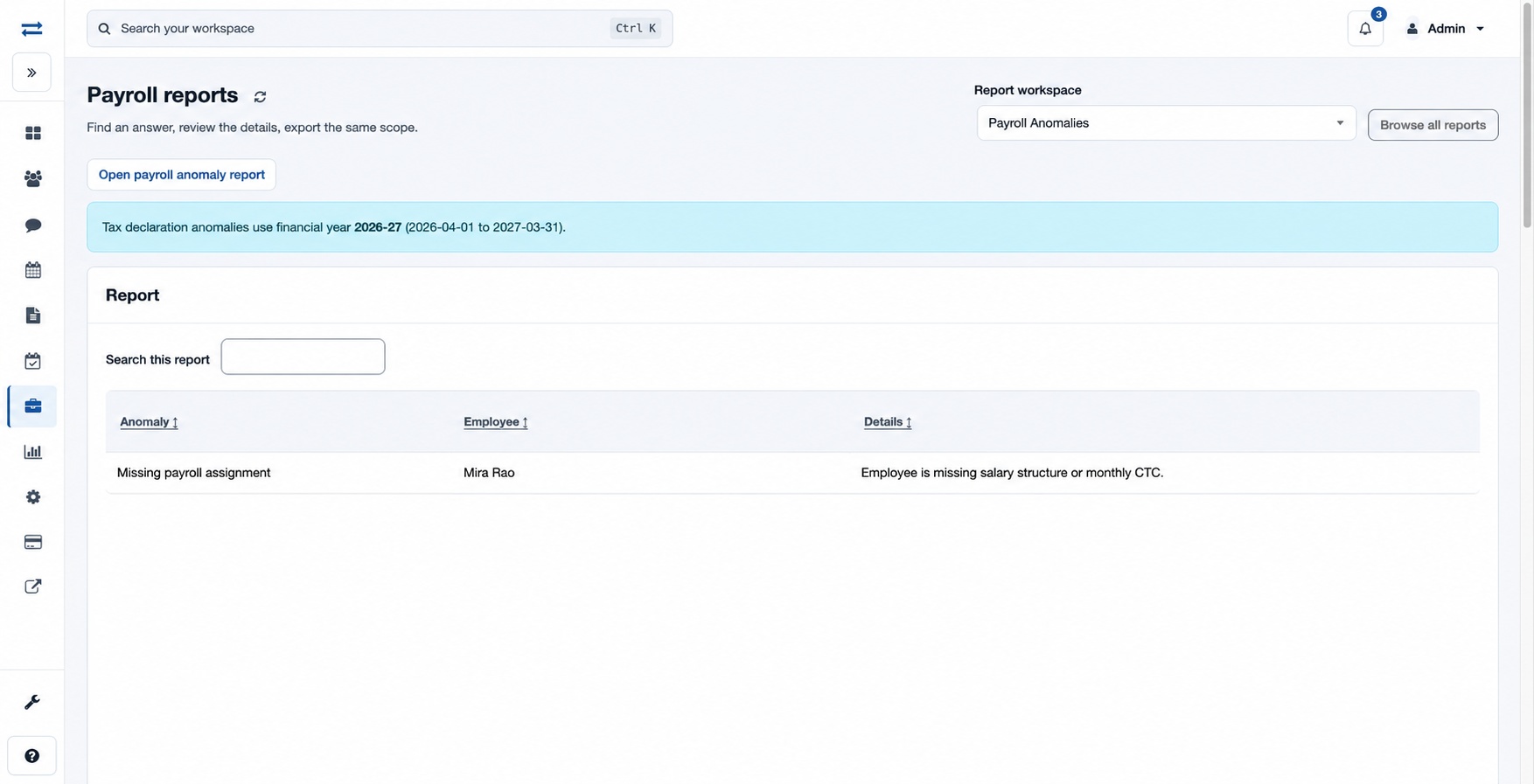
Open Payroll → Reports → Payroll Anomalies. The report displays Anomaly, Employee and Details, with search, sorting and pagination. Tax declaration anomalies use the active financial year shown above the table. This page does not have date or office filters.
For example, investigate a missing payroll assignment or policy mapping in the employee’s setup, then refresh the report. Choose Open payroll anomaly report for the detailed control view. Access is limited by your report permission and scope.
Access and scope
The payroll feature and payroll anomalies report permission are required. Results are limited to your permitted scope. If a report exceeds 2,000 entries, ask an administrator to review the accessible scope.
Interpret an anomaly
Anomaly names the condition, Employee identifies the affected person, and Details gives context such as a period, reference or missing assignment. Conditions include missing payroll assignment, policy mapping or tax declaration; negative net pay; a missing attendance link; duplicate advance or loan recovery; and an approved reimbursement pending payroll posting.
For fictional Mira Rao, a missing policy mapping directs you to review the leave and attendance policies on her employee assignment. After correction, refresh and check whether the condition remains. A missing row can also reflect access scope.