Payment activity and pending payments
Review subscriptions, unfinished checkouts and earlier provider history.
Open payment activity
From Billing → Overview, choose Review payment activity or View payment activity. This page is for administrators with billing access.
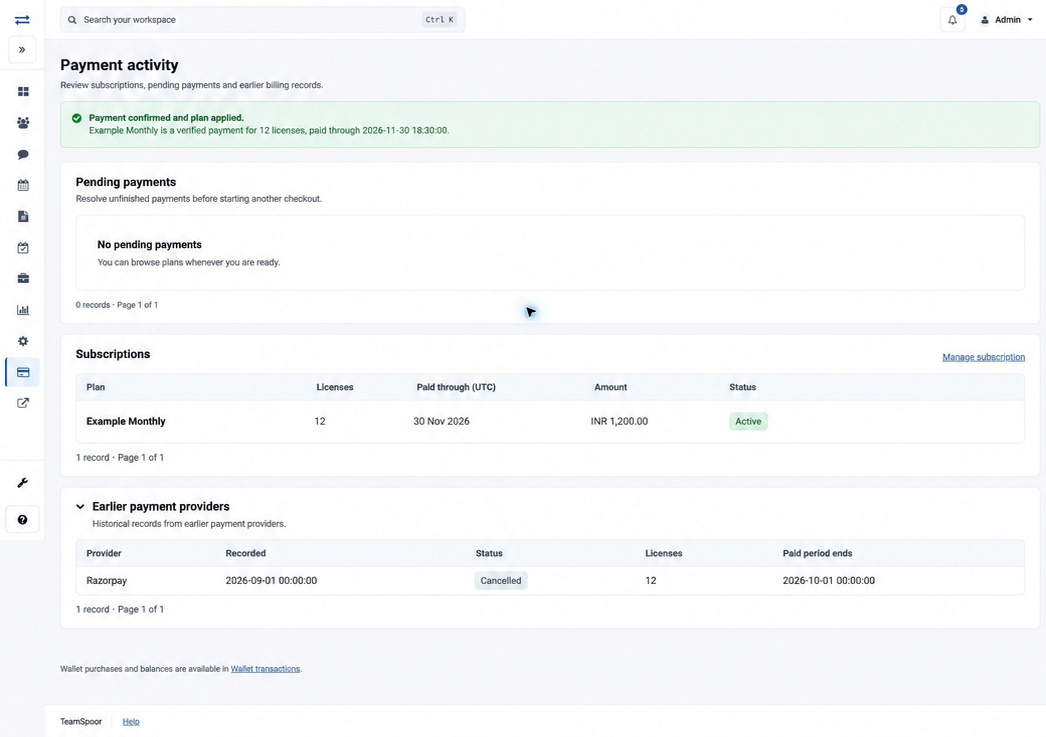
Review each section
| Section | Purpose and controls |
|---|---|
| Pending payments | Unfinished attempts that may block a new checkout. Read Plan, Details (provider and Started time), Status and Action. Each section has its own record count and pagination, with up to 25 records per page. |
| Subscriptions | Plan and Created time, licenses, paid-through date in UTC, amount, status and any processing message. Manage subscription opens the current eligible subscription controls. |
| Earlier payment providers | Expandable Stripe and Razorpay history, showing provider, recorded date, status, licenses and paid-period end. These are historical records. |
Resolve an unfinished payment
- Identify the pending attempt and check whether payment was made or authorized.
- Read the action and explanation in that row. Use Cancel pending payment when offered for an unpaid attempt. For a recovery attempt, the available action can be Check and cancel payment.
- Review the confirmation: the payment will be checked and cancellation requested only if it is still unpaid.
- Check the resulting status. Cancellation pending means a new checkout remains blocked until cancellation is confirmed.
- If the row says Payment review required, read its recovery message. Use Check and cancel payment when enabled. If it says Check again from a UTC time, wait until that time; recovery checks can require a 15-minute waiting period. Use Contact billing support for earlier-provider attempts or an unresolved review.
- Return to Plans only after the unfinished attempt is resolved.
Understand confirmation
Payment confirmed and plan applied identifies a verified payment and the paid-through date. Payment Confirmation Pending, or the banner Payment verification is still pending, means the payment lifecycle has not yet produced the verified confirmation needed to update access. A historical Active row with an old paid-through date should be read alongside Billing overview and the current subscription state.
When cancellation cannot complete
Cancellation setup in progress means the action is not currently available. Return later or contact billing support; there is no customer setting on this page to complete that setup. If the form has expired, reload Payment activity before trying again. If a recovery check cannot be confirmed, the existing attempt remains blocked: check again after 15 minutes or contact billing support. Do not start a duplicate payment while confirmation is unresolved.
Example
If an earlier checkout was abandoned, first review the pending attempt and its cancellation availability. Repeatedly selecting a plan can leave you blocked by the same unresolved attempt; completing the existing recovery process is the next step.
When history cannot load
Retry a temporarily unavailable section. Earlier provider history can remain available even if current subscription details are unavailable. If a request stays under review or a charge exists without an applied plan, contact billing support and check Wallet transactions for wallet-related payments.