Attendance Policies
Set attendance thresholds, weekly offs and regularization rules.
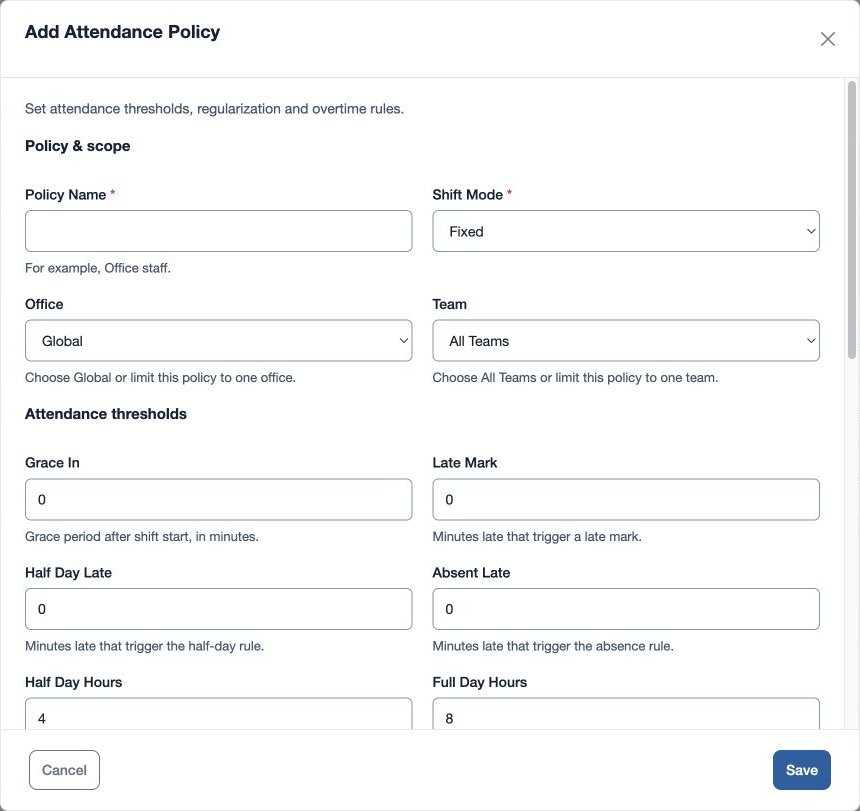
Open HR & attendance → Attendance → Attendance Policies as an administrator with attendance-policy management permission. Select the plus control and enter required Policy Name and Shift Mode: Fixed, Flexible, Rotational or Overnight. Choose Office (Global or an office) and Team (All Teams or a team).
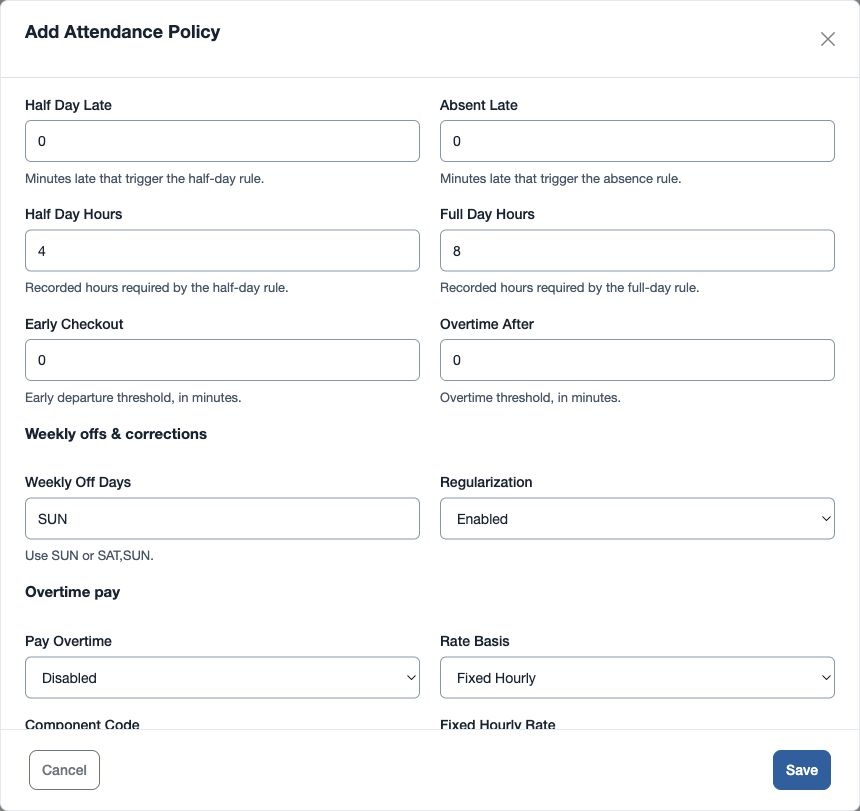
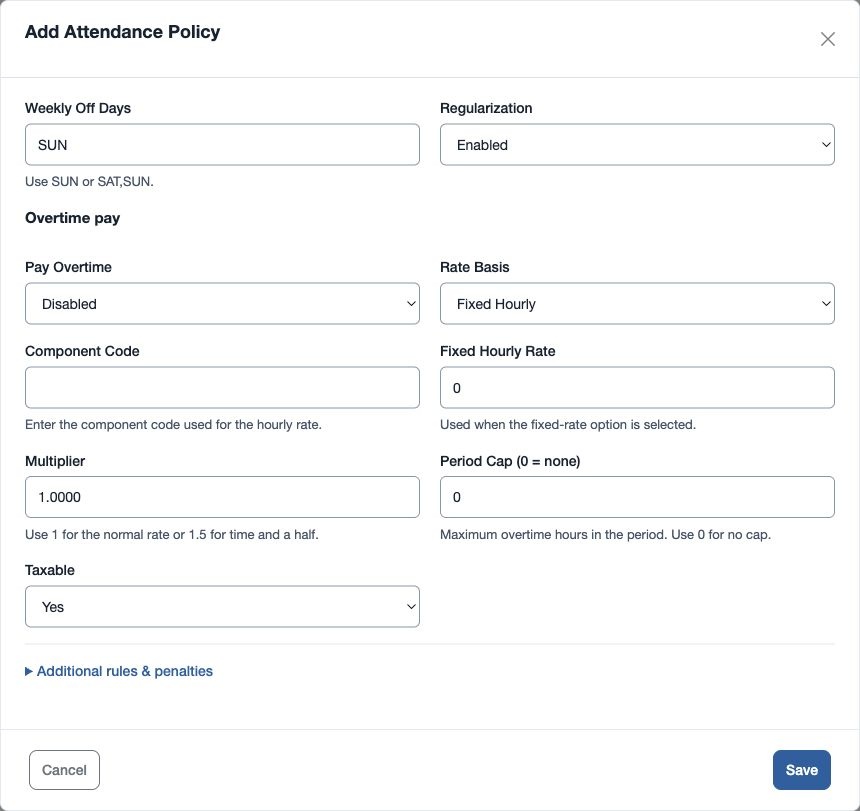
Set the numeric thresholds: Grace In, Late Mark, Half Day Late, Absent Late, Early Checkout and Overtime After in minutes; Half Day Hours and Full Day Hours; Late Penalty After Marks and Late Penalty Days. Enter Weekly Off Days such as SUN or SAT,SUN. Set Holiday Sandwich and Weekly Off Sandwich to Enabled or Disabled and Regularization to Enabled or Disabled.
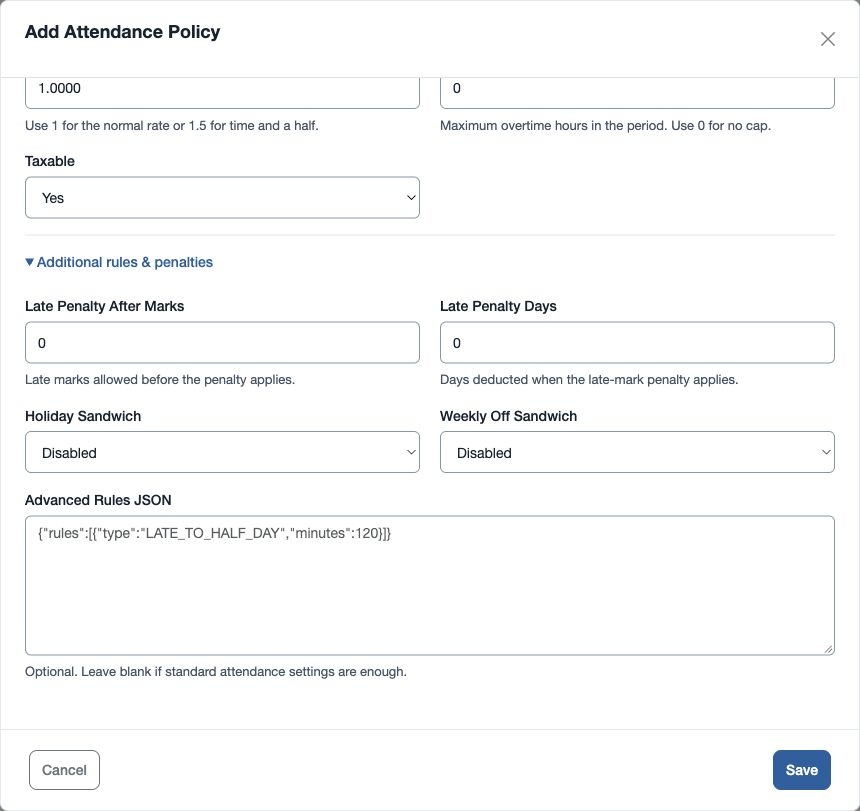
Advanced Rules JSON is optional; leave it blank when standard settings suffice. If used, it must be valid JSON. Overtime payout settings include Pay Overtime, Rate Basis (Fixed Hourly, Monthly CTC, Gross Pay or Component), Component Code, Fixed Hourly Rate, Multiplier, Period Cap (0 = none) and Taxable. Configure these with the responsible payroll administrator.
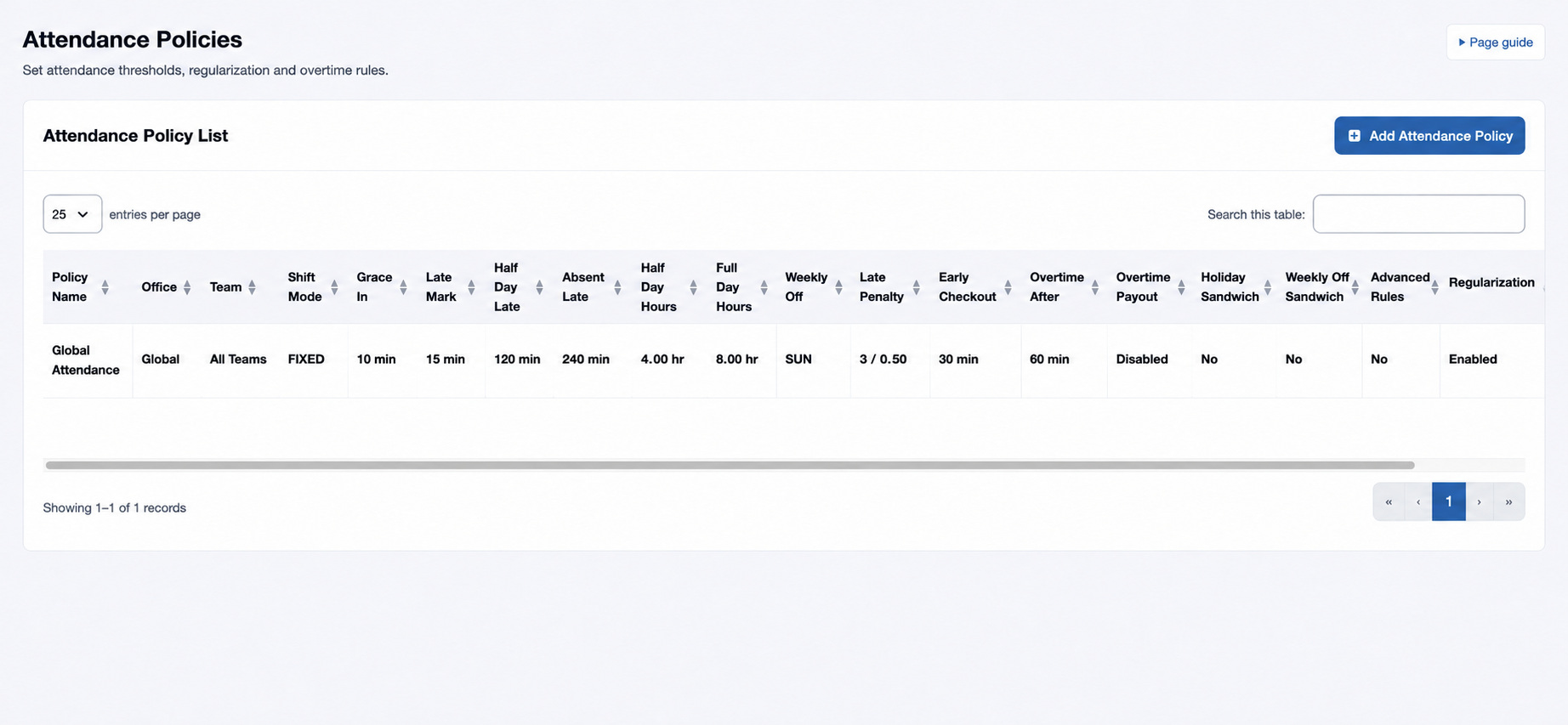
- Save and verify the new row and its scope.
- Assign the policy in Employee HR Setup and review attendance results for a representative period.
Example: a fictional day team uses Fixed mode, SUN off and a full day of 8 hours. If a result surprises you, check the employee’s assignment, applicable shift, effective roster, dates and thresholds before making changes.
Understand the thresholds
| Field | Meaning and use |
|---|---|
| Grace In | Grace period after the shift start, in minutes. Set this separately from Late Mark. |
| Late Mark | Minutes late that trigger a late mark. A late mark is counted when lateness exceeds this value; the penalty fields use the count. |
| Half Day Late / Absent Late | Minutes late at which the respective half-day or absence rule applies. A positive threshold applies when lateness reaches it. Absence is evaluated before half day. |
| Half Day Hours / Full Day Hours | Working-hour thresholds. With positive recorded hours, less than Half Day Hours is absent; otherwise less than Full Day Hours is half day. Enter in 0.25-hour increments. |
| Early Checkout | Early-checkout threshold in minutes. Advanced rules provide separate half-day and absence early-exit thresholds. |
| Overtime After | Minutes beyond the scheduled shift duration before additional worked time is counted as overtime. A positive threshold is required; time beyond that threshold is recorded as overtime. |
| Late Penalty After Marks / Late Penalty Days | For each complete block of the specified number of late marks, apply the specified days as loss of pay. Both values must be positive. Example: three marks and 0.5 days means six marks produce one day of penalty. |
| Holiday Sandwich / Weekly Off Sandwich | When enabled, the corresponding holiday or weekly off between two full loss-of-pay days is treated as a loss-of-pay day in the period calculation. |
| Weekly Off Days | Comma-separated weekday codes, such as SUN or SAT,SUN. Roster-marked off dates are added; policy off days still apply on dates not marked by a roster. |
| Regularization | Records whether regularization is enabled for the policy; confirm your organization’s review process for corrections. |
Validation and scope
Policy Name must be 3–80 characters. Select a team belonging to the chosen office; Global and All Teams cover broader scope. Minute thresholds accept 0–1,440; work-hour thresholds accept 0–24 hours. When both late thresholds are positive, Absent Late must be at least Half Day Late. Weekly Off Days accepts SUN, MON, TUE, WED, THU, FRI and SAT, comma-separated. A Component rate basis requires a valid Component Code, and enabling Fixed Hourly overtime requires a positive hourly rate. Multiplier must be greater than zero and at most 10; the period cap accepts up to 744 hours. Check these values and valid JSON if saving fails.
Shift Mode records whether the policy is Fixed, Flexible, Rotational or Overnight. Set the employee’s actual From and To times in their assigned shift; the period calculation uses those shift times, including a shift ending on the following day. Grace In and Early Checkout are recorded policy values. For the payroll-attendance classification described here, Late Mark is evaluated independently of Grace In; use the advanced early-exit thresholds to apply half-day or absent outcomes. Review an example batch before relying on these settings.
Advanced JSON can also specify top-level grace_in_minutes, late_mark_minutes, half_day_late_minutes, absent_late_minutes, half_day_work_hours, full_day_work_hours, late_penalty_after_marks, late_penalty_days, holiday_sandwich_rule, weekly_off_sandwich_rule, half_day_early_checkout_minutes, absent_early_checkout_minutes, holiday_payable_value, weekly_off_payable_value and weekly_off_days. These values override their corresponding standard values in the resolved calculation; rules in the array can then set them as well. For example, {"half_day_early_checkout_minutes":120} sets the early-exit half-day threshold to two hours. Use one clear source for each value and inspect the prepared result.
For example, if a nine-hour shift has Overtime After 30 minutes and a person records ten complete hours, the amount beyond nine hours 30 minutes is 0.5 hours. With 0 as the threshold, this calculation does not record overtime through that rule. A payroll payout additionally needs the employee marked eligible and Pay Overtime enabled.
Overtime payout
Pay Overtime and the employee’s Overtime Eligible assignment must both be enabled for payout. Fixed Hourly uses Fixed Hourly Rate. Monthly CTC uses monthly CTC; Gross Pay uses earnings; Component uses the specified Component Code. For those three bases the amount is divided by Full Day Hours multiplied by full-period working days to get an hourly rate. Payable recorded hours are multiplied by the rate and Multiplier. Period Cap limits hours (0 means no cap); Taxable is Yes or No. Check the rate, divisor and employee eligibility if an expected payout is missing.
Advanced rules
Use valid JSON only when the standard fields cannot express the intended rule. A rules array can specify LATE_TO_HALF_DAY or LATE_TO_ABSENT with minutes; WORK_HOURS_TO_HALF_DAY or WORK_HOURS_TO_FULL_DAY with hours; LATE_MARK_PENALTY with after_marks and penalty_days; SANDWICH_HOLIDAY or SANDWICH_WEEKLY_OFF with enabled; WEEKLY_OFF_DAYS with days; EARLY_EXIT_TO_HALF_DAY or EARLY_EXIT_TO_ABSENT with minutes; and HOLIDAY_PAYABLE or WEEKLY_OFF_PAYABLE with value between 0 and 1. For example: {"rules":[{"type":"LATE_TO_HALF_DAY","minutes":120}]}. Review the result on representative records before using a complex rule.