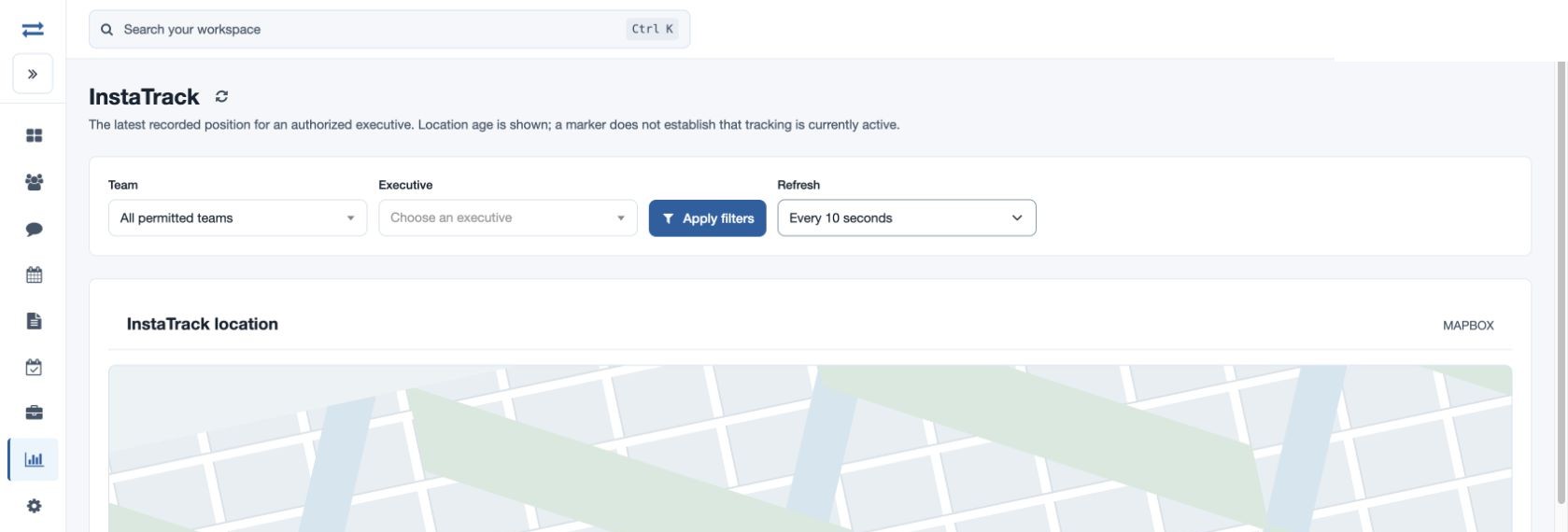
InstaTrack
Review the latest recorded position of a licensed executive.
Review the latest recorded position of a licensed executive. Availability depends on the applicable location permission, feature and selected map provider; the selection is limited to your scope.
Find a position
- Open Reports → InstaTrack. Choose Team and a required Executive within your scope, then select Apply filters. InstaTrack requires the feature and the employee’s license.
- Review the latest recorded marker and its age. Team, battery, accuracy and speed can appear in its details.
- Choose Refresh: Paused, Every 10 seconds, Every 30 seconds or Every minute. The default is Every 10 seconds; the refresh icon reloads the data.
The marker and age do not establish that tracking is currently active. An old update alone does not establish that a device is offline.
Read the map and location table
Use available layer controls to show the recorded categories. Select a marker for its details. Below the map, Location records lists Record, Recorded at, Layer, Latitude, Longitude and Details, with a Map action; sort column headings and use Previous or Next to page. Lines connect recorded locations and do not represent driving directions. Invalid or missing coordinates cannot appear as markers. If more than 2,000 valid points match, narrow the selection. These map screens do not offer a direct CSV export; use the relevant report for permitted downloads.
Example and troubleshooting
For fictional Maya Rao, select the applicable team and executive, then inspect the recorded time and details. If no point appears, confirm access, employee and date or freshness, app recording and valid coordinates. An illustrative map background does not represent a recorded location. Refresh once after changing filters.
Access and interpretation
InstaTrack is available to permitted non-executives when maps and the InstaTrack feature are enabled. Its markers and point details reflect recorded device locations; missing points can result in an incomplete track. Choose an executive and inspect the recorded time and age of the latest position. Check device reporting before drawing a conclusion.