Billing overview
Understand your plan, licensed seats, account access and wallet balance.
Before you begin
Sign in as an administrator with billing access, then open Billing → Overview. Partner-managed companies use their billing partner for subscription changes and renewal assistance. Billing may remain available when account access has expired so an authorized administrator can review renewal options.
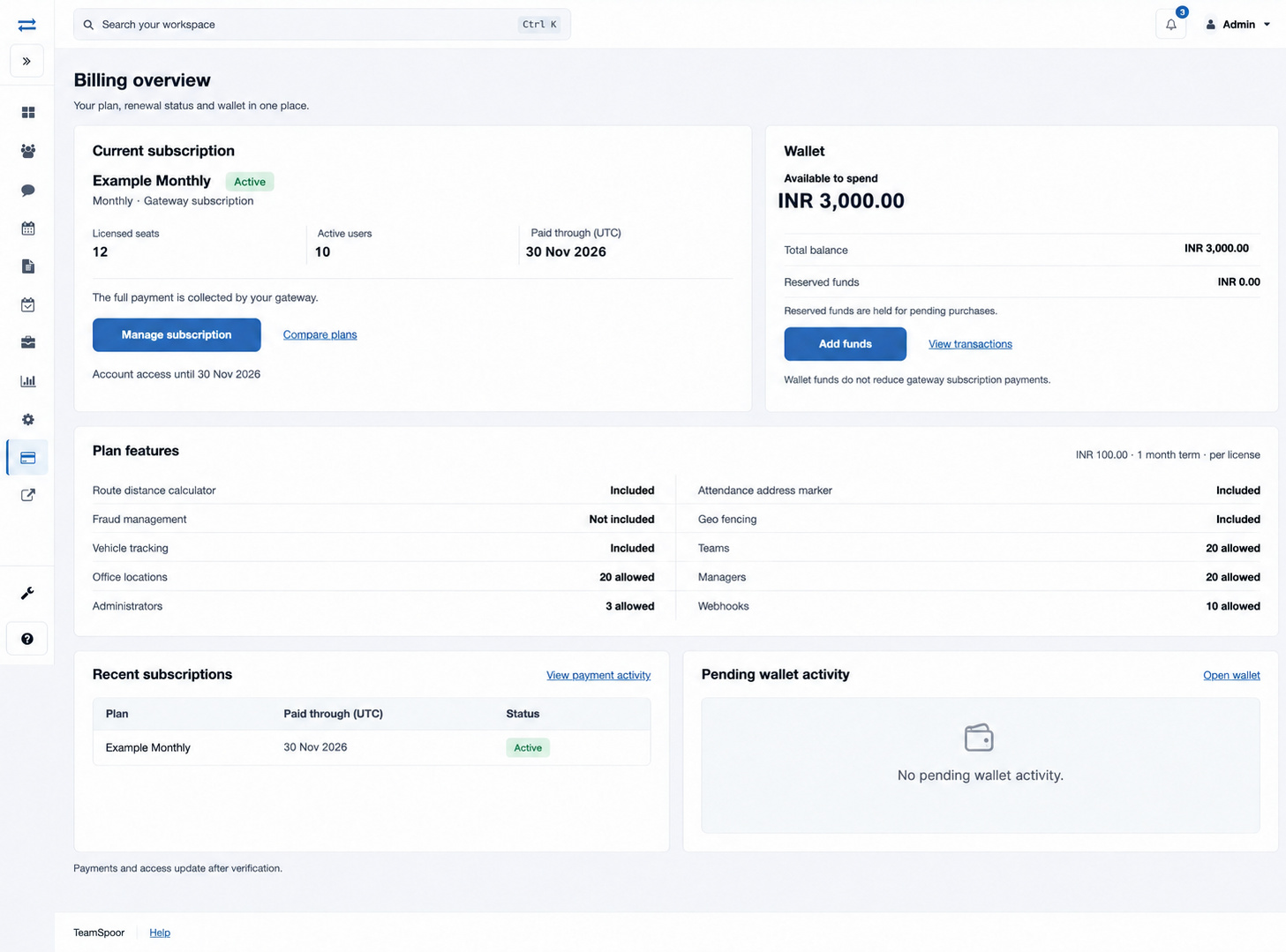
Read your account summary
| Item | What it tells you |
|---|---|
| Current plan / Last assigned plan | The plan currently assigned to the account. An expired account shows its last assigned plan. A plan name alone does not confirm current paid access. |
| Monthly / Yearly / term | The billing period assigned to the plan. Read the payment type alongside it: gateway subscription, prepaid, partner managed or an earlier billing arrangement. |
| Licensed seats | The number of available licenses, or Unlimited when the plan has no per-user limit. |
| Active users | Users currently counted as active. Check this before selecting a license quantity. |
| Paid through (UTC) | The verified paid-through date for a gateway subscription. It uses UTC. |
| Account access until | The account validity date. Review this separately from the subscription lifecycle and renewal status. |
| Available to spend | Wallet funds available for eligible purchases after reserved funds are excluded. |
| Total balance / Reserved funds | Total wallet funds and the part held for pending purchases. Reserved funds are not currently available for another purchase. |
Read plan features and renewal status
| Feature or limit | How to read it |
|---|---|
| Route distance calculator | Whether the plan includes the route-distance feature. Check the separate RDC credit balance in Wallet before purchasing additional credits. |
| Attendance address marker | Whether attendance address marking is included. |
| Fraud management | Whether this feature is included in the assigned plan. |
| Geo fencing | Whether the plan includes location-boundary controls. Configure permitted work locations and the executive’s attendance-location settings separately. |
| Vehicle tracking | Whether the plan supports tracking. Review Instatrack capacity and each executive’s tracking setting separately. |
| Teams, Office locations, Managers, Administrators | The number allowed by the plan. Compare these limits with the organization records you intend to add. |
| Webhooks | Whether webhooks are included and the allowed number when recorded. |
Included and Not included describe plan entitlement. Not recorded means that no value is displayed for the feature or limit; it does not mean unlimited. Permissions and configuration still determine which included features a user can operate.
Renews automatically describes a verified active subscription. Cancels at period end means renewal has been scheduled to stop. Review subscription status or See payment activity directs you to unresolved lifecycle information. Read these labels alongside the paid-through and account-access dates; the label alone is not confirmation of the next payment.
Choose the next billing task
- Review the current plan, license count, active users and access date.
- Check Plan features for included features and limits on teams, offices, managers, administrators and webhooks.
- Use Compare plans to review available plans. Use Manage subscription for an existing verified gateway subscription.
- Choose Add funds for wallet funding, View transactions for the statement or Open wallet for add-ons and renewal settings.
- After a purchase or subscription change, return here and verify the updated plan, licenses or balance. Updates follow payment verification.
Review recent activity
Recent subscriptions shows up to three records with Plan, Paid through (UTC) and Status. Use View payment activity for the complete paginated history. Pending wallet activity shows up to three requests that have not reached Applied, including cancelled or failed requests. Read Purpose, Amount and Status, then open the linked operation or Open wallet.
The main billing action depends on the account: Manage subscription opens gateway subscription controls, Review wallet renewal opens prepaid renewal settings, and Review payment activity opens payment recovery and history. Partner-managed accounts display their billing-partner guidance.
Example
A company with 18 active executives and 20 licenses has room for two more active executives. If it plans to activate five more, its billing administrator first reviews the required new license total. Adding wallet funds alone does not increase the license count.
If the summary is unclear
- Wallet unavailable: open Wallet for the displayed billing availability message and retry later if the service is temporarily unavailable.
- Subscription and access dates differ: review Payment activity and Manage subscription. An account validity date does not cancel an open subscription.
- Feature unavailable: compare plan inclusion with your permissions and the company’s configuration.
- Partner managed: contact the billing partner shown for the account.