Travel settings
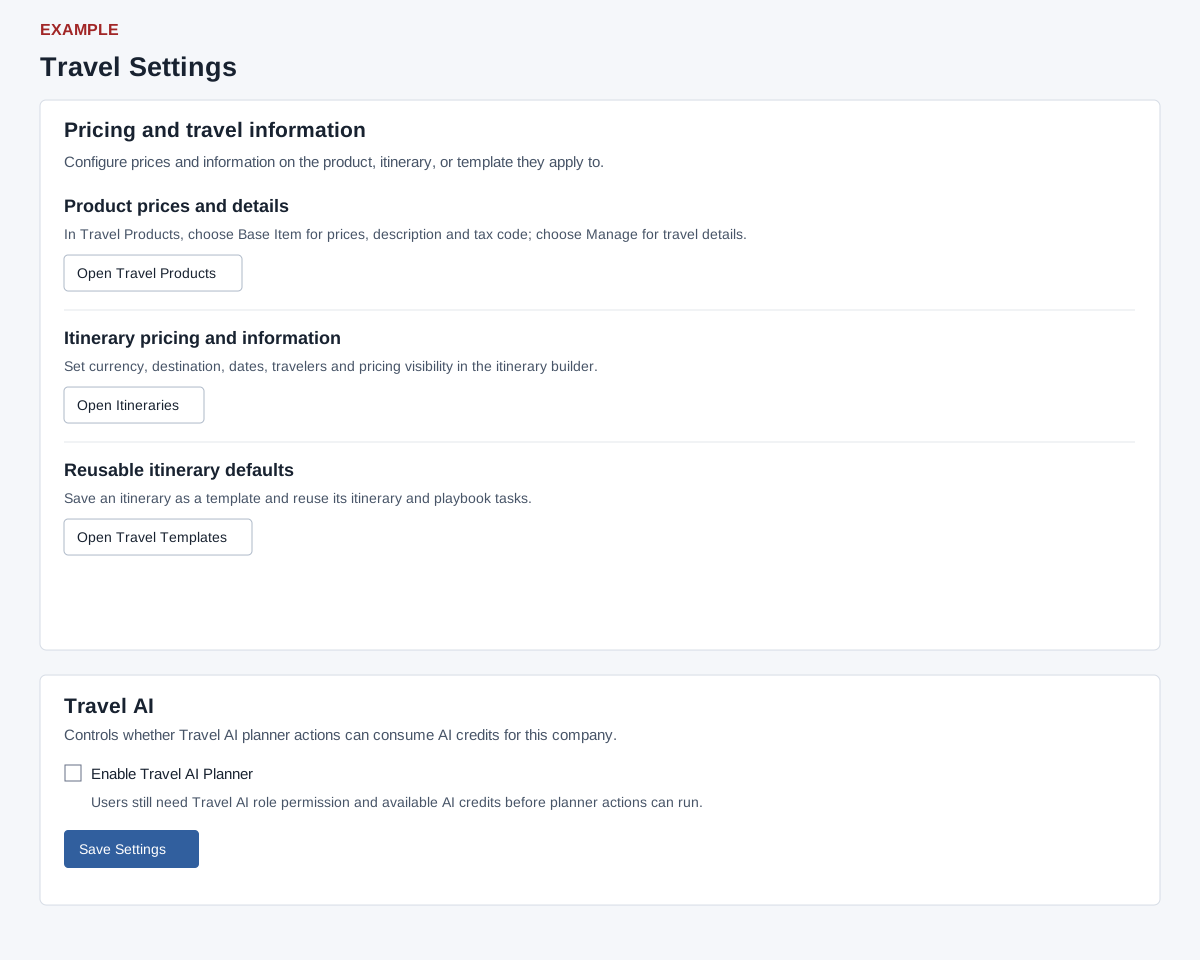
Open the page
Account Settings → Features Settings → Travel Settings. Administrator role, Travel CRM access and Travel admin permission are required.
Navigate and configure
- Use Open Travel Products for product prices and details, Open Itineraries for itinerary pricing and information, and Open Travel Templates for reusable defaults.
- Under Travel AI, choose Enable Travel AI Planner and select Save Settings. Save Settings submits the checkbox for the company; it is not autosaved. Travel AI role permission and available AI credits are also required for users to run planner actions. If the save control is disabled or the setting fails to save, contact your administrator. Reload and verify the setting after an error or uncertain result.
Related: Travel template library and playbook
See also Travel product library and Travel itinerary list.
Detailed procedures
- Build and share an itinerary
- Customer itinerary response
- Group manifest and rooming
- In-trip service cases
- Itinerary operations tasks
- Itinerary preview and sharing
- Itinerary templates and playbook tasks
- Post-trip follow-ups
- Supplier reconciliation
- Travel AI planner
- Travel dashboard
- Travel departure calendar
- Travel document registry
- Traveler readiness
- Travelers, readiness and documents
- Travel operations tasks
- Travel reports
- Travel reports
- Travel service cases and follow-ups
- Travel supplier directory
- Travel suppliers, reconciliation and reporting