Marketing automation
Build timed journeys with delivery channels and monitor their execution.
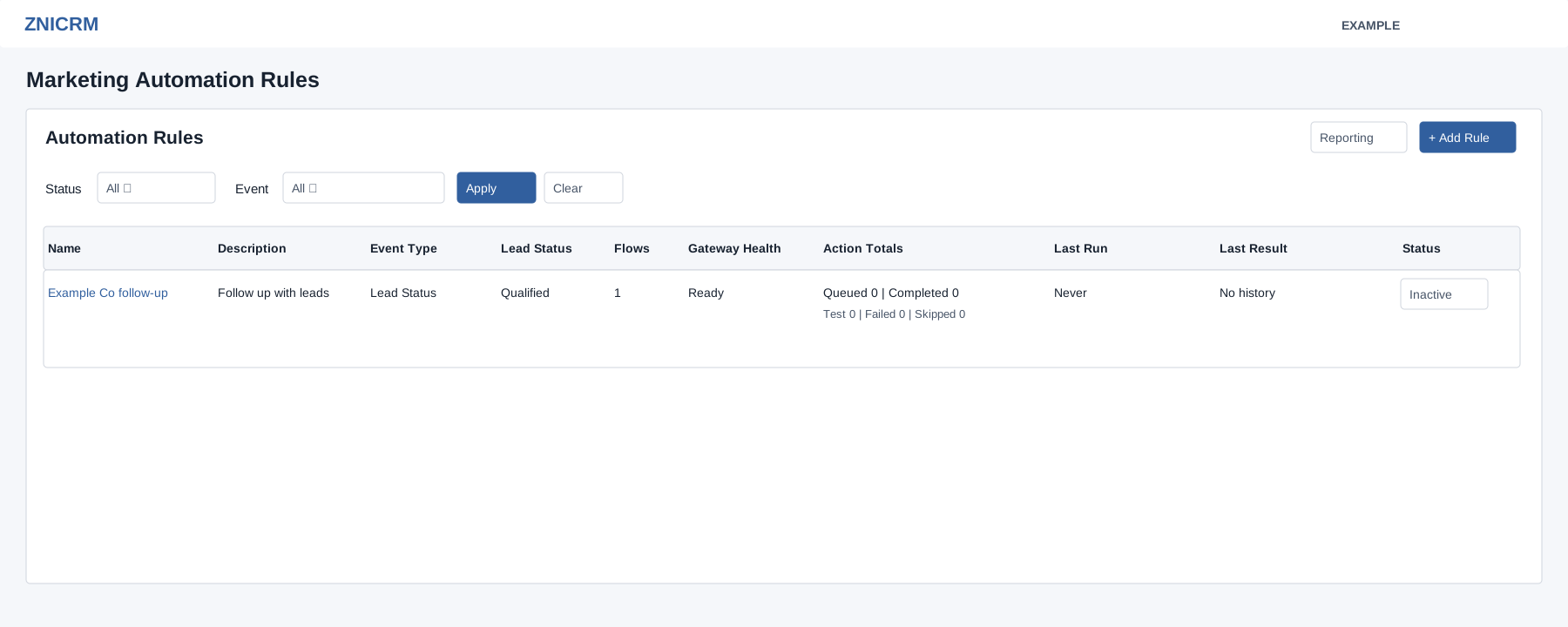
Create a rule
- Open Account Settings → Features Settings → Automation and select Add Rule.
- Enter the required name and description. Under Event Based On, choose Birthday, Anniversary, Lead Status, Subscription Expiry, Lead Creation Date, Pending Invoice, Follow-up Due or Follow-up Overdue.
- Complete the conditions displayed for the event. For Lead Status, select a specific status. The visible “Doesn’t matter” choice does not pass the current save validation.
- Choose one or more delivery channels: Email, SMS or WhatsApp. Complete the delivery settings shown for selected channels.
- Select Create Rule. The new rule is Active, so return to All Rules and disable it before adding steps. Follow the activation and preview limitations: inactive rules cannot be previewed here. Use an isolated demo setup for active preview, then review the intended production configuration before enabling.
Monitor
Filter the rules by status and event, then select Apply. The list shows flows, gateway health, action totals, last run, last result and status. Open a rule to manage its journey; use Reporting for execution history. The status control enables or disables a rule.