AI credit charges report
Filter charged AI usage and review its associated credit details.
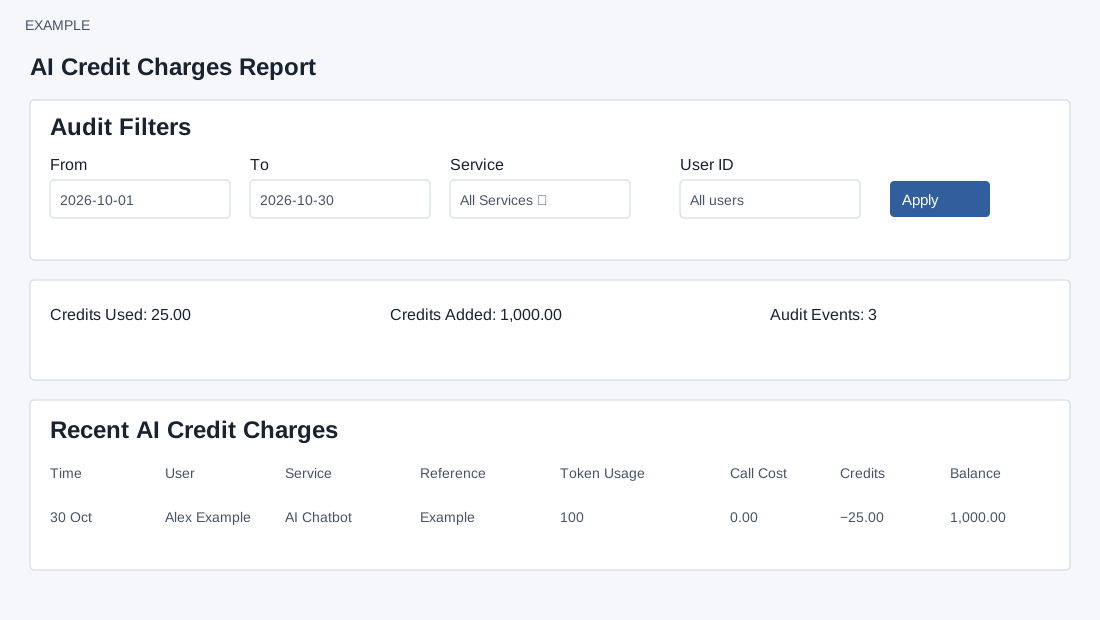
Filter and inspect
ADMIN opens AI Credits → Detailed Report. From and To default to 30 days ago and today; Service offers All Services, Helpdesk, CRM Chat, CRM Deal Analytics, CRM Follow-up, AI Chatbot, Knowledge Parsing, GSTLaw, Billing and General. User ID accepts a positive numeric company user ID; blank means all users. Select Apply to reload. The AI Billing link returns to the overview.
Dates cover the selected full days. Credits Used sums the absolute value of negative credit changes, Credits Added sums positive changes, and Audit Events counts all matching audit events; the table contains charged rows only, up to the latest 500, so it need not sum to all summary values. Columns are Time, User (or system/customer automation), Service and feature, Reference and remarks, Token Usage (total, input, output), Call Cost, Credits and Balance before/after. Values depend on recorded metadata; missing token metadata displays zero. Narrow dates or service if the 500-row cap obscures entries. A missing audit storage warning means history is unavailable, not necessarily zero usage. There are no table drilldown or export controls on this screen.