AI training reviews
Inspect low-confidence chat answers and record corrections for review.
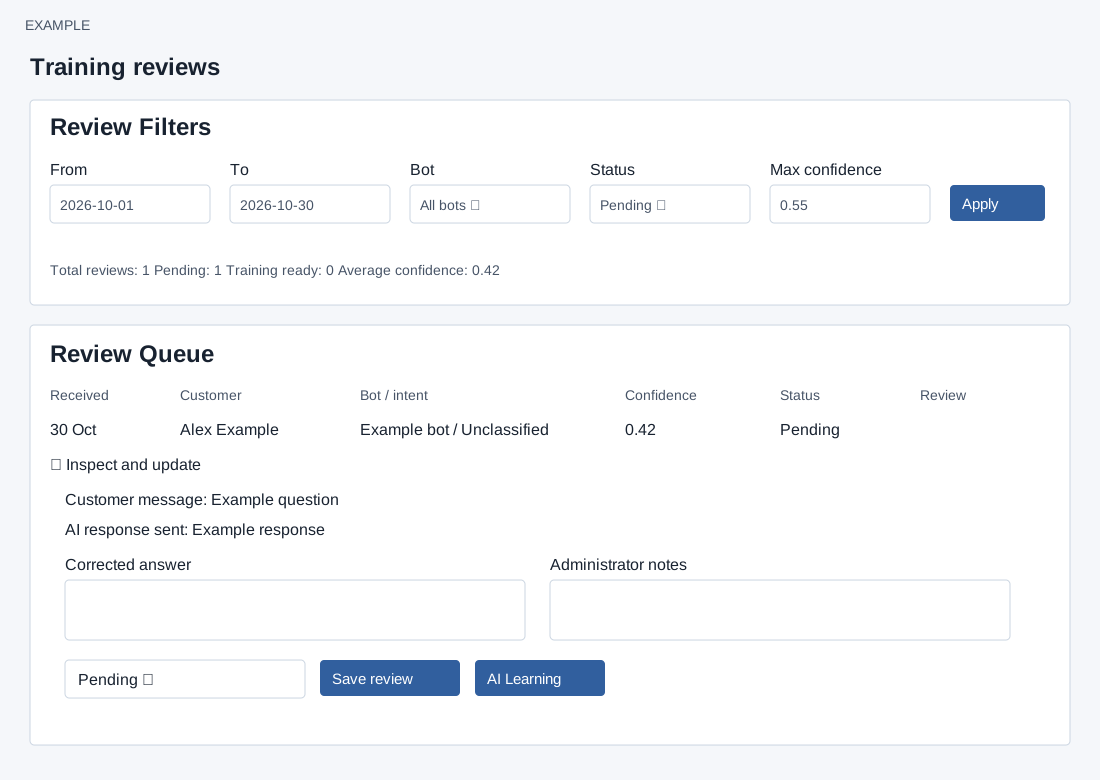
Find reviews
ADMIN opens a bot’s Reviews tab. From and To default to 30 days ago and today. Bot offers All bots or a listed bot; Status offers All statuses, Pending, Reviewed, Training ready, Trained and Dismissed. Max confidence defaults to 0.55 and accepts 0–1 in 0.01 steps. Apply reloads the filtered queue. Total reviews, Pending, Training ready and Average confidence summarize matching records; the queue shows up to 500 latest rows. It lists Received, Customer, Bot / intent, Confidence, Status and Review. Conversation and CRM profile links appear when corresponding identifiers exist. Open AI Learning appears for a selected bot; All bots and bot tabs navigate as labelled.
Inspect and save
Open Inspect and update to read Customer message, AI response sent and any Analysis. Enter a Corrected answer and Administrator notes, choose Pending, Reviewed, Training ready, Trained or Dismissed, and select Save review. Notes are truncated to 10,000 characters and corrected answers to 20,000. This saves the status, text, reviewer and time for that company review after the permission and form-token checks; the service rejects an invalid status or a review that was not updated. There is no separate Approve or Reject button. Training ready is a status, not automatic training or publication: the page says corrected answers remain drafts until an administrator adds them to approved learning data. AI Learning opens the row’s bot when available.
If the form expires, refresh and re-enter unsaved text. If an update fails or the result is uncertain, reload and check the row before retrying; filters may hide a review after its status changes.