In-trip service cases
In the Travel sidebar, select Service.
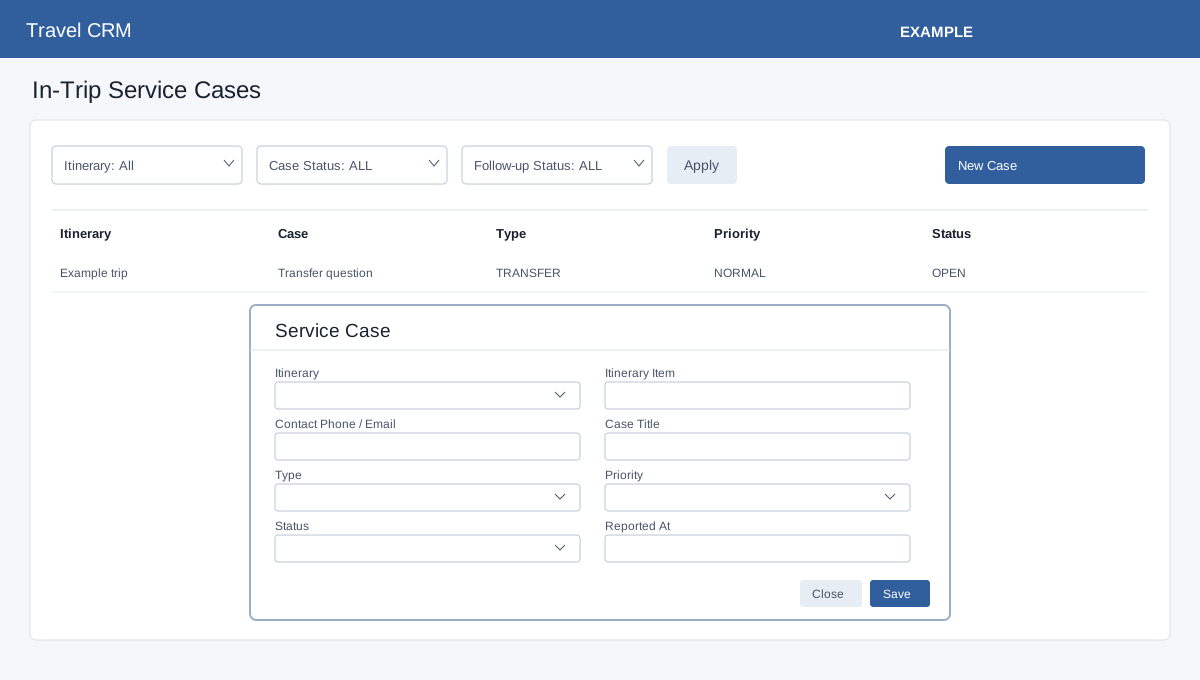
Open Travel Service. Travel access and operations permission are required; service permission also exposes the editing controls. Advanced storage and an itinerary are prerequisites. Filter by Itinerary and Case Status and Apply. Select New Case, search and select the required itinerary, and enter required Case Title. Optionally search for an itinerary item and a CRM contact by phone or email. Choose Type (General, Flight, Hotel, Transfer, Activity, Document, Payment, Medical, Supplier or Customer), Priority (Low, Normal, High or Urgent), and Status (Open, In Progress, Waiting Supplier, Resolved or Closed). Optionally enter Reported At, Notes and Resolution Notes. Save reloads the list; inspect the row. Edit, Close and Delete are available on the row. A missing itinerary or case title is reported; check the displayed error and access for other failures.