AI credits and usage
Review AI credit rates and audit usage before buying credits.
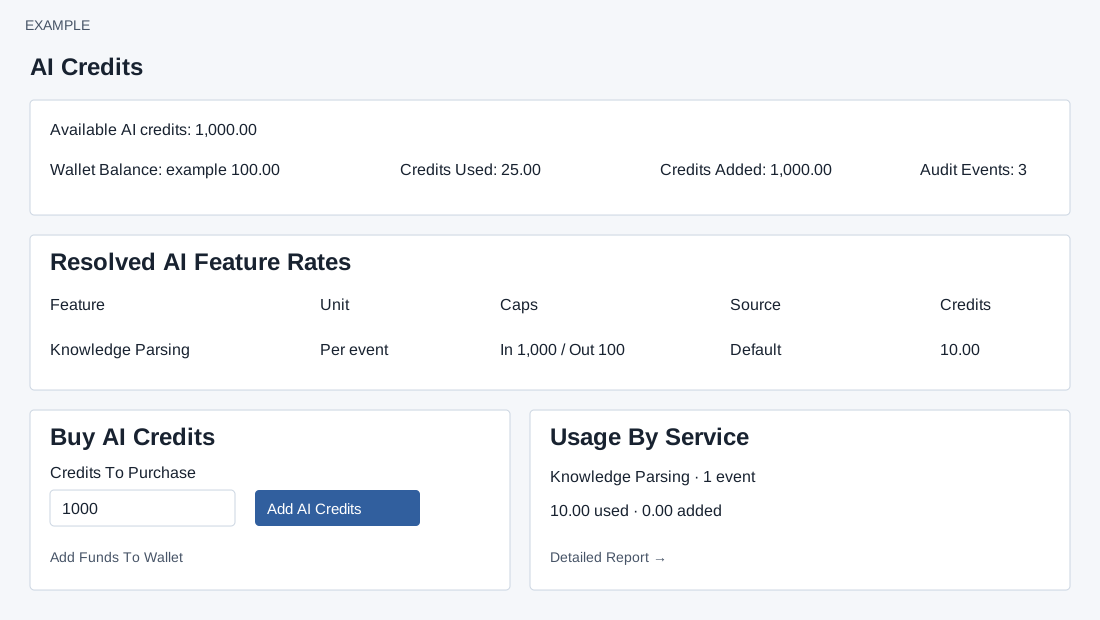
Balance, rates and purchase
ADMIN opens Account Settings → AI Credits. Available AI credits and Wallet Balance are separate. Credits Used, Credits Added and Audit Events summarize the default period from 30 days ago to today; Usage By Service shows events, used and added. Resolved AI Feature Rates lists Feature, Unit, input/output token Caps, Source (Company, Plan, Default or Legacy) and Credits. Rates and wallet conversion are account-specific; consult the displayed values before proceeding.
Credits To Purchase defaults to 1,000; the input advertises 1,000–50,000. Add AI Credits immediately requests a purchase from the wallet; there is no confirmation dialog on this screen. The client checks the 1,000 minimum and available wallet balance, and calculates cost rounded up to two decimal places. A positive amount, configured conversion and sufficient wallet balance are required. Add Funds To Wallet opens the separate wallet funding flow. The screen states credits are non-refundable and valid while the account is active; verify current terms in your account.
The wallet is debited before credits are added. If credit addition fails, check both balances and contact support before retrying. If an error or connection interruption occurs, refresh and inspect both balances and history before retrying; contact support if they disagree. A usage or rate storage warning means empty audit figures need not indicate no activity.
Charges report
Recent AI Credit Charges lists the latest 20 charged entries with Time, User, Service, Reference, Credits and Balance; the period summary and this latest list use different filters. Detailed Report opens AI Credit Charges Report for date, service and user filtering.