AI learning
Manage the knowledge sources used by a chatbot.
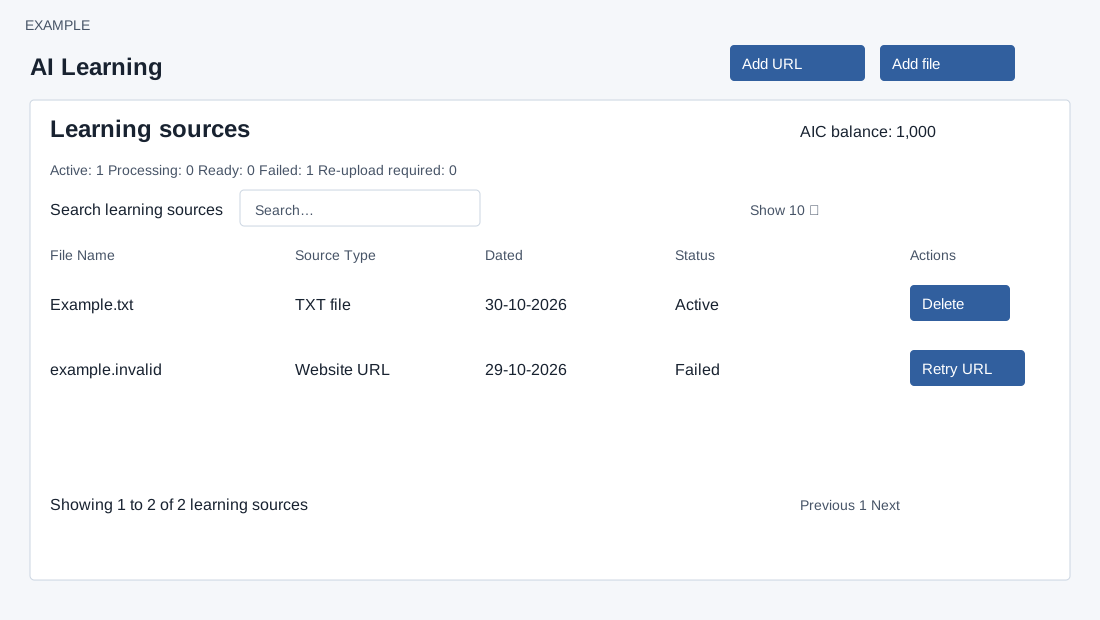
Learning sources and access
Open Chat Bots → select a bot → Learning. Management requires CHATBOTS access and write permission plus Manage chatbots; an invalid bot returns to the bot list. All bots returns to that list; Bot settings and Reviews open that bot’s related pages. AIC balance is shown. Search learning sources filters the table; Show controls page size, column headings sort (date defaults newest first), and pagination moves among results. Columns are File Name, Source Type, Dated, Status and Actions. Counts summarize Active, Processing, Ready, Failed and Re-upload required.
Active means published and available; Processing means queued or indexing. Ready for activation indicates indexing/reconciliation or publication is complete but global publication or the release gate remains pending. Failed and Re-upload required include error and diagnostic IDs when present; extraction status, coverage, fetch mode and renderer can also appear. A queued or ready source does not guarantee availability.
Add, retry or remove knowledge
- Choose Add file for authorized TXT or PDF. Drop or select up to ten files, maximum 20 MB each; uploads run one at a time. The file extension and content type must match the supported formats. Closing the dialog reloads the list. Upload acceptance means queued, not active. If queue insertion fails, the source record can remain failed; inspect it before retrying.
- Choose Add URL, enter an authorized HTTP or HTTPS website page, then Add source. URLs can contain at most 1,024 bytes. The page is fetched before queuing; unreachable, disallowed, non-text or oversized responses can be rejected. A success row initially shows Pending. The page recommends allowing the X-Agency: ZNICRM header through the website WAF.
- For a failed or migration-required website source use Retry URL; for a file choose Re-upload and select a replacement. These start processing again. Active sources offer Delete with confirmation, which first retires their knowledge and then marks the source deleted. A source still in learning cannot be deleted through the service; if retirement fails, deletion returns an error. Inspect status and relevant bot answers after processing; do not repeat an uncertain action without checking the list.
The page disables Add URL and Add file when displayed balance is below 500 AI credits. It states each source is charged once at the configured knowledge-embedding rate; review the current rate and balance first. A server or connection error may occur after a source record or queue step; refresh and inspect status before retrying. A missing source, fetch error, upload size/MIME error, or release gate can prevent availability. Consult an administrator with any displayed diagnostic ID.
See Training reviews and AI credits.