Partner overview
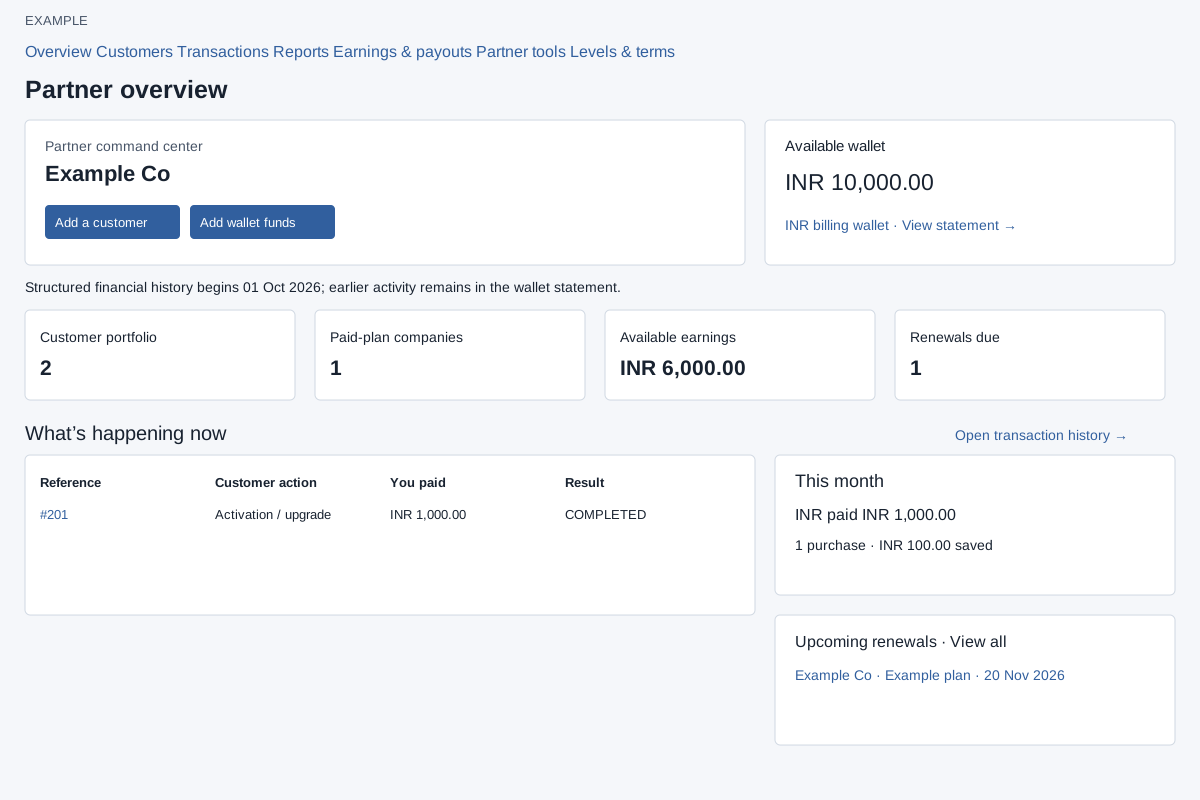
Use the partner overview to decide which customer account, renewal or financial record needs attention.
Open the workspace
- Open Partners → Overview as an active administrator of an active company with an active recognized partner membership.
- If the company has not enrolled, follow company enrollment first. Customer management is available to reseller and partner types.
- Check the partner identity and company wallet before selecting an account or financial action.
Read the summaries and shortcuts
Overview shows partner identity, wallet and customer/earnings measures, recent transactions, current-month performance and upcoming renewals. Add a customer appears for customer-management partners; Add wallet funds opens billing. View statement opens the wallet report, transaction references open history, and renewal rows open customer details. The sidebar links Overview, Customers (when permitted), Transactions, Reports, Earnings & payouts, Partner tools and Levels & terms.
| Area | How to interpret it |
|---|---|
| Available wallet | Current company wallet and billing currency. View statement opens the wallet report; Add wallet funds opens billing. |
| Customer portfolio | Registered customer companies. The shortcut opens Customers, subject to customer-management access. |
| Paid-plan companies | Includes both active and expired paid plans; it is not a count of only unexpired subscriptions. |
| Available earnings | Available recorded earnings, shown separately by currency. A dash indicates no eligible sales recorded; open Earnings & payouts for availability and reservations. |
| Renewals due / Partner level | Customer-management partners see paid plans expiring in the next 30 days; other partner types see the current configured level. |
| Recent transactions | Reference/date, customer action, amount paid and financial result. Open the reference or Open transaction history for details. An empty state may offer Start a purchase when permitted. |
| This month | Reseller purchases, cost and discounts saved by currency. Discounts saved are not cash commissions. |
| Upcoming renewals | Customer, plan and expiry in the next 30 days. A row opens details; View all opens the filtered customer list. |
The displayed structured-financial-history start date limits newer transaction and earnings records. Earlier wallet activity may still appear in the wallet statement. A blank or empty state does not reconstruct older financial history.
Use the linked detailed procedures below for each separate screen.
Detailed procedures
- Create a partner customer account
- Enroll a company as a partner
- Manage partner customers
- Partner customer details
- Partner earnings and payout requests
- Partner levels and terms
- Partner purchase: choose the customer
- Partner purchase: plan, renewal and licenses
- Partner purchase: review and activate
- Partner purchases and customer funding
- Partner referral links and plan calculator
- Partner reports
- Partner transaction history and service sync
- Transfer partner wallet funds to a customer