Itinerary operations tasks
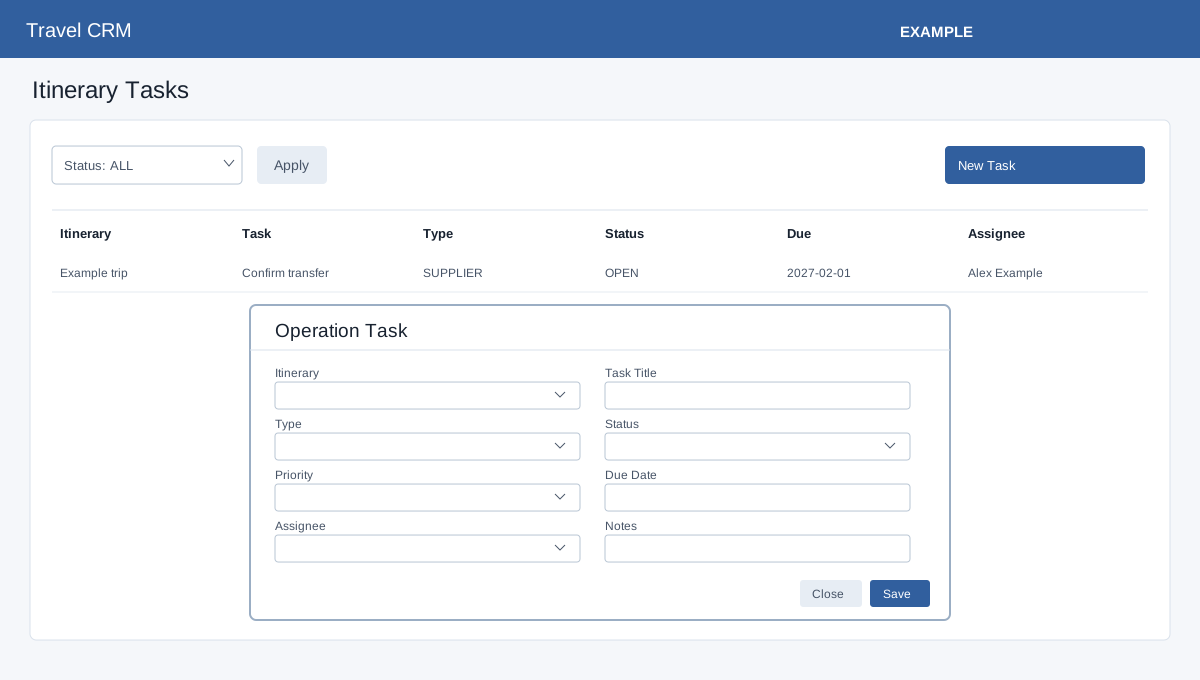
In the Travel sidebar, select Operations.
Open Travel Operations or Travel Service from Travel CRM. Travel access is required. Operations permission is required; service permission also controls whether service editing controls appear. Create the itinerary first.
Itinerary tasks
In Travel Operations, filter Status and Apply. New Task opens a form: select the required Itinerary and enter required Task Title. Choose Type (General, Payment, Supplier, Document, Visa, Passport, Insurance, Ticketing, Customer or Follow Up), Status (Open, In Progress or Completed), Priority (Low, Normal, High or Urgent), optional Due Date, Assignee and Notes. Save reloads the list. Check the row and use Edit to update it, Complete to finish, or Delete with confirmation. The Overdue filter helps locate late work.