CRM customisation
Configure the vocabulary and fields used to organize leads and deals.
Open Account Settings → CRM Functions → Customisation. The page has tabs for Lead Status, Deal Stages, Lead Source, Custom Fields and Categories.
For edit, delete, dependencies and verification, see Lead Status settings and Deal Stages settings.
Add a lead status
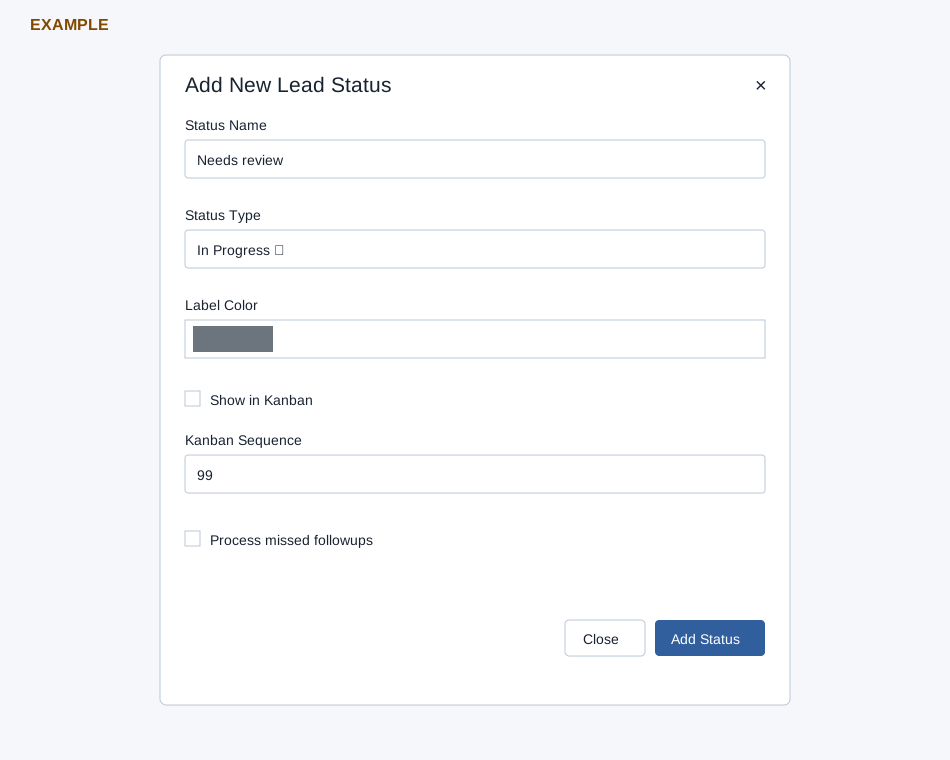
- On Lead Status, select Add Status.
- Enter the status name and choose In Progress, Won or Lost as its type.
- Choose a label color. If the status should appear on the Kanban board, select Show in Kanban and enter its sequence.
- Choose whether to Process missed followups, then select Add Status.
The table displays type, Kanban visibility and sequence, missed-followup setting and label color. Some rows have edit and delete controls.
Add a deal stage
- Select Deal Stages → Add Stage.
- Enter a stage name; choose In Progress, Won, Lost or Void and whether to show it in Kanban.
- Select Add Stage.
Lead Source lists source IDs and names and offers Add Source and delete controls on some rows. See the detailed guides for Lead Sources, Custom Fields and Categories. Before removing a status, stage or source, review its use in existing records and reports.