Traveler readiness
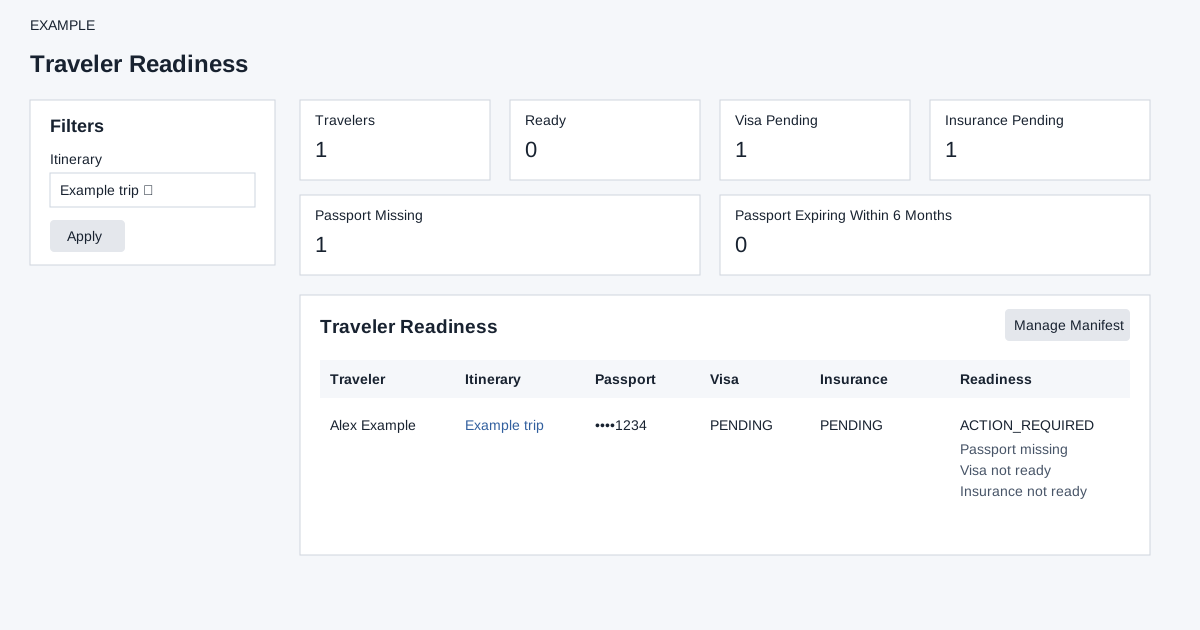
In the Travel sidebar, select Readiness.
Open this workspace from Travel CRM. Create an itinerary first. Travel access and the appropriate action permissions are required; advanced storage enables manifest and readiness.
Readiness
Open Travel CRM → Traveler Readiness, select an itinerary or All itineraries and Apply. Manage Manifest opens the filtered manifest when a specific itinerary is selected. The report reads up to 1,000 travelers; the itinerary selector loads up to 300 itineraries. Summary cards show visa and insurance pending, missing passport and passport expiry within six months. Each traveler shows passport, visa, insurance and Ready or Action Required with listed risks. Passport Missing counts an empty passport expiry, not the masked number. The expiry warning includes dates at or before six months from today, including already expired dates. Visa is ready only for Not Required or Approved; insurance is ready only for Not Required or Issued. A traveler is Ready when none of these risks is present. This calculation uses the stored fields above; it does not inspect visa-expiry dates, verify documents or establish actual travel eligibility. Correct the underlying traveler record in Group Manifest, then return and recheck readiness.
Itinerary builder · Contact travel dashboard
Setup check limitation: If loading or saving fails despite no setup warning, ask an administrator to check the deployment and permissions.