Partner referral links and plan calculator
Find the company’s referral links and start a customer price comparison from one place.
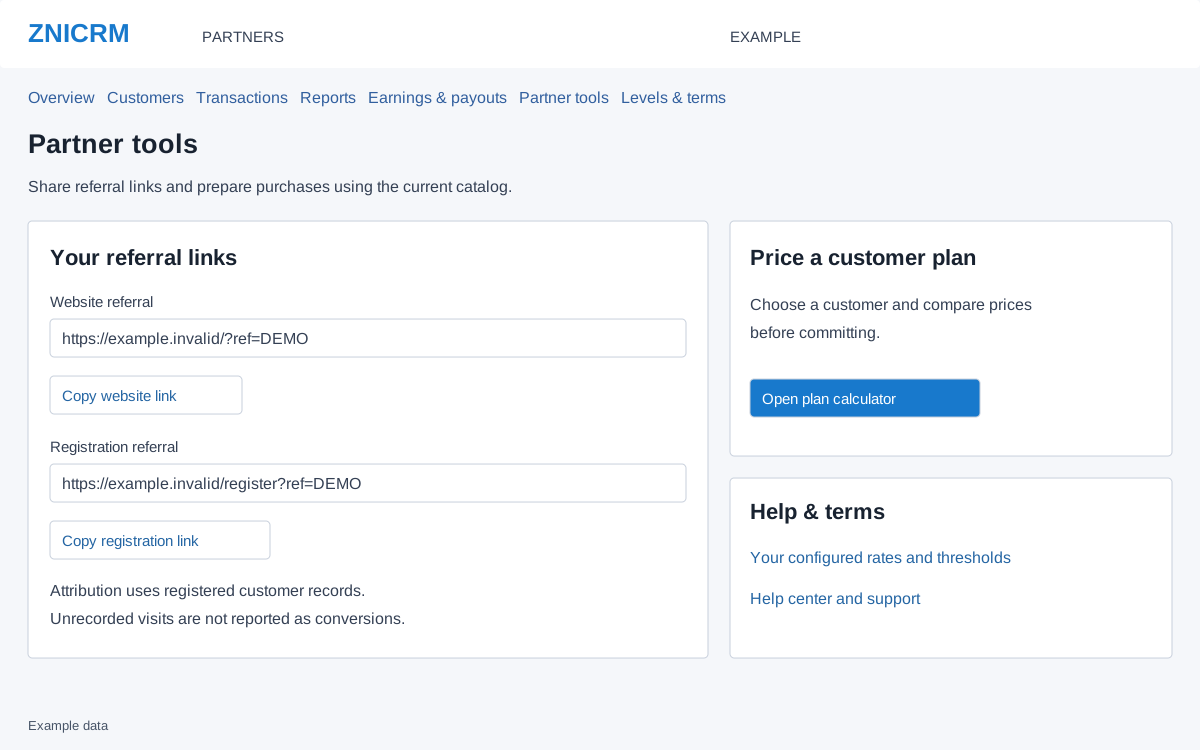
Copy the appropriate referral link
- Open Partners → Partner tools.
- Use Website referral for the website entry link or Registration referral for the registration entry link. Both fields are read-only.
- Select Copy website link or Copy registration link. If clipboard access fails, select and copy the highlighted text manually.
- Use the copied link in your authorized customer outreach. Verify that the intended company’s referral value is present before sharing it.
Attribution is confirmed from registered customer records. Link clicks and unrecorded visits are not reported as conversions; sharing a link does not itself prove a credited customer or commission.
Prepare a customer plan
- Under Price a customer plan, select Open plan calculator. This control is offered only to partners with customer-management access.
- Choose the customer, set team size and compare available terms and prices.
- Review the discounted payable. The calculator does not make a purchase until the separate confirmation step.
Your configured rates and thresholds opens Levels & terms. Help center and support opens the support destination. Rates and thresholds should be checked for the company’s currency.