Partner reports
Review and export your partner portfolio or financial history.
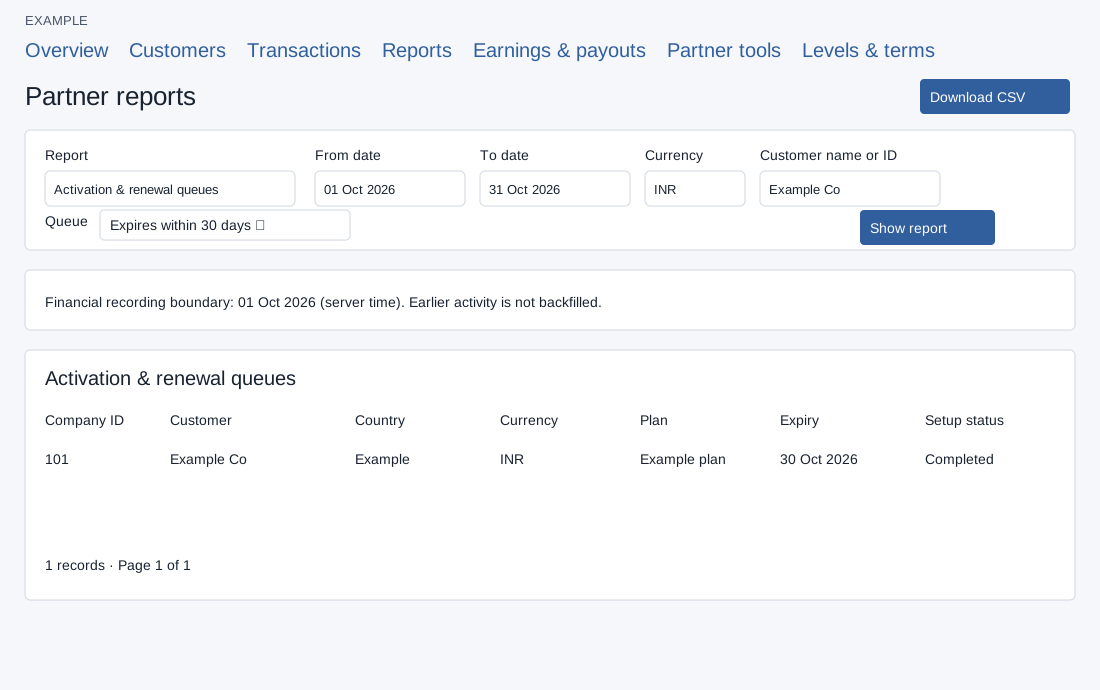
Select and export
- Open Partners → Reports. Choose Customer portfolio, Activation & renewal queues, Reseller purchases, Wallet statement, Affiliate earnings or Payout history. The first two require customer-management access. The default is Customer portfolio when that access exists and Affiliate earnings otherwise.
- Set From date and To date and optionally a three-letter Currency. Portfolio and queue reports also offer Customer name or ID. For queues choose Not on a paid plan, Setup not completed, Expires within 7 days, Expires within 30 days or Expired paid plans. Purchases offers All purchases, Activation / upgrade, Renewal and Added licenses.
- Choose Show report and inspect the rows; Previous and Next move between 25-row pages. For example, choose Wallet statement and a month for Example Co to inspect recorded credits and debits. Download CSV exports matching rows, not only the displayed page, but rejects more than 1,000 matching records. Narrow the dates or filters and export separate ranges if necessary.
If there are no records, check the report, date range, customer and currency before broadening filters. Customer date filters use registration date, while renewal queues use current paid-plan expiry. The wallet report defaults to month-to-date; its opening and closing balances are reconstructed from the current wallet and retained ledger, so historical gaps and currency changes cannot be verified. Financial records before the displayed recording boundary are not backfilled. CSV export also rejects files over 10 MB and asks for a retry if the matching count changes during preparation; an empty export has a labeled summary row. Transactions and service sync.
Understand the report columns
| Report | Columns and their CRM use |
|---|---|
| Customer portfolio and Activation & renewal queues | Company ID, Customer, Country, Currency and Account status identify the company. Plan, Plan category, Purchased seats, Active CRM users and Expiry describe entitlement. Registered, Last login, Setup status, Setup completed and First value recorded describe onboarding. Missing history is not proof that setup never happened. |
| Reseller purchases | Transaction ID, Date, Customer ID and Action identify the operation. Plan ID, Term and Seats describe the purchased entitlement. Currency, Catalog amount, Discount percent, Discount and Reseller cost explain pricing. Financial result and Follow-up result separate payment completion from service synchronization. Wallet transfers are excluded. |
| Wallet statement | Wallet entry, Date, Direction and Amount describe the movement. Classification, Partner transaction, Customer ID, Payout ID, Payment reference, Billing order and Subscription receipt link recorded sources. Subscription follow-up describes synchronization and renewal-notification attempts; completion does not confirm message delivery. Recorded currency and Reconstructed wallet balance help reconciliation. Original remarks includes only the first 2,000 characters. |
| Affiliate earnings | Earning ID, Sale date, Source reference, Customer ID, Entry type and Original earning identify the sale or adjustment. Currency, Eligible base, Rate percent and Earning / adjustment explain the amount. Status, Availability reason, Available from and Payout ID explain whether an entry can be settled or is already reserved. |
| Payout history | Payout ID, Requested, Destination and Currency identify the request. Positive earnings, Adjustments and Net payout explain its total. Status, Masked destination, Settlement reference, Settled and Cancelled distinguish a request from a recorded outcome. A bank request alone does not prove payment. |
Wallet statements use the current wallet currency; entering a different currency is rejected. Unknown ledger directions, missing dates or historical currency changes can prevent reliable balance reconstruction. A failed subscription follow-up does not reverse its recorded payment. See earnings and payout requests to act on eligible earnings.