Partner customer details
Review a customer’s entitlement and onboarding before choosing a purchase or transfer.
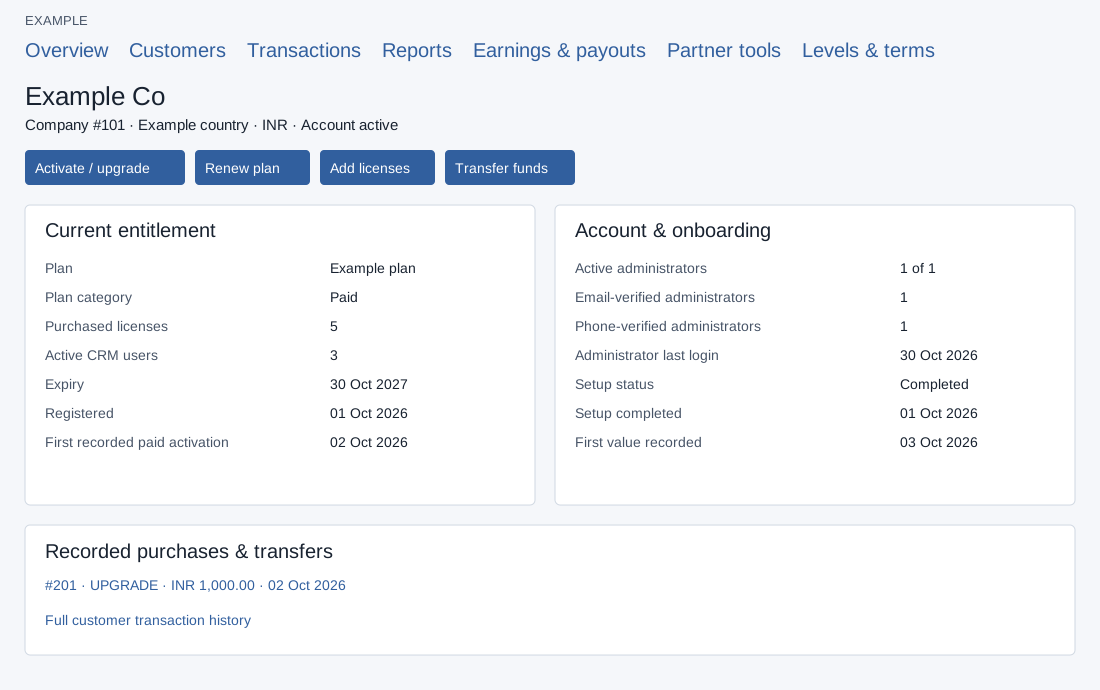
Open and review
- Open Partners → Customers, filter for Example Co and select the customer name. The signed-in partner must have customer-management access to that company.
- Review Current entitlement: plan, category, purchased licenses, active CRM users, expiry, registration date and first recorded paid activation. Review Account & onboarding for administrator counts, verification, last login and setup milestones. Earlier payment history is not reconstructed in first recorded paid activation.
- Use Activate / upgrade, Renew plan, Add licenses or Transfer funds to open the respective review flow; opening these links does not itself confirm a purchase. Recorded purchases & transfers links to each transaction and Full customer transaction history.
After customer creation, a notice may report unconfirmed welcome-mail submission or setup and linking warnings. Do not create another account to retry; use password recovery or contact support with the company number. Accepted mail is not proof of inbox delivery. If details are unavailable, confirm partner access and customer association. Plan and funding procedures.