Partner purchase: review and activate
Confirm a reviewed customer plan purchase using the partner company’s wallet.
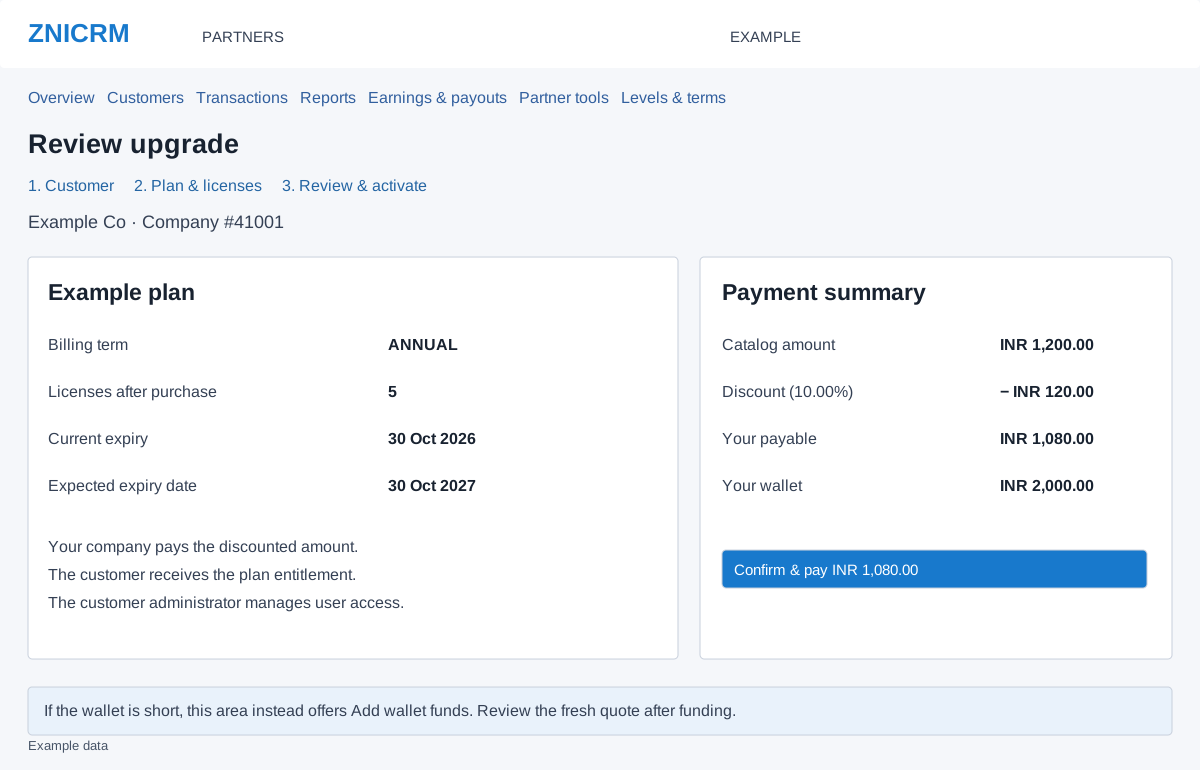
Review the quote
- From Plan & licenses, open the review for the chosen action.
- Check customer name and company number, action, plan, billing term, licenses after purchase, current expiry and expected expiry. Read every warning. The partner pays; the customer receives the entitlement and continues to manage individual users.
- Check Catalog amount, Discount, Your payable and Your wallet. Use the Customer or Plan & licenses step links to correct the selection before committing.
- If funds are sufficient and all details are correct, select Confirm & pay once. This commits a wallet purchase. Wait for the transaction result.
- Verify the transaction and the customer’s resulting licenses and expiry. Financial completion and service synchronization are separate results.
When the wallet is short
The page shows the shortfall and Add wallet funds instead of Confirm & pay. Complete the separate wallet funding workflow, then use Return to customer purchase when offered. Review the fresh quote and confirm it. Funding alone does not activate or renew the customer’s plan.
Expired quotes and uncertain outcomes
A quote expires after 30 minutes. A changed price, plan or customer entitlement also requires a fresh review. Return to the plan selection and check the new quote. If the connection fails after confirming, inspect transaction history and customer entitlement before submitting again. If the purchase is completed but service sync needs attention, use the transaction’s Retry service sync when offered; do not make another purchase to retry synchronization.
For example, a quote may show INR 1,200 catalog amount, INR 120 discount and INR 1,080 payable. Verify the account’s actual quote; these amounts do not establish your rate.