Partner earnings and payout requests
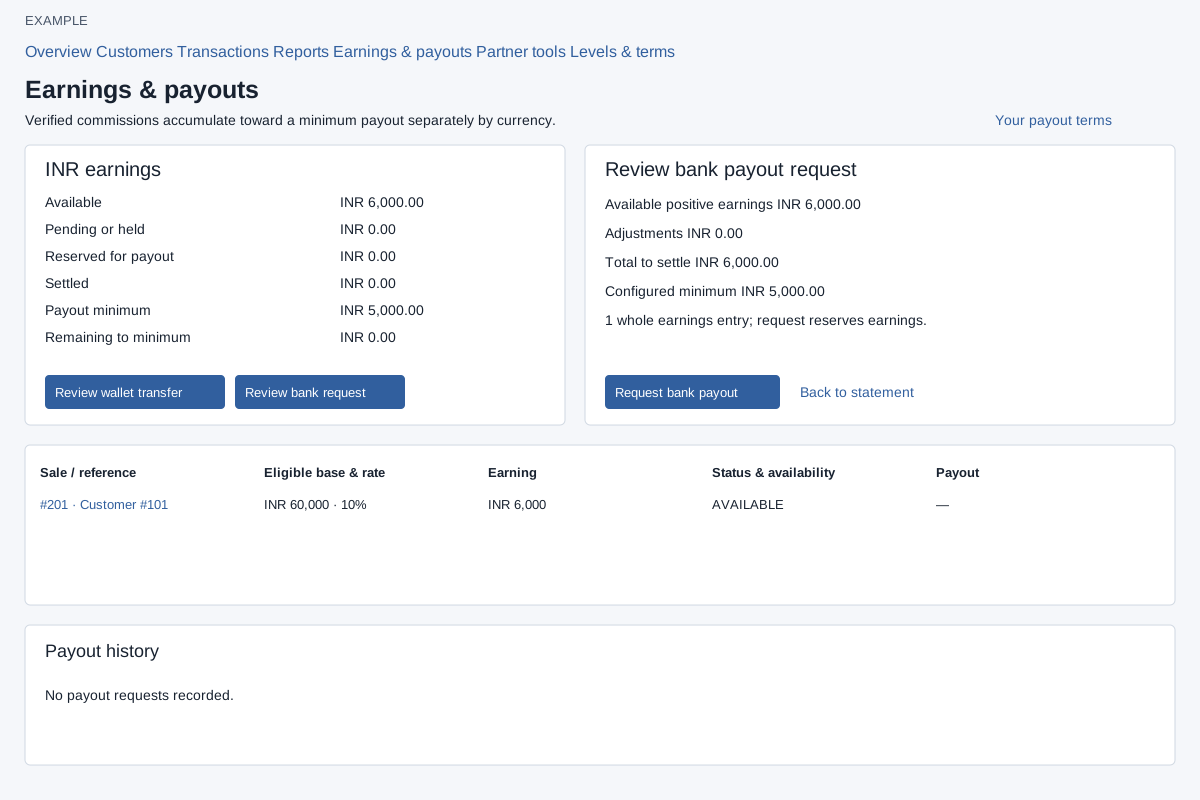
Open Partners → Earnings & payouts. Review Available, Pending or held, Reserved for payout, Settled, the displayed minimum and shortfall by currency. The page states minimums of ₹5,000 or $100 separately by currency; check the current configured terms on the page. Reseller discounts are not cash earnings.
Select Review wallet transfer or Review bank request for a currency. The currency must match the configured payout terms; a wallet payout must also match the company wallet. Available net earnings must reach the configured threshold, and unresolved negative adjustments must be reconciled first. Review available positive earnings, adjustments, total to settle, configured minimum and number of whole entries. Balances are checked again on confirmation; the review expires after 30 minutes, so reopen it if prompted. Transfer to wallet credits the company wallet and removes those earnings from bank-payout availability. Request bank payout reserves earnings; this panel does not verify bank details, approve payouts or send bank payments. Use Back to statement to leave the review.
Earnings statement shows sale/reference, eligible base and rate, earning, status and availability and payout. Payout history shows request, destination, amount, status/reference and action; each has separate Previous/Next pagination. Requested means reserved, not paid. Cancel request is shown for an unprocessed requested bank payout and asks for confirmation. Inspect the result and status; a successfully cancelled request releases its reserved earnings. Held or reserved amounts and existing requests can affect eligibility. Processing or unknown outcomes retain their reservation until resolved outside this panel.