Partner transaction history and service sync
Availability depends on your account configuration and permissions.
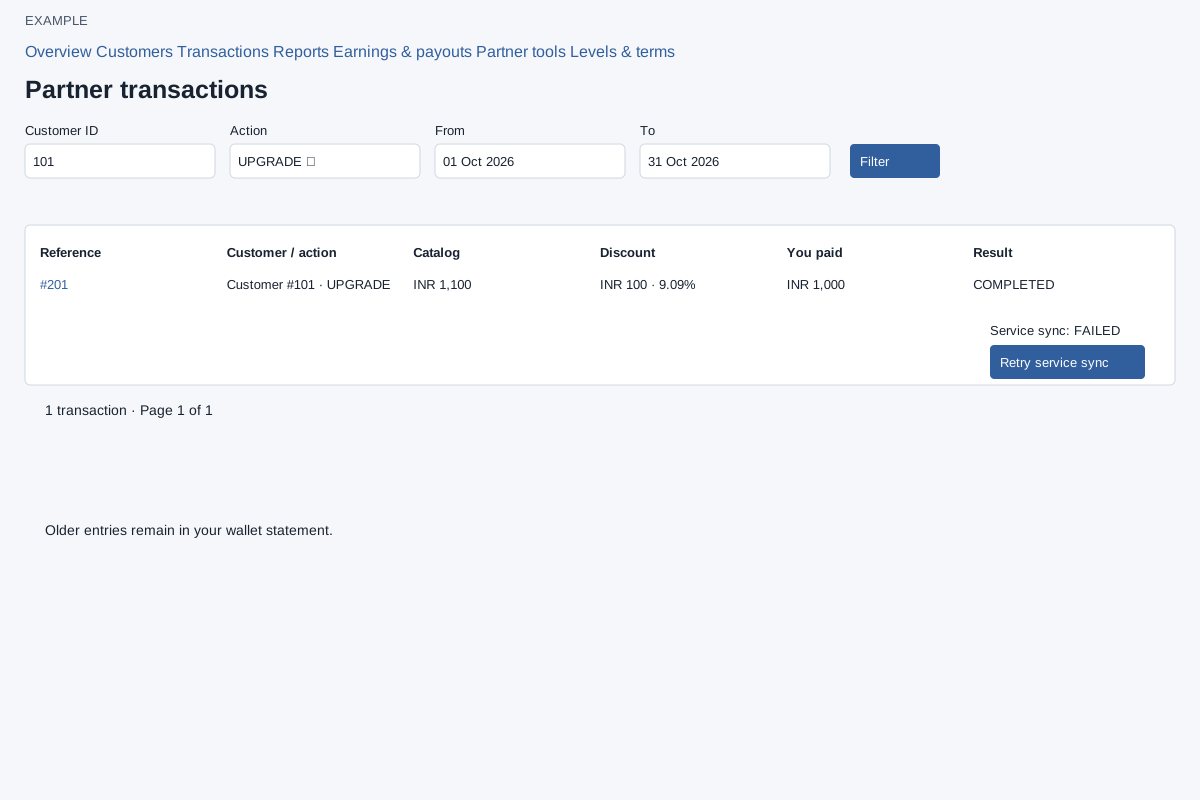
Open Partners → Transactions. Filter by Customer ID, Action (All actions, UPGRADE, RENEW, ADDLICENSE or TRANSFER), From and To, then Filter. Review reference, customer/action, catalog amount, discount, amount paid, result and service sync. Where available Retry service sync requests another sync for an incomplete non-transfer operation. It does not make another purchase: financial completion is retained even if synchronization fails. Use Previous/Next to navigate. Older entries may remain in the wallet statement.
Verify or recover an operation
- Open Partners → Transactions and narrow by customer, action and dates.
- Match the reference, customer, action, currency and amount to the intended operation. Distinguish the financial result from service synchronization.
- If financial completion is recorded but synchronization is incomplete, select Retry service sync where offered for that purchase. A transfer has no purchase-sync retry.
- Wait for the result and inspect the same transaction again. An uncertain response is a reason to check history, not to make a second purchase or transfer.
Previous and Next navigate the result pages. If an older financial entry is absent here, check the wallet statement and its recording boundary.
See partner reports and CSV export for a separate reporting procedure.