Real Estate lease billing and evidence
From a lease select Billing and evidence. Section links lead to Rent billing, Security deposit, Owner collections / expenses, Owner allocations and Maintenance. The available records and actions depend on lease, financial, invoice, subscription, receipt and Helpdesk permissions and access to the property, renter and owner. An administrator must complete Invoicing settings before recording property-management money. New money evidence uses the current company currency; historical currency records can be reviewed without an inferred conversion.
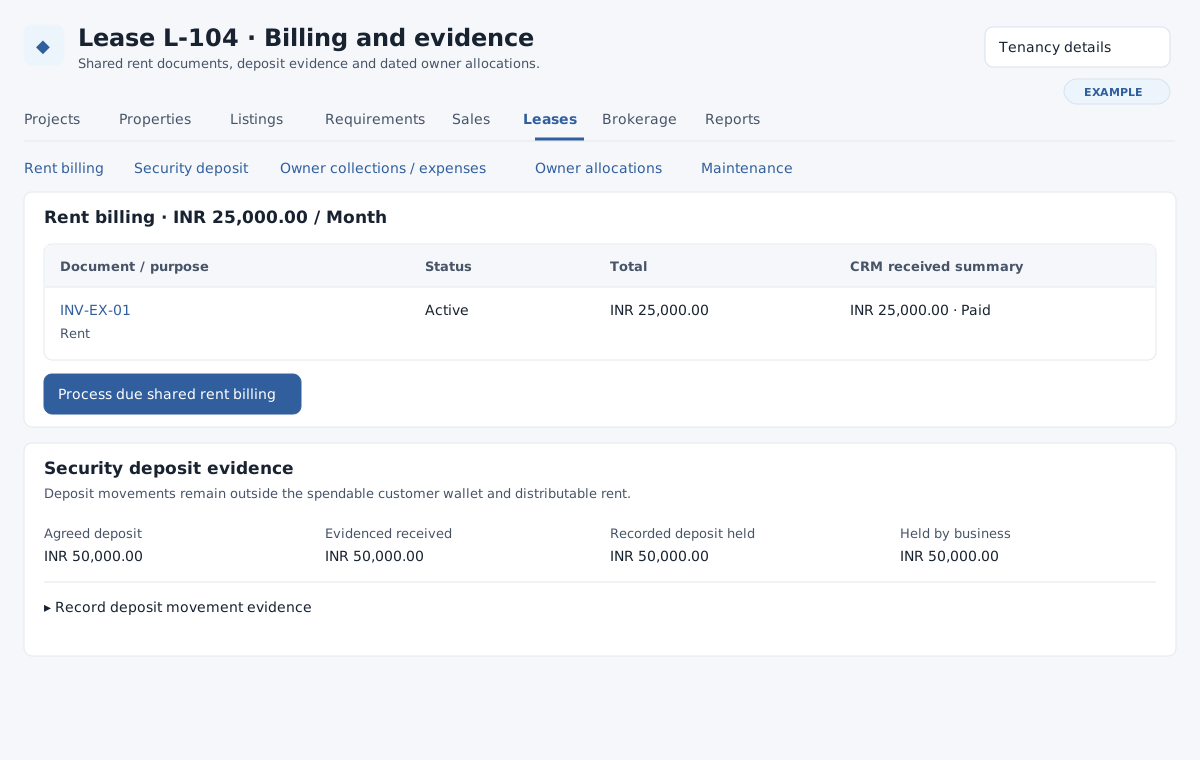
For detailed forms and examples, see rent invoices and corrections, deposits and maintenance, and owner allocations and remittances.
Rent billing
For principal leases, authorized documents show purpose, status, total and CRM received summary. Subscription periods show their service window, excluded end, billing date and status. Where offered, select Process due shared rent billing and inspect the resulting periods and documents. Subscription and invoice permissions control visibility and actions. Agency rent uses owner-issued documents and actual collection evidence; it is not issued as the business’s own rent invoice.
For a positive agreed initial or final partial charge without a linked invoice, expand the corresponding partial charge. Either enter Partial net amount, explicit tax amounts, required Printed renter bill-to address and optional Charge description, then choose Create Initial/Final partial invoice; or enter the positive ID of an existing matching invoice and choose Link existing Initial/Final partial invoice. Net plus taxes must equal the agreed charge with zero rounding. Verify the resulting document and purpose in the table.
To apply already recorded renter wallet funds, expand Settle rent invoice from existing renter wallet, select an eligible Rent invoice, enter a positive Wallet settlement amount, Wallet settlement date, recorded payment mode and optional remarks, then select Record rent wallet settlement. This spends existing wallet funds; it does not receive an external payment or hold a deposit. Review the invoice and receipt summary.
Record financial evidence
Evidence forms require a positive Evidenced amount (up to two decimal places, maximum 9,999,999,999.99), Actual value date, Reason / approved agreement, External document / transaction reference, Issuer / sender named on evidence and Payee / recipient named on evidence. Text fields are limited to 255 characters. Evidence dates cannot be in the future. Enter actual evidence in the displayed currency and check the saved history. These records do not transfer funds or change the customer wallet.
Correct issued rent
Under Issued rent charges and correction evidence, review original charges, CRM settlements, external credits and refunds, reconciled amounts and overcollection. Expand Record correction evidence for the invoice; select externally issued rent credit or actual external rent refund and complete the evidence fields. A refund also requires the exact Original rent settlement. A credit cannot predate its invoice; a refund cannot predate its source receipt. Cumulative credits cannot exceed the original charge, and refunds cannot exceed their original receipt. Select Record external rent correction. If the source has already been distributed, record evidence of the actual return of related remittances first, then correct the owner allocation before correcting the source. This records evidence only: it does not issue a credit note, alter tax, reverse a wallet debit or make a payment. Original documents and settlements remain.
Security deposit
For an activated lease with a deposit holder, expand Record deposit movement evidence. Select actual received, authorized supported deduction, actual refund or correction of an original movement; complete the evidence fields. A deduction needs an authorized Supporting maintenance link or Supporting authorized charge invoice ID, plus the approved reason. A reversal requires its exact original movement. Select Record deposit evidence and check the movement and held totals. Receipts cannot exceed the agreed deposit; deductions and refunds cannot exceed funds held on the value date. Reversals are bounded by the original and may require reversing downstream deductions, refunds or allocations first. Deposits remain separate from spendable wallet funds and distributable rent.
Owner-issued collections and actual expenses
Expand Record an external collection or expense, choose the actual event and complete the evidence fields. Agency collection is for rent actually received by the business for the lease landlord and requires the Owner-issued rent document reference. For an actual outlay, optionally select the related maintenance link. For a reversal choose the exact original event, with matching context, and first compensate any allocation. Select Record external cash evidence and verify its history. A closed ticket alone does not establish an expense.
Allocate a supported source
Under Allocate actual sources to the dated owner, expand Allocate or correct a supported source. Choose the actual rent receipt, external event or evidenced deposit deduction; enter positive Amount to allocate or correct, Owner allocation date and Allocation reason. For a correction, choose the original allocation and the same source. Select Record owner allocation. The date must be on or after the source and no later than today; amounts are limited to the remaining source. If earnings were remitted, record evidence of the actual return first; then correct the allocation, then correct the source. Follow a source link to inspect its history and check the owner statement.
Maintenance
Under Maintenance through existing Helpdesk, use Open existing Create Ticket if needed, then enter an existing authorized maintenance ticket ID and select Link existing ticket. Open the linked ticket for assignment, status, messages and supporting documents. Linking a ticket neither records an expense nor authorizes a deposit deduction. Ticket visibility and Helpdesk permissions apply.
Each history has its own Previous and More controls. If a source or action is absent, check its history page, lease status, currency, setup and permissions. If a save is rejected for a remaining balance or dated dependency, inspect the original source and related allocation/remittance history before entering a correction. See owner source history and tenancy details.