Real Estate deposits and maintenance
Open a lease and select Billing and evidence. Security deposit records are evidence of actual movements, separate from the spendable wallet and distributable earnings. They do not transfer money. To record them, the lease must have been activated with a deposit holder, its currency must match the current company currency, Invoicing settings must be complete, and you need lease and deposit management permissions. Financial read access is needed to see the deposit history.
Link maintenance support
- Under Maintenance through existing Helpdesk, choose Open existing Create Ticket to create a ticket when needed, or use an existing authorized ticket. Work on its assignment, status, messages and documents in Helpdesk.
- Return to the lease, enter the positive Existing authorized maintenance ticket ID and select Link existing ticket. Verify the ticket and lease maintenance link number appear. Helpdesk visibility and maintenance management permissions are required. Linking the same ticket again does not create another link.
- A link supports a deduction or expense; it does not itself record a payment, establish an expense or authorize a deposit deduction. For older links use the separate Previous and More maintenance controls.
Record a deposit movement
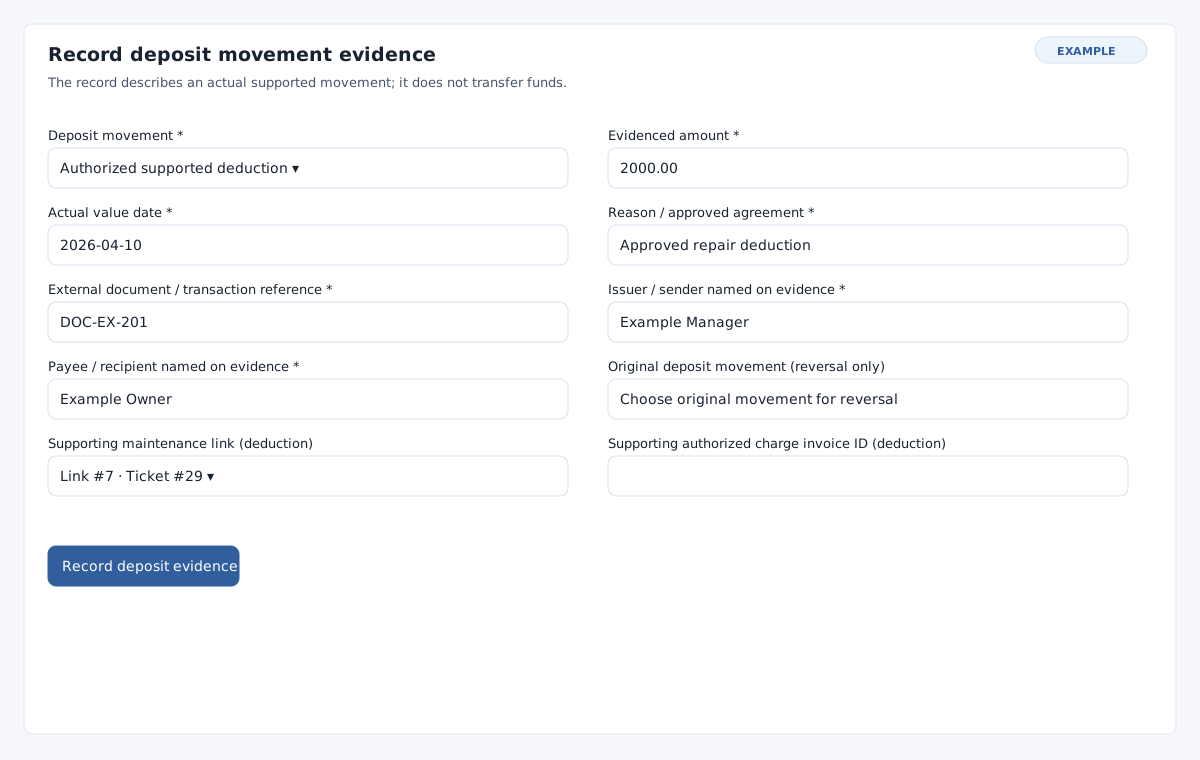
- Under Security deposit evidence, expand Record deposit movement evidence. Choose Actual deposit received, Authorized supported deduction, Actual deposit refunded, or Correct an original movement in Deposit movement.
- Enter required positive Evidenced amount, Actual value date, Reason / approved agreement, External document / transaction reference, Issuer / sender named on evidence and Payee / recipient named on evidence. Use the displayed currency, up to two decimal places and an actual date no later than today; each text field accepts up to 255 characters.
- For a deduction, select a Supporting maintenance link (deduction) for this lease or enter a positive Supporting authorized charge invoice ID (deduction). A supporting invoice must be an authorized, active, non-void invoice for the renter. Provide the actual approved reason. For a reversal choose Original deposit movement (reversal only); the support controls are disabled and the original support is retained. Leave support empty for receipt or refund.
- Choose Record deposit evidence. Check the new history row and the agreed, received, deduction, refund, held, business-held and owner-held totals. A receipt cannot exceed the agreed deposit; a deduction or refund cannot exceed funds held on its value date.
Correct and recover
Corrections retain the original movement and cannot exceed its remaining amount or predate it. Before reversing a receipt, correct dependent deductions or refunds as needed; before reversing an allocated deduction, record any actual owner return and correct the allocation. Use Previous and More deposit evidence controls to find the original on its history page. Check the holder, actual date, approved support, current currency and permission if a form or source is unavailable. If a save is uncertain, inspect evidence before repeating it; if the record has changed, select Reload current record and review it.
See lease billing and evidence and owner allocations and remittances.