Real Estate brokerage fees
Record an agreed fee against an authorized sale or lease and name the actual payer. The payer may be the developer, owner or customer, and the fee is separate from the buyer’s property invoice.
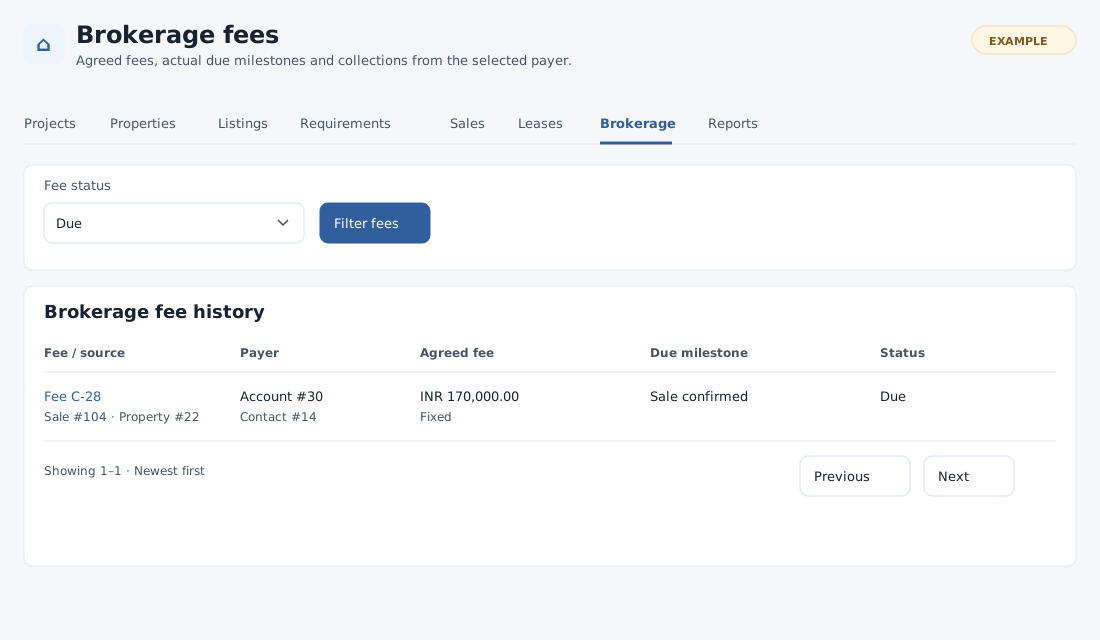
Open and find fees
In Real Estate choose Brokerage. Property catalog and permitted CRM read access are needed; management requires the relevant write scope. Filter Fee status by All statuses, Pending milestone, Due or Void and choose Filter fees. History shows fee and source, payer account and contact, agreed fee and basis, milestone and status. Select a fee to open details, and use the page controls to see more results.
Record an agreed fee
- Under Record an agreed fee, choose Property sale or Lease as Source type and select Load sources. Select a Source agreement and choose Use this source. The page shows source status, property and source terms. A sale or lease details page can also open the corresponding source directly.
- Search for the Fee payer account and Fee payer contact by typing at least three characters and selecting a permitted result for each. The contact must belong to the chosen account. An optional positive Payer deal ID must be a deal for that contact; the enquiry buyer’s deal is not attached automatically. Account and contact search plus write access to the source customer are required.
- Choose Fixed commercial total and enter a positive fixed total, or Percentage of an explicit basis and enter a positive agreed basis and percentage from 0.0001 to 100, with at most four decimal places. The fee is calculated and rounded to two decimals; no sale value or annual rent is assumed. Currency follows the source.
- Choose when the fee becomes due: Sale confirmed, Sale completed, or Explicit staff milestone for a sale; Lease activated or Explicit staff milestone for a lease. Add optional agreed fee notes and select Record brokerage fee.
- Open the resulting fee and verify source, payer, basis, total, milestone and Pending status. Recording a fee does not itself mark it due or create a quote.
If a source or payer is unavailable, check your permissions, customer scope and that the contact belongs to the selected account. Record the source through Sales or Leases first if needed. If the response is uncertain, inspect history before creating another fee.
Continue with brokerage fee details to record the due milestone, billing, settlements and correction evidence. Authorized reports provide related reporting.
Find a source and check the amount
The source selector lists up to 100 authorized sales or leases. If the intended source is absent, open that sale or lease directly and select Record brokerage fee. For percentage fees, check the calculated amount: a positive basis and rate that round to 0.00 are rejected.