Set up a website chatbot
Availability depends on your account configuration and permissions.
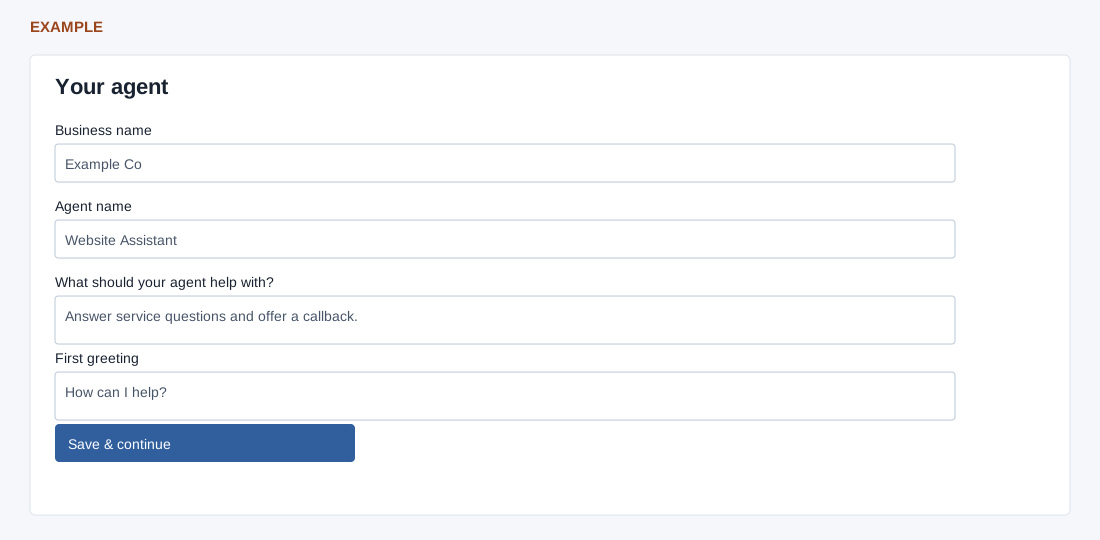
From the dashboard select Chatbot setup wizard. A signed-in administrator, Chatbot viewing access and JavaScript are required; learning management permission is needed to add knowledge and activate. Back and Continue later preserve completed steps, and Continue a saved website resumes an existing setup.
- Your website: enter the required website address, or select a saved site. Save & continue saves the domain; the normalized domain must be at most 120 characters. Without a website, the help link opens contact form settings.
- Your agent: enter required Business name (maximum 90), Agent name (maximum 45), What should your agent help with? (maximum 240) and First greeting (maximum 255). The preview is visual only. Save & continue saves these settings. If the site already has an agent, changes update that agent, including other channels using it.
- Its knowledge: enter a public page URL on the saved domain (maximum 1024) and select Learn from this page. It adds one page, not a whole-site crawl. Add PDFs or more knowledge opens learning settings. Use Check learning status; learning runs in the background. The enable button remains unavailable until knowledge is ready and the user can manage learning. Failed or reupload-required sources need attention.
- Install & test: Enable agent & get install code activates the agent. Copy code and install it once before the closing head tag on the website. Open my website, test a knowledge question and human handoff, then submit your own test enquiry and verify its CRM recipient. Review conversations opens the report; routing, contact form, WhatsApp and widget appearance links open further settings. Open ZNIEngage opens the configured site.
Read the displayed error if a save or learning request fails; return to the saved site and check status before trying again. Activation changes the live agent configuration; installing code requires website access.
See website, agent, knowledge and installation for each step.