Payment events and reconciliation
Use Billing → Payment events to investigate money paid into your CRM wallet and the application of recurring CRM subscription payments. You must be an administrator. Customer payments collected through your own merchant gateways appear in their respective CRM payment screens.
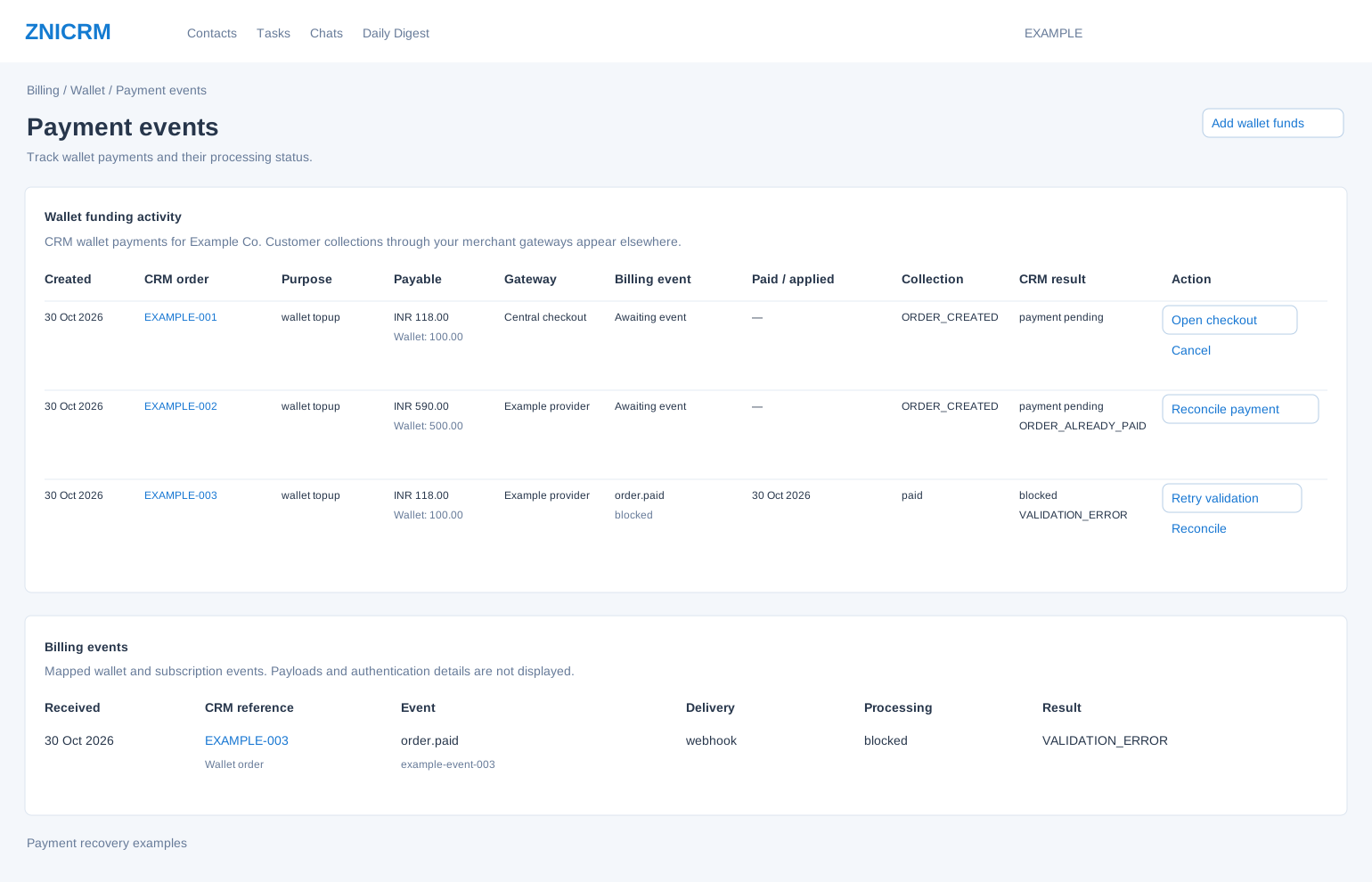
Find the payment and separate collection from application
- Open Payment events from Wallet. Each table displays up to the latest 100 company records, newest first. This screen has no date filter, search, export or next-page control.
- Match the CRM order, date and amount to the payment you are checking. Select the order reference to open its payment status.
- Read Collection alongside CRM result. A provider can have collected money while CRM application is still pending or requires review. Do not infer that a plan was upgraded solely from payment collection.
- Check the wallet balance and, for a renewal or upgrade, the current plan, license quantity and renewal date. Use the available recovery action only when its meaning matches the problem below.
| Column | How to use it |
|---|---|
| Created / CRM order | Identify the order and open its individual status. Retain this reference when asking billing support to investigate. |
| Purpose | Identifies the requested wallet or billing action. A wallet top-up adds balance; a payment prepared for a plan action also needs that action to be applied. |
| Payable / Wallet | Payable includes the quoted tax; Wallet is the amount intended for wallet credit. They can differ. |
| Gateway | The collection provider, or Central checkout before a provider is recorded. |
| Billing event | The most recently received event and its processing state. Awaiting event means no event is shown yet. |
| Paid / applied | Payment receipt time and, when recorded, CRM application time. A missing applied time is a reason to check the result. |
| Collection | Central collection state, with the local mapping state used when a collection value is unavailable. |
| CRM result | Local completion state, wallet-log reference when available and any error code. “Paid review” requires attention even though its badge uses the completed-payment colour. |
Choose the appropriate recovery action
| Action and when it appears | Procedure and expected result |
|---|---|
| Open checkout: an open order without an already-paid conflict | Resume the existing order’s checkout. Review the provider’s amount and payment state before authorizing payment. This opens a payment flow; it does not by itself prove payment or wallet credit. |
| Cancel: the same open-order state | Select only when abandoning that unpaid order. The service asks Central Billing to cancel and then records the local cancellation. A paid order cannot be cancelled this way. If Central Billing is unavailable, the order remains pending; read the error rather than assuming cancellation. This action is not a refund. |
| Reconcile payment: open locally with the ORDER_ALREADY_PAID error indicating Central Billing already recorded payment | Request synchronization of the existing payment. A successful message means reconciliation was requested. Recheck the order later for application; do not create a second payment to resolve this state. |
| Retry validation: CRM result is blocked | After the reason for the block has been addressed, queue the existing blocked billing event for local validation again. The order returns to payment pending. The action does not collect a new payment and does not immediately guarantee wallet credit. If no blocked event remains, the screen reports that there is nothing to retry. |
| Reconcile: CRM result is blocked | Ask Central Billing to reconcile the existing order. Use this to investigate the provider state; it is distinct from re-running local validation. A request can fail if the central order is unavailable. Verify the later result. |
| View: other states | Open the order’s status and read the result. Completed, cancelled and review states do not all mean the same thing. |
Read Billing events
The second table combines mapped wallet and subscription events. Received is arrival time; CRM reference links to the relevant wallet or subscription status; Event shows its type and identifier; Delivery identifies the arrival source; Processing shows its local state; Result shows an error code, processing time or Awaiting worker. No event payload, authentication secret or manual edit is exposed here.
Example: Example Co. has order EXAMPLE-002 marked “Paid · pending sync” on Wallet. Its payment has already been recorded centrally. The administrator selects Reconcile payment and later checks for wallet application and the intended license change. Starting another checkout would not resolve the first order’s application problem.
Resolve an unclear result
- No rows: no applicable orders or events have been returned for the company. These tables are not a statement of all historical charges.
- Session could not be verified: reload the page, inspect the current order state and then repeat the intended action once if still necessary.
- Activity temporarily unavailable: wait and reopen the page. Do not treat an empty table shown with this error as proof of no payments.
- Persistent blocked, rejected or paid-review result: contact billing support with the CRM reference and visible error code. Verify the balance and plan before considering a new payment.
Add wallet funds · Manage a subscription · Billing overview and wallet