Helpdesk Digest
Prioritize your visible support queues and find a customer’s open tickets.
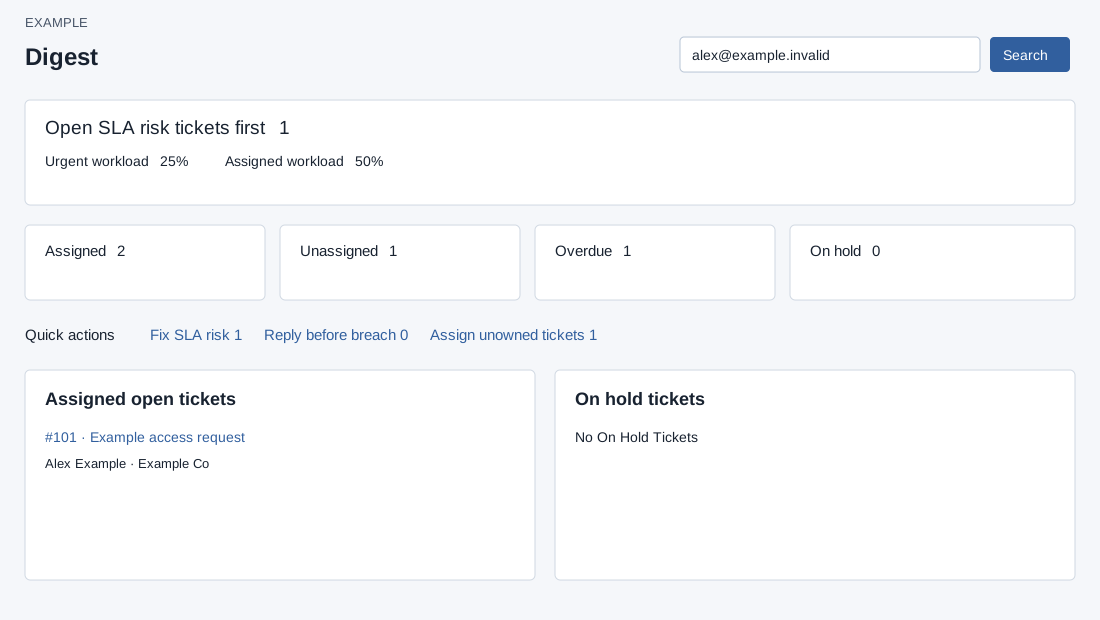
Scope and priorities
Open Helpdesk → Digest. HELPDESK access and an authorized report scope are required. Digest counts and queue links use the signed-in user’s visible scope. Non-administrators additionally require support membership. Queue sections show up to the configured limit (1–100; invalid values fall back to 10); open the queue link for the full report.
The focus link chooses overdue first, then critical, then first-response due, then unassigned; otherwise it opens assigned work. Assigned, Unassigned, Overdue and On hold each open their corresponding queue. Fix SLA risk opens overdue, Reply before breach opens first-response due, and Assign unowned tickets opens unassigned. These links navigate; they do not change a ticket.
The urgent and assigned percentages divide overlapping queue counts by a sum of counts, not a unique ticket count. A ticket can contribute to more than one category; treat these as workload indicators rather than a distribution of distinct tickets. Additional cards and graphs may not be available.
Search and open work
- Enter a customer’s full email address or numeric phone of at least eight digits and click the search icon. Enter does not trigger this search. The system requires at least three characters and returns up to 50 matching OPEN or ONHOLD tickets for the company, newest first; matching is exact against a contact profile.
- Select a result by ticket number and subject to open the ticket. For example, search Alex Example’s email and select the matching access request. If “No matches” appears, check the complete email or number and ticket status; the same message also appears after a network failure, so retry or use the ticket report.
- Review Assigned open, On hold, and conditionally enabled Unassigned and Overdue lists; select a ticket to open its workspace. R marks a customer response. An empty list is not evidence that the whole company has no tickets.