Travel product library
Product library
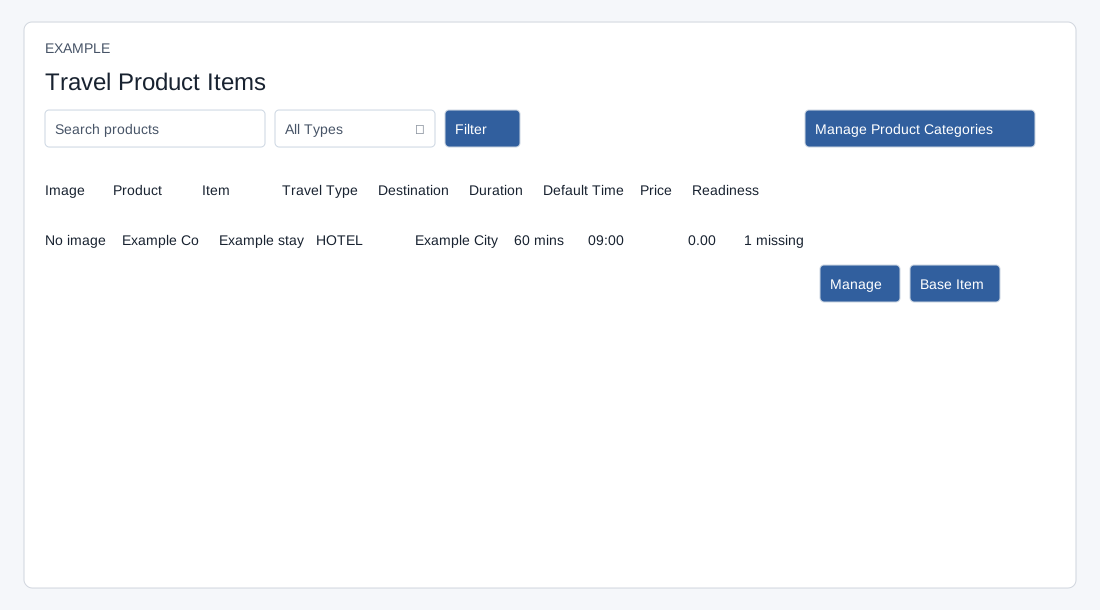
Travel → Product Library searches active Travel product items. Search matches item name, product name or item description; choose All Types, GENERAL, HOTEL, FLIGHT, TRANSFER, ACTIVITY, CRUISE, RAIL, INSURANCE, VISA, MEAL or CUSTOM and press Filter. Up to 200 items are returned. Clear the search and choose All Types to broaden results. Columns show image, product, item, travel type, destination, duration, default time, price and readiness. A thumbnail opens its image.
Readiness counts missing image, non-GENERAL type, city or country, positive duration and client description. “Ready” is a completeness indicator, not a booking guarantee. Manage and Base Item appear with product permission and open the inventory item’s Travel tab or base item respectively; Manage Product Categories opens inventory settings. Create, update and delete are handled in inventory, not on this list. Verify that the item and its Travel product are active and its type is Travel if it is absent. Use the itinerary builder to add a library item and create a quote draft.