Provider call logs
Availability depends on your account configuration and permissions.
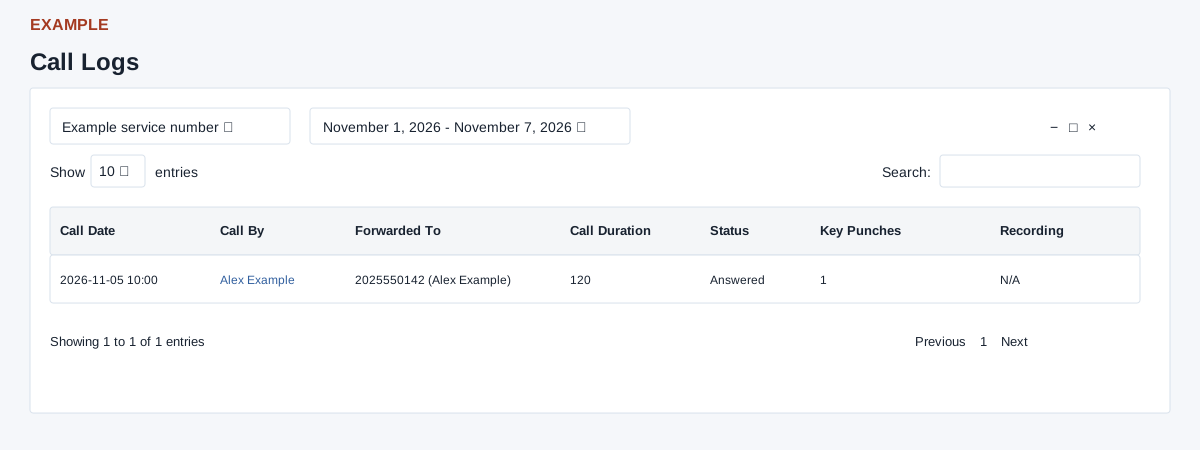
Open the page
Telephony > Call Logs. CTEL access is checked. This is the custom-telephony log; the older provider report is described separately below.
Find a call
- Choose the service number and date range, then use Search, column sorting, Show entries and Previous / Next to browse the loaded rows. Changing the service or applying the date range reloads the report. Presets are Today, Yesterday, Last 7 Days, Last 30 Days, This Month and Last Month. Without dates the report uses today. Its date boundaries include the full selected days.
- Read Call Date, Call By, Forwarded To, Call Duration, Status, Key Punches and Recording. Call By can be a linked CRM contact; Forwarded To can show a number and staff member. A recording is available through Click to open when present, otherwise N/A.
Use the result
- Example: inspect an answered call from Alex Example forwarded to Example Agent, then open the CRM contact if further follow-up is needed. The report loads at most 500 rows without a guaranteed order; table sorting and search only operate on those rows, and there is no export button. Narrow the date range to investigate larger volumes. With a single custom account the selector can show the literal placeholder “phone_no”; check the account setup if selection or results look wrong. A call log status reflects the provider data and does not alone explain the outcome of the customer issue.
- If the service selector displays a placeholder or no expected account, ask an administrator to verify integration and access. Do not copy real numbers or recording links into guide examples.
Older provider call logs
The separate provider report uses different data, permissions and recording behavior.