Older provider call logs
Review the older provider call report when it is available for your account.
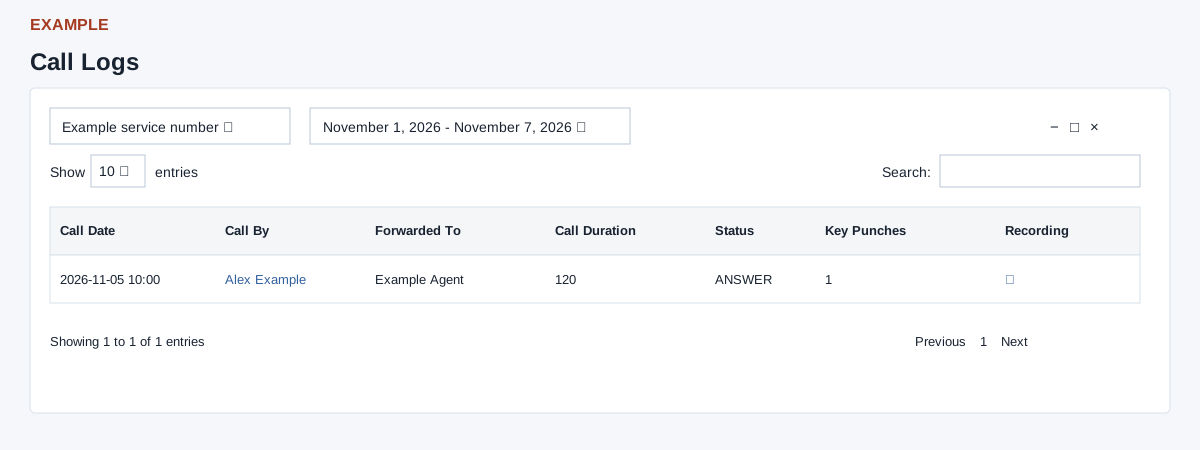
Select service and period
This separate report requires CTEL access and a linked provider account. A missing account redirects to provider setup. Choose the service number and apply a date range: Today, Yesterday, Last 7 Days, Last 30 Days, This Month, Last Month or a custom range. Changes reload the report. With no dates selected the report uses today; selected dates include each entire day. Service selection has inconsistent relation-ID and phone-number handling, so check the displayed results and report an unexpected selection.
Read and investigate
Call Date is the provider call timestamp; Call By is the provider caller handle, optionally linked to a CRM contact. Forwarded To is the forwarding handle; Call Duration, Status and Key Punches come from provider records. Recording shows a download icon when flagged and a blank icon otherwise. Open the contact to follow up, and use a recording only if available and appropriate. Example: inspect an answered Example Co call and review its contact history before returning it.
The service returns up to 1,000 rows, newest first, excluding BLACKLIST status. For non-admin staff it includes their own and unassigned rows. Search, column sorting, Show entries and Previous / Next act on loaded rows; there is no export button. Narrow dates if the limit is reached. The card’s collapse, expand and close controls affect the display. If rows or recordings are missing, check service, period, role and provider setup; a status or recording flag does not establish a customer outcome or successful external playback.