Real Estate: Sale quote, invoice and wallet settlement
Use the Shared quote and invoice section of a sale to create or link the buyer’s commercial document and settle an invoice using existing wallet funds. A document or settlement does not by itself confirm the property allocation.
Prepare the sale and buyer
Open Sales, select the sale number and find Shared quote and invoice. Sale management and buyer write access are needed for the forms, with separate permissions for creating quotes, converting invoices and recording receipts. Document details require authorized Invoice access. Quote creation and conversion require completed Invoicing settings and an existing buyer company-office address. A Held sale must still be unexpired for a new document; a Confirmed sale is also eligible. Check the agreed commercial total before preparing the figures.
Create a sale quote
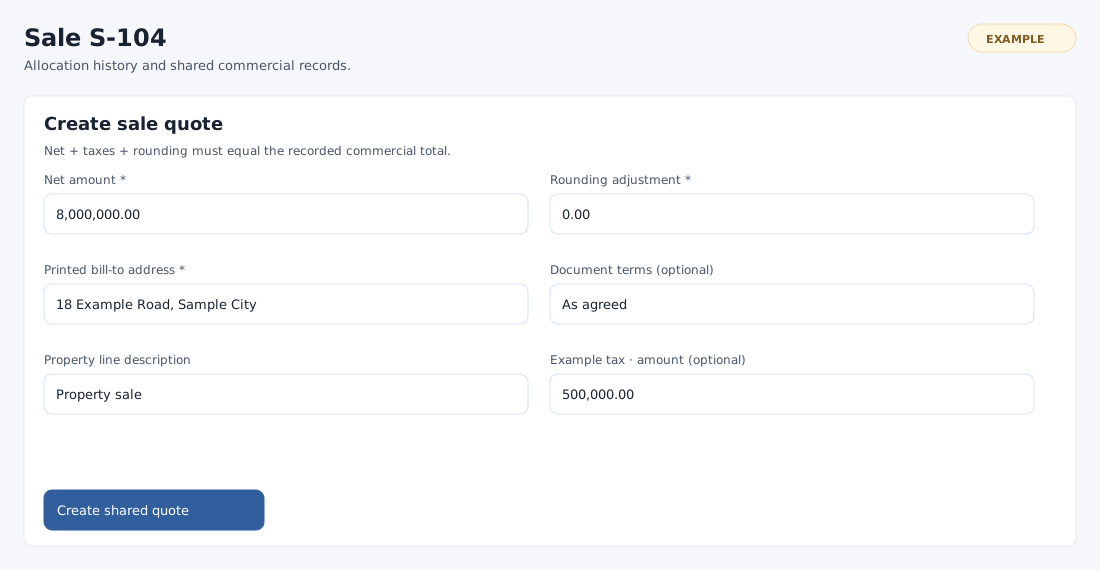
- If no quote or invoice is linked and you have quote permission, expand Create sale quote.
- Enter required Net amount and Rounding adjustment. Net and each tax are non-negative with up to two decimals; rounding accepts −99.99 through 99.99 and starts at 0.00. Enter the actual amount for each applicable displayed tax, or leave its field empty to omit it. Net + explicit tax amounts + rounding must equal the sale’s agreed total exactly.
- Enter the required Printed bill-to address. Optionally enter Document terms and edit Property line description, which starts as “Property sale”. Select Create shared quote. The sale details reopen; check the document link and commercial total.
Convert or link a document
When the linked quote is visible, no invoice is linked, the sale is open and you have invoice permission, select Convert quote to invoice. Verify the invoice row and status in the same section. Alternatively, expand Link an existing issued document, enter its positive Existing quote or invoice ID, then choose Link existing document.
The authorized, active document must match the buyer, sale deal and agreed total; it must include the property exactly once with quantity one, and its line amounts, taxes and rounding must reconcile. If a quote and an invoice are both linked, the invoice must be that quote’s conversion. A document already linked to another sale cannot be reused. Linking leaves the allocation status unchanged.
Settle an invoice from the buyer wallet
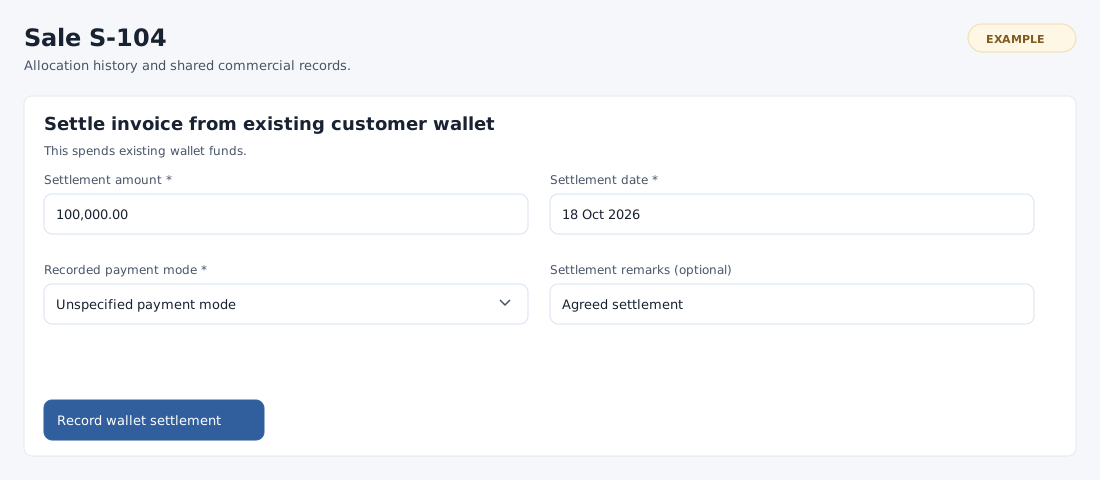
- For a linked, authorized non-void invoice and with receipt permission, expand Settle invoice from existing customer wallet. Ensure verified funds already exist in the buyer’s wallet using the existing finance workflow.
- Enter a positive Settlement amount and the Settlement date. Choose a listed Recorded payment mode, or leave Unspecified payment mode, and add optional Settlement remarks of up to 255 characters.
- Select Record wallet settlement. Check the invoice settlement amount and status and the activity on the reopened sale. This spends existing wallet funds; it does not collect external cash or record a security deposit.
Resolve a problem
If a control is absent, check sale status and expiry, linked documents, buyer scope and quote, invoice or receipt permissions. For a rejected document, compare its buyer, deal, property line, amount, tax and rounding with the sale; confirm any linked quote/invoice pair belongs together. If the page reports a changed record, reload and review it. If a save response is uncertain, inspect the sale’s document and settlement history before repeating it. Release or cancellation does not reverse the commercial documents or settlements; handle those through the appropriate finance process.
A wallet settlement cannot exceed the payer’s available wallet funds or the invoice’s unpaid gross amount. Check both balances before entering the settlement.