Real Estate: Brokerage billing and corrections
Bill the actual fee payer and record any externally issued credit or actual refund evidence on brokerage fee details. The fee document is separate from the buyer’s property sale invoice.
Prepare the fee
From Brokerage, open the fee and verify its source, payer account and contact, optional deal, amount and status. Mark a Pending fee Due after the chosen milestone using the actual due date; for an explicit staff milestone also supply its approved reference. The date must not precede the recorded source milestone or be in the future. Fee management requires write access to both the source customer and the payer. Billing, invoice access, settlement and correction actions have additional permissions.
Create a brokerage quote
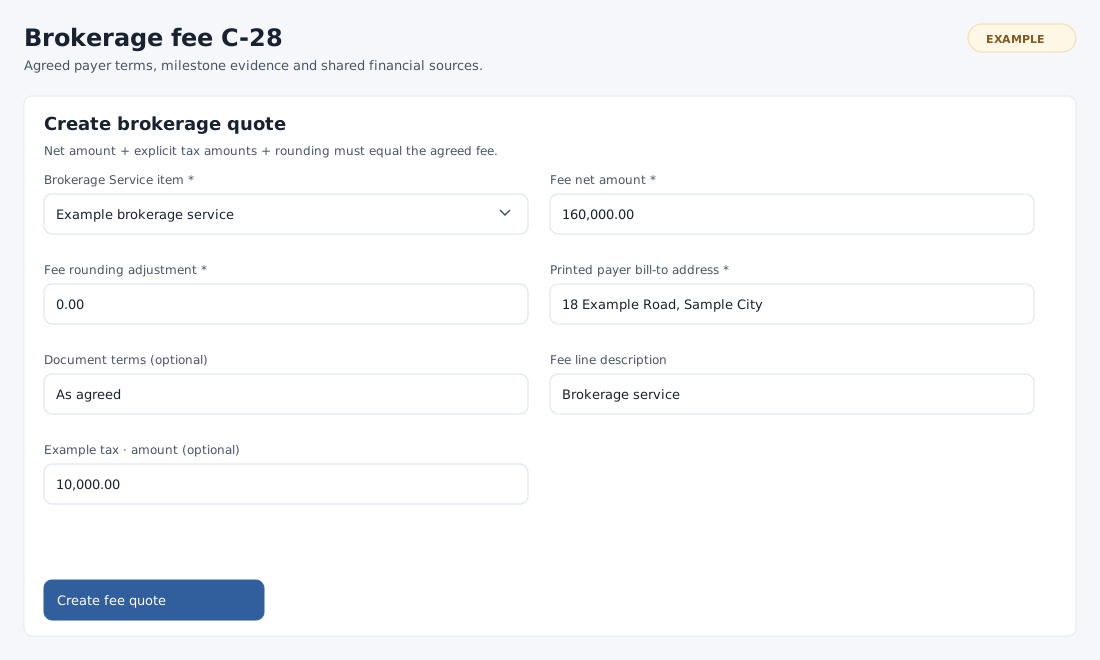
- On a Due fee with no linked document, expand Create brokerage quote. If prompted, create an active Service item in the existing product catalog. Complete Invoicing settings and make sure the payer contact has an office address.
- Choose the required Brokerage Service item and enter Fee net amount and Fee rounding adjustment. The rounding starts at 0.00 and ranges from −99.99 to 99.99. Enter actual non-negative amounts for applicable listed taxes, or leave them empty to omit them. Net + taxes + rounding must equal the agreed fee exactly.
- Enter the required Printed payer bill-to address; optionally enter Document terms and edit the Fee line description, initially “Brokerage service”. Select Create fee quote and check the document and total on the reopened fee.
Convert, link or settle
If eligible, choose Convert fee quote to invoice. To use an existing document instead, expand Link an existing payer document, enter the positive Existing payer quote or invoice ID and choose Link existing fee document. It must be an authorized active document for the selected payer and deal, agree with the fee total and contain one valid Service line of quantity one without a discount. Its line, taxes and rounding must reconcile. A linked quote and invoice must be the same conversion pair; a document already linked to another fee cannot be reused.
For a Due fee and an authorized non-void invoice, expand Settle fee invoice from payer wallet. Enter the positive Wallet settlement amount and Wallet settlement date, choose a listed Recorded payment mode or Unspecified, and optionally enter settlement remarks. Select Record payer wallet settlement, then verify the invoice received summary. This spends funds already in the selected payer’s wallet; record verified external funding separately through the finance workflow first.
Record external correction evidence
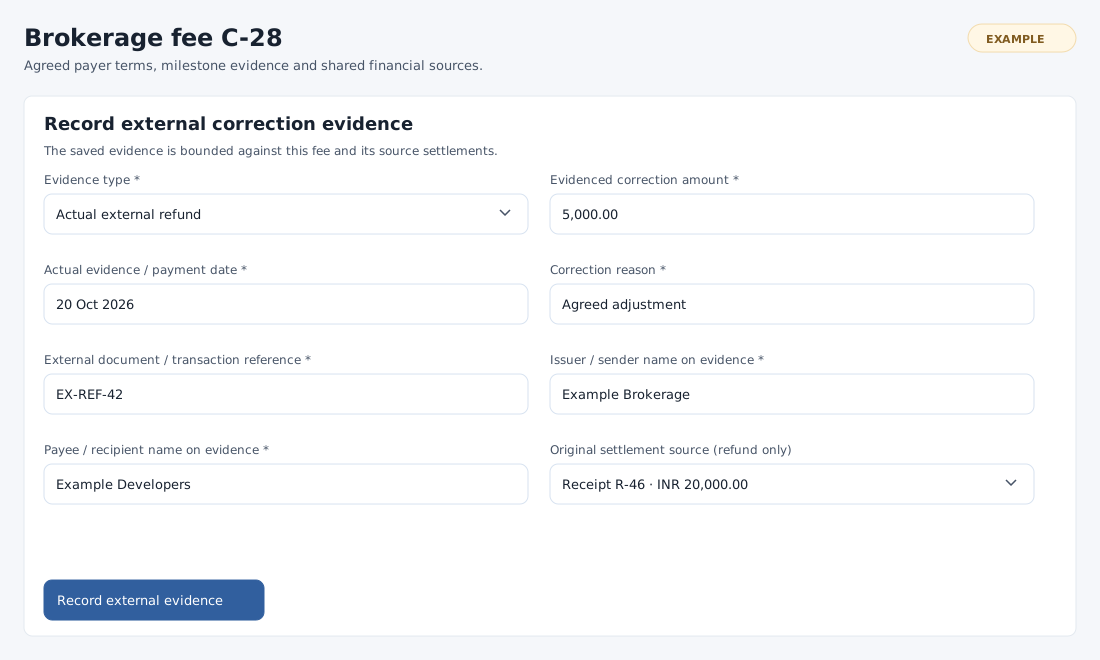
- For an authorized linked payer invoice, review Financial sources and reconciliation and original invoice settlements. Open Record external correction evidence when the applicable credit or refund action is available.
- Choose Externally issued credit or Actual external refund. Enter the positive Evidenced correction amount, Actual evidence / payment date, Correction reason, External document / transaction reference, Issuer / sender name on evidence and Payee / recipient name on evidence. Each text field allows up to 255 characters.
- For a refund select the Original settlement source; this field is disabled for a credit. The date cannot precede the source invoice or receipt or be in the future. Cumulative credits cannot exceed the original invoice charge, and cumulative refunds cannot exceed their original receipt. Select Record external evidence and check the new history row and reconciliation.
Correction evidence is immutable. It does not issue a CRM credit note, change tax, reverse a wallet debit or initiate a payment. The original invoice and receipts stay unchanged; use the appropriate separate financial process. Reconciliation distinguishes the original charge, CRM settlements and received summary, outstanding, external credits and refunds, net charge and retained collections, outstanding after corrections and any overcollection. The latest 100 correction records appear; totals include all authorized evidence.
Recover or void
If a form is absent, check Due status, document and payer access, Service item availability and financial permissions. If a save is rejected, check the document pairing, exact totals, dates, source receipt and remaining correction amount. Reload a changed record and inspect existing documents or evidence before retrying an uncertain save. A Pending or Due fee without an invoice may be voided using Void unissued fee and a reason; an existing quotation remains. An issued fee cannot be voided here.
A wallet settlement cannot exceed the payer’s available wallet funds or the invoice’s unpaid gross amount. Check both balances before entering the settlement.