Manage a project template
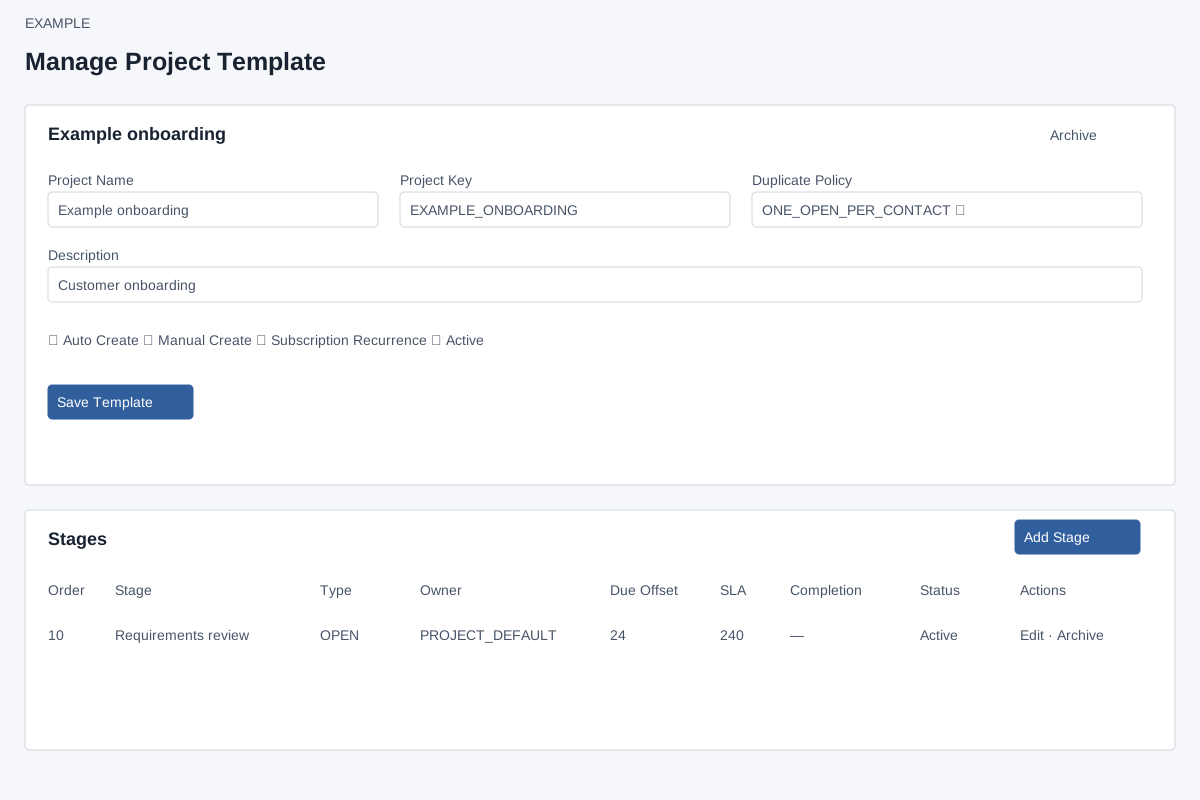
Open the page
Project Management → Project Templates → open a template. Project permissions determine access and available actions.
Configure the template
- Review Project Name, Project Key, Duplicate Policy and Description. Duplicate Policy determines which existing projects prevent another from the same source.
- Set Auto Create, Manual Create, Subscription Recurrence and Active as needed, then Save Template. Review the effect on project creation before saving.
Manage stages
- The Stages table shows order, stage, type, owner, due offset, SLA, completion, status and actions. Choose Add Stage or Edit to open its editor.
- Use Archive or Activate where available only after assessing the impact on new work. Review the stage order and owner choices after changes.
Related: Project stage settings
Settings and duplicate behavior
Project Name is required; Project Key may be blank to generate one from the name; Description is optional. Duplicate Policy offers ALLOW, ONE_OPEN_PER_CONTACT, ONE_OPEN_PER_DEAL and ONE_PER_WORKFLOW_SOURCE. The contact and deal policies check OPEN, IN_PROGRESS or BLOCKED tasks of this template for the corresponding linked record; the workflow policy requires a source deduplication key. A matching duplicate prevents a new task.
Auto Create, Manual Create, Subscription Recurrence and Active are checkboxes. Manual board creation does not check the Manual Create flag; treat it as stored configuration rather than a proven enforcement rule. Save Template updates the template, increments its version and reloads. Archive/Activate is a separate action that returns to the template list. These options alone do not create a task or configure a workflow or subscription binding. For a customer onboarding template choose a policy consistent with the team’s parallel-work needs, save, and reopen to verify. Missing stages or inactive templates can make work unavailable on the board.