AI Chat
Ask an available bot questions in your own AI Chat history. This is separate from AI Assist in a customer conversation.
Start or continue
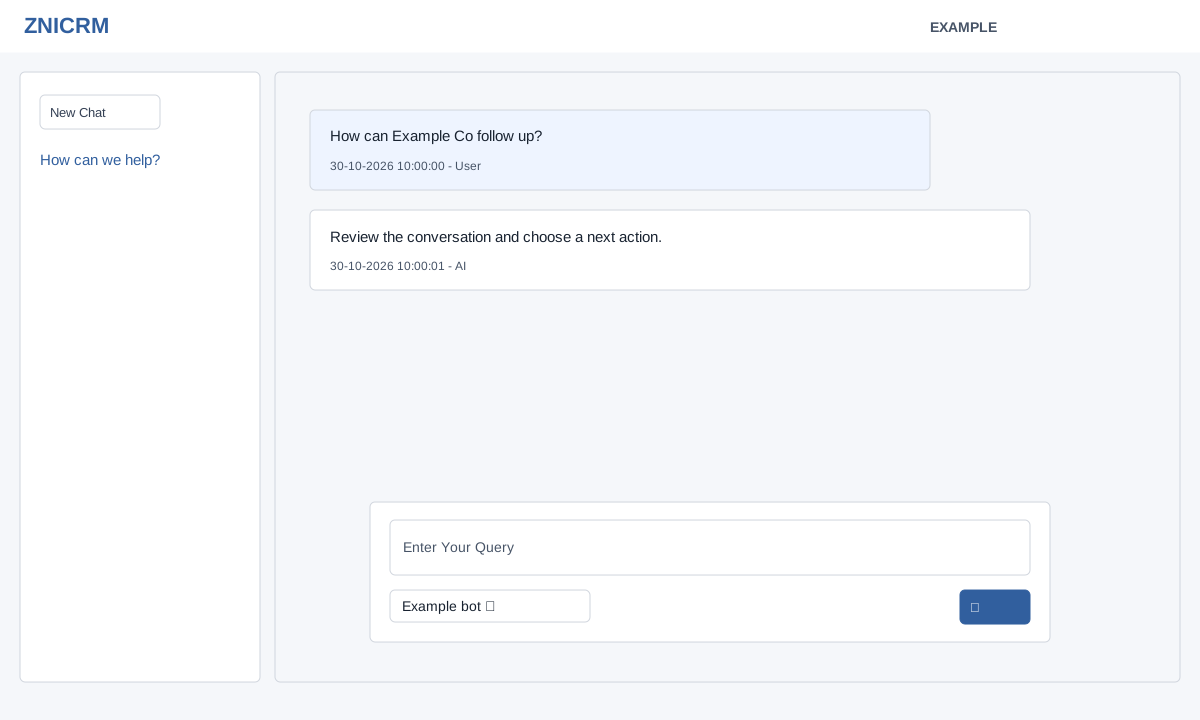
Choose AI Chat in the main navigation. AI Chat app access and an available valid bot are required. The left list contains up to 50 of your most recent chats; choose one to read its timestamped User and AI messages, or select New Chat.
- Type a question in Enter Your Query and choose a bot from Select Bot.
- Click the paper-plane send button. A first question creates a chat whose subject is taken from the first 45 bytes of the question and opens its history. Subsequent questions use the bot saved with that conversation, even if another bot is selected in the dropdown. Start a new chat to use a different bot.
- Check the answer and reopen the chat from the list to review its saved history; the page loads the latest 20 messages. The question is saved before the AI response is obtained, so an unanswered question can remain in history. Verify factual or consequential answers independently.
If the page reports an invalid chat, open a chat from your own list. If a query fails, check the text, bot selection, app access and displayed error before retrying. AI response quality and bot availability depend on configuration. For a practice query, ask “Draft three follow-up questions for Example Co’s onboarding enquiry.” Review the answer before using it in a customer conversation; sending an AI Chat question does not itself send the answer to a customer.