Facebook Pages: older integration view
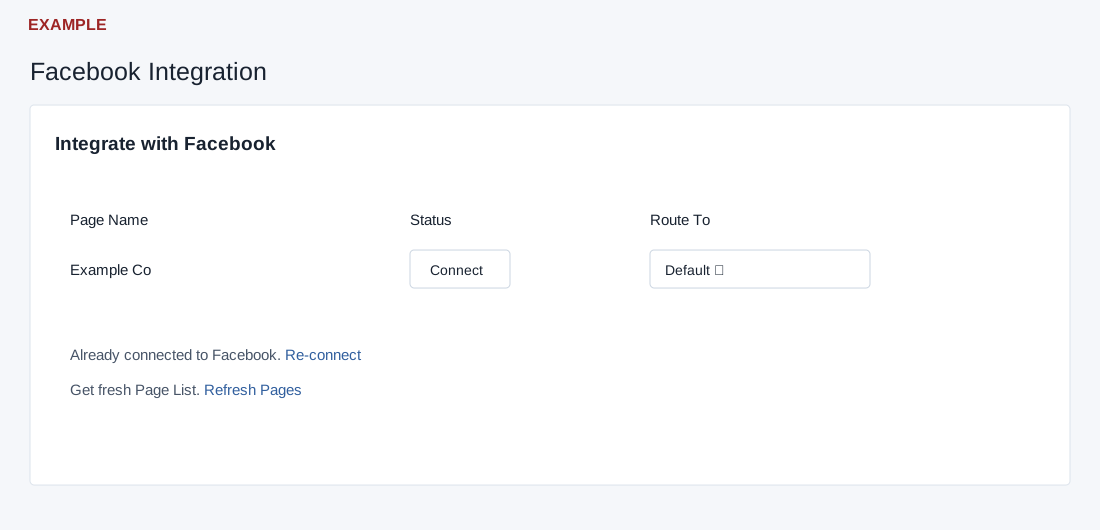
Connect a page
This older integration view requires an administrator; page-management actions also check Facebook lead-page permission. Have access to the intended provider account and page.
- When disconnected, select Connect with facebook and complete the provider authorization flow. A code callback attempts the connection and page refresh on load, then redirects; it is not a passive preview.
- In the returned Page Name, Status and Route To table, find the intended page and select Connect if offered. On success the button disables; connected pages display Connected on a subsequent render.
- Check the page status after reopening. A connection alone does not prove a lead has arrived.
Route incoming leads
- For the page, select Default or an available department in Route To. The selector sends the change immediately; there is no separate Save button. Department choices, including Default, are populated when departments exist.
- Read the resulting success or error message and reopen the page to check the selection. If an update fails, check page-management permission before retrying.
Refresh or reconnect
- Select Refresh Pages to request a fresh page list; success reloads the page, while failure displays a message and re-enables the button.
- If authorization needs renewal, select Re-connect and complete the provider flow. Check the returned page list and routing again. Read any displayed error and contact support if retrying does not resolve it.