Google Ads API and conversion integration
Connect Google Ads for conversion reporting and inspect the accessible accounts and setup results.
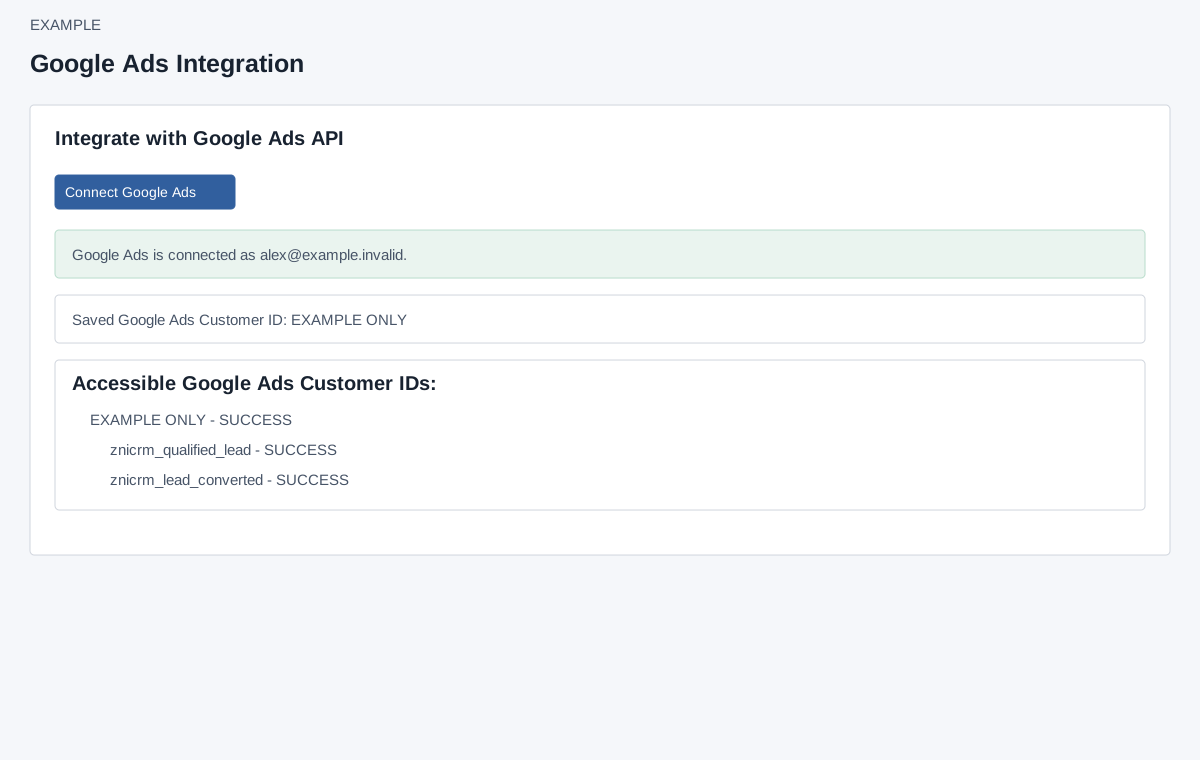
Open and connect
Account Settings → Integrations → Google-Ads Conversion requires ADMIN and Premium Integration access. When OAuth is configured, the page displays Connect Google Ads. Select it and complete the provider consent flow using the intended account. If the control is absent, ask an administrator to check server OAuth configuration. Authorizing establishes a connection and can create or locate conversion actions in accessible Google Ads accounts.
- Confirm that the administrator account has Premium Integration access and that the intended Google identity can access the advertising accounts.
- Select Connect Google Ads, review the provider authorization request and complete consent for the intended identity.
- Wait for the return page. Read the overall result and each account’s conversion-action results before leaving it.
- Return to this integration page and inspect the saved account and action statuses. If authorization succeeded but one action failed, resolve that account-specific error; do not treat the whole setup as ready.
Authorization result
The callback is the return page from authorization, not a separate setup form. It reports success or an OAuth error, possibly the connected email, accessible customer IDs and per-account action results for znicrm_qualified_lead and znicrm_lead_converted. A success connection can coexist with a warning or failed action; examine each status and any account-mapping warning. The callback can attempt to find or create both named upload-click conversion actions and save account mappings. A missing refresh token requires reauthorization with consent. Do not manually revisit the callback with an old authorization code.
Inspect and recover
On the integration page a connected state shows email if available, saved customer ID, and accessible customer IDs with conversion action statuses, resource names and errors when present. Loading the connected page can refresh the access token and discover accounts; it may show an account fetch or saved-account sync warning. There is no customer selector, manual sync, test or disconnect control on this page. If account discovery fails, review the displayed error and ask an administrator to check authorization and server-side developer token configuration; a connected banner alone does not prove every conversion action is ready. Reopen the page and inspect each status after resolving the issue.
Read the account and action results
| Result | What it confirms |
|---|---|
| Connected email | The profile returned for this authorization, when available. Check it is the intended identity. |
| Saved customer ID | The stored advertising account mapping. It is a displayed result, not an account-selection control. |
| Accessible customer IDs | Accounts discovered through the current authorization. Discovery can fail even while a stored connection exists. |
| Conversion-action SUCCESS | The named action was found or created for that account and its result recorded. This does not prove an individual CRM conversion was uploaded. |
| Conversion-action FAILED or error text | An account-level setup problem remains. Record the action name and non-sensitive error when asking an administrator for help. |
| Resource name | The provider identifier associated with an action. It helps distinguish account/action mappings; do not replace it with the action’s display name. |
| Saved accounts sync warning | The page could not fully reconcile the saved account information. Check the warning even if the authorization banner is successful. |
Example: Example Co connects a Google identity that sees two advertising accounts. If Qualified Lead succeeds for both but Lead Converted fails for one, investigate that action/account pair before relying on conversion reporting. Do not reconnect repeatedly without reading the specific failure.