Add or edit an SMS gateway
Configure an HTTP provider request, validate it and optionally send a real test.
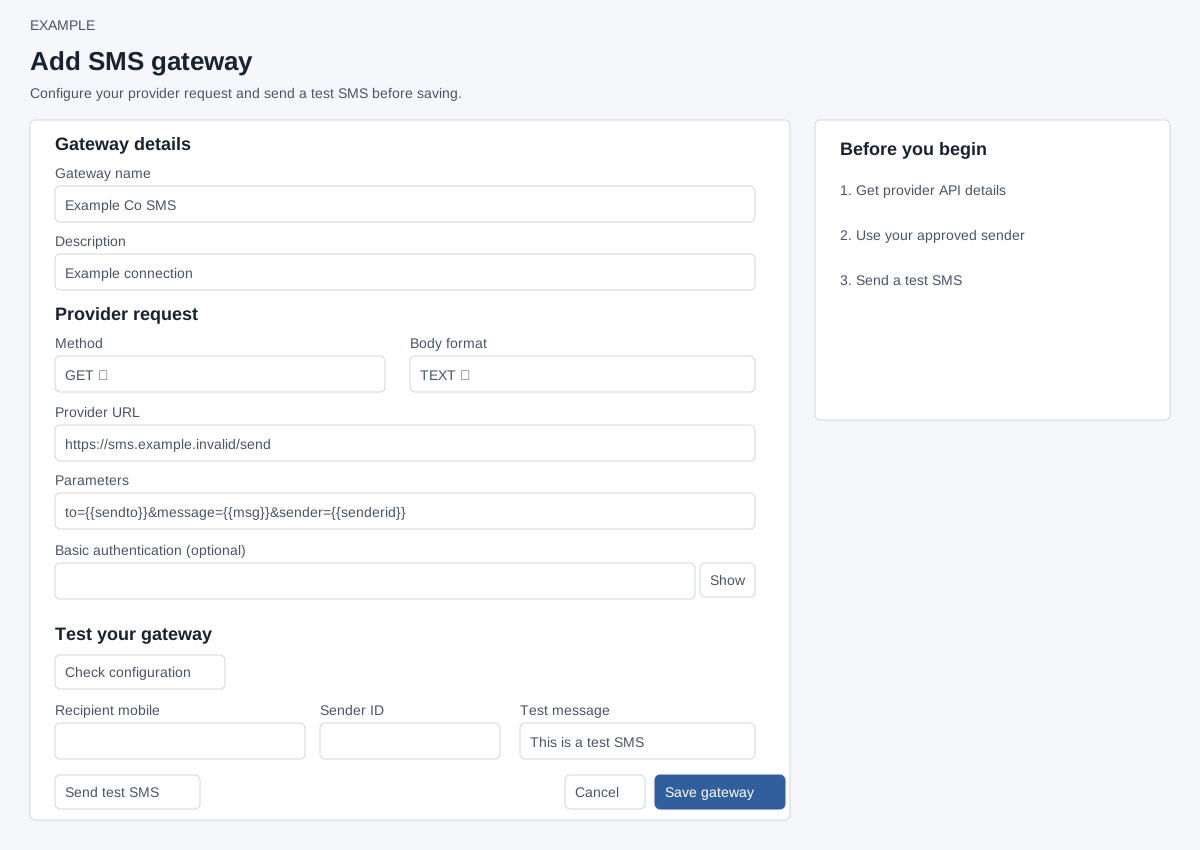
Open and enter provider details
Admin settings → SMS gateways → Add SMS gateway, or Edit on a row. Administrators only. Obtain the provider endpoint, required parameter names and approved sender from your provider.
| Field | Input |
|---|---|
| Gateway name; Description | Required, maximum 45 and 200 characters. |
| Method; Body format | GET or POST; TEXT or JSON. JSON requires POST and valid JSON, with variables inside quoted strings. TEXT uses URL-encoded key-value pairs. |
| Provider URL | Required HTTP or HTTPS URL without embedded credentials or fragment. For GET put query parameters in Parameters, not the URL, for the diagnostic test. |
| Parameters | Required provider-specific request template; a provider key placed here is part of the saved configuration, so share screenshots and access carefully. {{sendto}} is recipient, {{msg}} URL-encoded message even in JSON, {{senderid}} sender ID and {{guid}} unique reference. A test requires both sendto and msg placeholders. Example only: to={{sendto}}&message={{msg}}&sender={{senderid}}. |
| Basic authentication | Optional username:password; Show/Hide controls visibility. On edit blank keeps existing credentials only when URL is unchanged. Changing URL requires replacement credentials or, when offered, checking Remove saved Basic authentication. |
Check, test and save
- Check configuration validates request format without contacting the provider. It does not save.
- For Send test SMS, enter recipient with country code (8–15 digits beginning with 1–9, optional leading +), sender ID (1–15 letters, digits, spaces, +, underscore or hyphen), and a nonempty message up to 160 characters. The default message can be changed. The test strips the leading + before substituting the recipient into the request. Sending contacts the provider and may consume credits.
- Save gateway persists the form and returns to the list; Cancel returns without saving. When editing, saved credentials can be reused under the conditions above.
HTTP success is not delivery confirmation. Check the phone and provider delivery report. For a timeout, delivery is unknown; inspect provider logs before sending another test. See test details and recovery.