New Digest: work queues and loaded-record filters
Use All Work to prioritize the records currently retrieved, then open the source view for context and action.
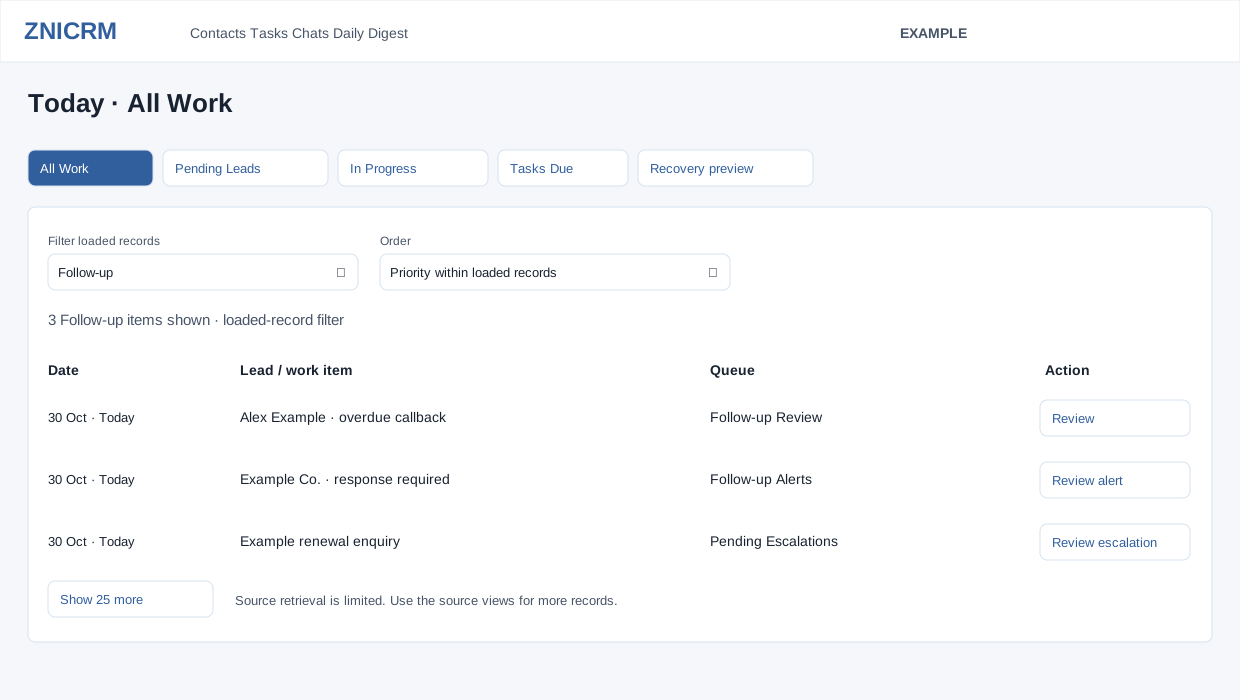
Review All Work
- Open Daily Digest → Today → All Work. Confirm the selected user and the loading status.
- Choose Filter loaded records: All queues, CRM & Sales, Follow-up, Helpdesk or Operations. The filter narrows the records already loaded; it does not search all source records.
- Choose Order: Priority within loaded records, Earlier records or Later records. Priority uses the source queue's urgency, with dates breaking ties. Changing Order reloads the queue; changing the group filters the loaded set.
- Read Date, Lead / work item, Queue and the row's action. Use its Review action to open the source report or contact. If a ticket belongs to multiple helpdesk queues, it can appear once with additional queue actions.
- Use Show 25 more to reveal further loaded work or fetch the next page when available. Continue from the source view when the retrieval-limit notice appears.
Interpret counts correctly
The All Work badge counts loaded, combined records. It is not an exhaustive total of every outstanding CRM obligation, and it need not equal the sum of the exception badges. A count with + indicates a capped result. Queue retrieval and the source report can both have limits.
No matching records are loaded yet can mean the group has no matches within the current batch. Load more work, change the filter or use the relevant source report. One or more queues could not be loaded is a partial result. On a failed load-more request, earlier records can remain visible with their earlier update time.
Pending Leads and In Progress
- Select Pending Leads or In Progress to focus on that lead queue.
- Use Sort by date → Later records / Earlier records. Changing it reloads that queue.
- Review Contact / account, Status and Last activity, then open the contact using its action. Check the contact's ownership and recent conversation before choosing the next CRM action.
- Use Load 20 more when available. Open full contact list opens the permitted source list; it may have its own access and filtering rules.
Example
Alex Example chooses Follow-up and Priority within loaded records, reviews a flagged customer, and opens the contact to check the latest response. If the needed contact is absent, Alex uses its source report or the contact list instead of treating the current batch as complete.
See Digest overview and contact conversation.