Dialer settings
Begin at the Dialer administration overview for queue metrics and Open Settings.
Open the page
Account Settings → Features Settings → Dialer → Settings. Administrator permissions may be required.
Configure disposition sets
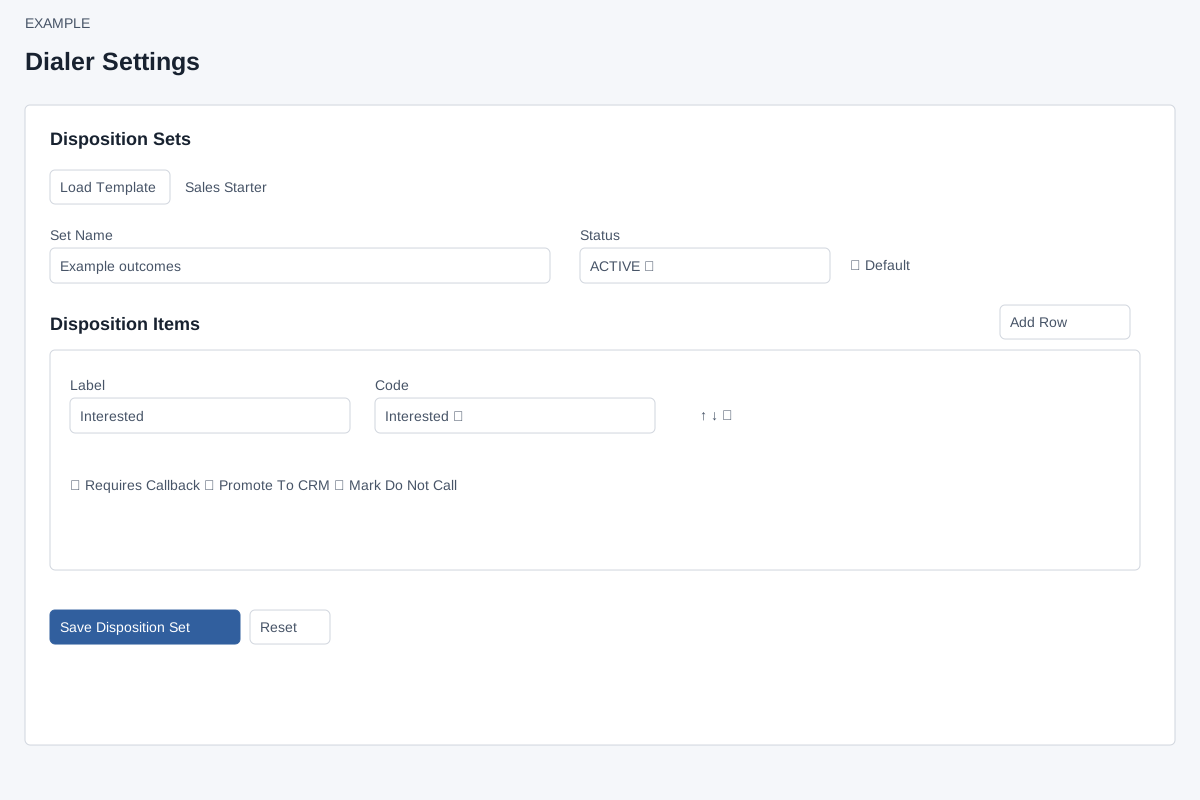
- In Disposition Sets, enter Set Name, choose ACTIVE or INACTIVE and decide whether it is Default. Build outcomes with Add Row, their labels and codes; use the row controls to order them.
- Sales Starter, Follow-up Heavy and Collections / Recovery provide Load Template actions. Review the loaded outcomes before choosing Save Disposition Set. Reset clears the editing form.
- Example: a set contains an Interested outcome and a Follow-up Later outcome with the appropriate supported code.
Configure call scripts
- In Call Scripts, enter Script Name, choose status and enter Script Body, then Save Call Script. Review Saved Sets and Disposition Help. Dialer Defaults describes a 60-second claim heartbeat, 900-second claim timeout and callback items returning to the queue with CALLBACK status; retries are agent-driven through dispositions and callback scheduling.
- Saving a set or script changes configuration for users; verify permissions and test the workflow with an authorized test record.
Outcome builder reference
ADMIN and the Dialer app are required. Each row has Label, Code, optional Custom Code, Requires Callback, Promote To CRM and Mark Do Not Call; arrows change order and trash removes the draft row. Standard codes are NO_ANSWER, INTERESTED, QUALIFIED, CALLBACK, NOT_INTERESTED, WRONG_NUMBER, DNC, DO_NOT_CALL (legacy), BUSY and VOICEMAIL. CUSTOM exposes Custom Code; the editor uppercases it and replaces other characters with underscores. Labels and unique codes are required and at least one row is required. Flags control the corresponding workspace prompts; DNC/DO_NOT_CALL also trigger suppression by code. Load Template replaces the current draft with its predefined rows; it does not save until Save Disposition Set. Setting Default clears other set defaults. Saved Sets → Edit loads a set; Reset clears the editor. Inactive sets are not active choices.
Sales Starter, Follow-up Heavy and Collections Recovery provide different draft outcome mixes; inspect their labels, codes and flags before saving. Call Scripts has required Script Name, optional Script Body, ACTIVE/INACTIVE and Save Call Script; Saved Scripts → Edit loads one and Reset clears it. These are configuration changes, not outbound calls. If saving fails, correct the shown error and reopen the saved set or script to verify.