Campaign response bot transcript
Read the chatbot conversation associated with a campaign reply before deciding on a follow-up.
Open the transcript
In Campaign Replies, expand an eligible response and choose Bot Transcript when offered. CRM access and permission for the follow-up’s contact and current owner are required. The stored response must identify the matching chatbot session and an inbound log; an older or out-of-scope link may be unavailable.
Read and use the conversation
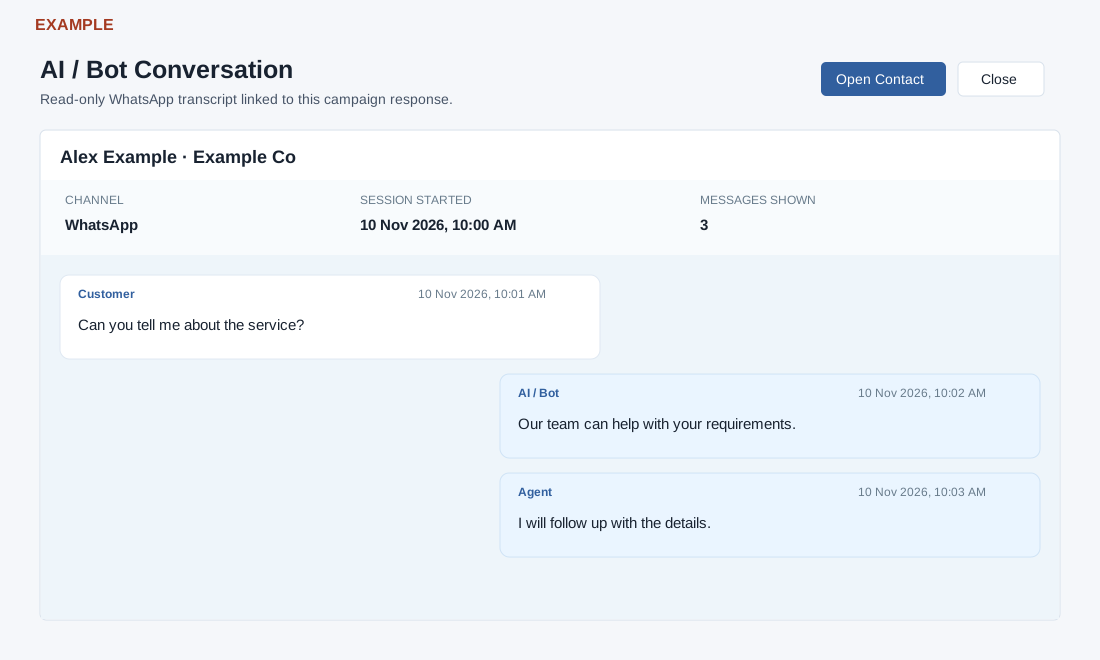
The header identifies the contact and company. The summary shows Channel, Session Started and Messages Shown. Messages display sender, date and text: Customer is on the left, AI / Bot and Agent are on the right, and System messages are centered. Blank text displays “No text content.” Scroll the transcript to read it. The transcript shows up to the latest 500 session entries in their recorded order. Messages Shown is the number displayed and may not include the complete session.
For example, if Alex Example asks about a service and the bot gives a general answer, use the transcript to prepare a specific follow-up. Open Contact opens the contact in a new tab when available; Close requests that the window close. This screen is read-only: it has no reply, search, export or pagination controls. Follow-up decisions belong in Campaign Replies or the contact workspace.
If unavailable
“Conversation unavailable” can mean the recorded session or inbound link no longer matches, the contact is outside your current scope, or loading failed. Return to Campaign Replies, check the selected response and access, and retry; ask an administrator to investigate if it persists. Opening the transcript does not demonstrate that any external message was delivered.