Contact project tasks
Open the page
Contact conversation → Projects
Review project tasks
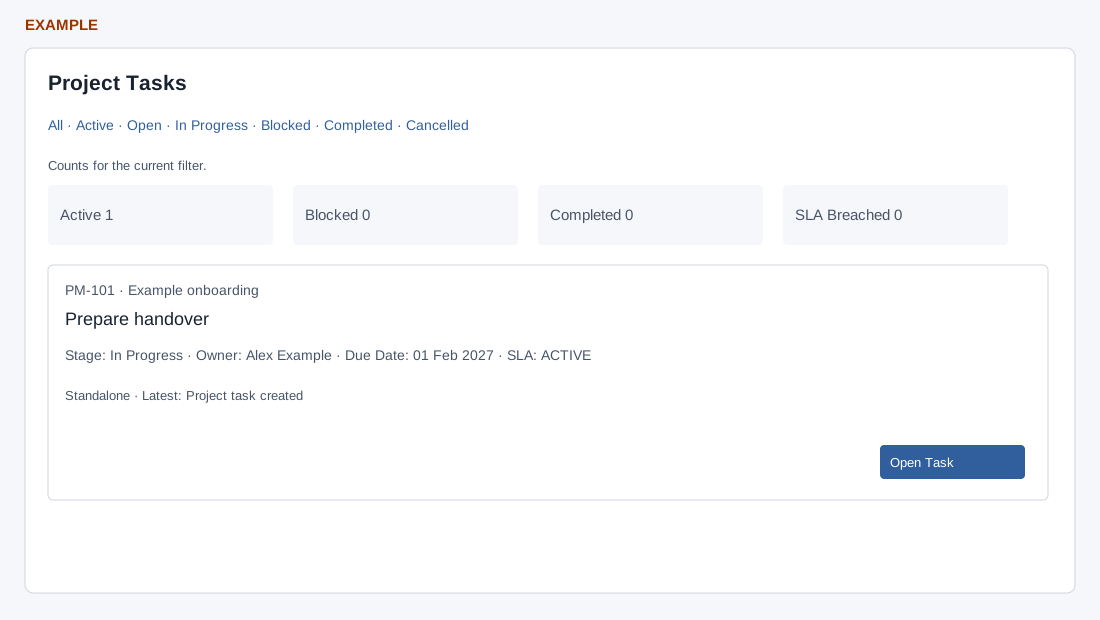
- Use the status filters and review each task’s stage, owner, due date and SLA. Choose Open Task to open its project task page. This panel depends on project access.
- Example: review the Requirements review task and owner before following up.
Related: Project board and reports · Project task detail
Filters and counts
CRM access, a valid company contact, project read access and permission to read each task are required. Filters are All, Active (default), Open, In Progress, Blocked, Completed and Cancelled. The list retrieves at most 300 matching tasks before excluding tasks you cannot read. Active, Blocked, Completed and SLA Breached counts summarize only the current filtered, accessible results; they are not all-time totals.
Each card shows reference and project, title, optional description, status, stage, owner, due date, SLA and SLA due, source or subscription, optional cycle and latest activity. Open Task opens its detail. For example, select Blocked for Alex Example to identify an outstanding handover, then open it and review the history before following up. If no task appears, try All and check access and the contact link; the limit and filter affect results.