Custom forms list
Create and organize the forms staff use on contact records.
Create
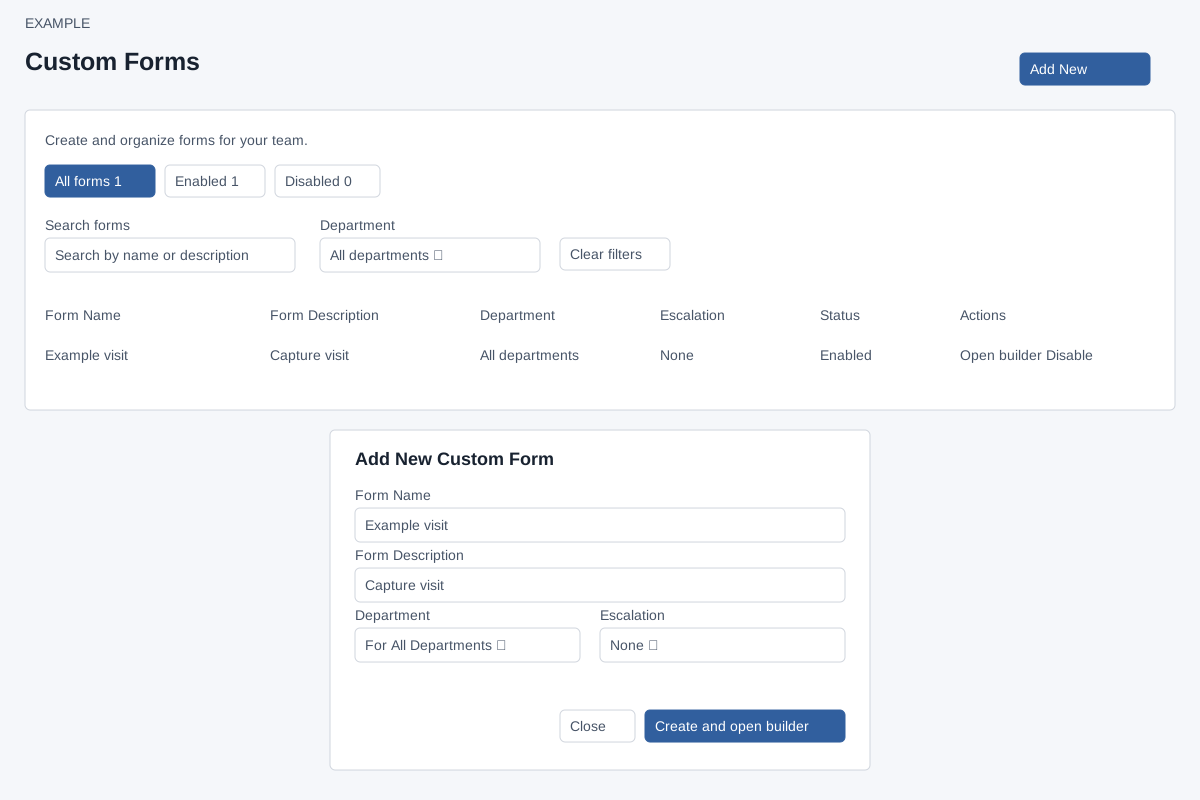
Account Settings → Features Settings → Custom Forms requires ADMIN. Add New asks for required Form Name (up to 45 characters) and Form Description (up to 90), Department (For All Departments or a listed department), and Escalation (None or a listed escalation). The current creation script changes every numeric department selection to For All Departments (zero), including a selected department. Verify the saved scope rather than relying on the chosen department. Create and open builder creates the form and navigates to its field editor; Close or × cancels. Correct any required field or reported error before retrying.
Filter and manage
All forms, Enabled and Disabled tabs filter status; their counts reflect all loaded rows. Search matches name or description, Department filters to a specific department, and Clear filters resets all three controls. The shown count changes with filters. Rows show name, description, department, escalation and status. Open builder edits fields; select the Escalation value to choose and save another escalation. Enable or Disable changes availability and updates the row and counts. Review any displayed migration notice. There is no delete button on this list. Notes opens the sidebar.