WhatsApp sender dependency impact
Check references and in-flight work before draining or retiring a sender.
Open and prepare
- WhatsApp Management → sender → View impact
- A sender record and access to its management page are required.
Read the impact report
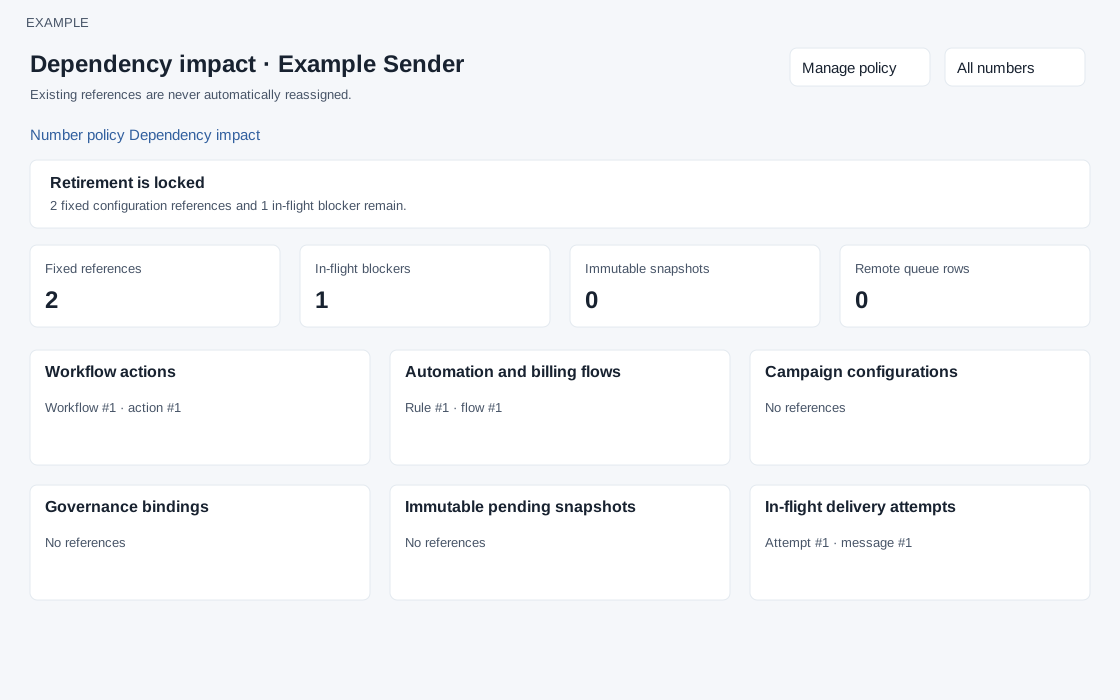
- Review readiness, Fixed references, In-flight blockers, Immutable snapshots and Remote queue rows. Expand or review each dependency group and the counts shown.
- An incomplete dependency inventory locks retirement; missing or unreconciled sources must be investigated. Existing references are not automatically reassigned.
- Coordinate changes to workflows, automation, campaigns and other listed references, then return to number policy for final review. The final retirement request uses a dependency hash and the current policy version. It also depends on the remote queue inventory being available; if a source or queue cannot be reconciled, retirement remains locked.
Groups and readiness
The report lists Workflow actions, Automation and billing flows, Campaign configurations, Governance bindings, Immutable pending snapshots, In-flight delivery attempts, Chat routing settings, Open service sessions and Compatible active alternatives. Each group shows a count and individual records, or Inventory unavailable / No references. Truncated results leave retirement locked. Readiness requires a complete report and queue inventory, zero fixed references and zero in-flight blockers. Manage policy and All numbers are navigation links; this report does not reassign records.