WhatsApp governance report
Review WhatsApp activity by sender, category, feature and template.
Open and prepare
- WhatsApp Management → Governance report
- Governance viewing permission is required. Several detailed sections request at most 100 grouped rows; the health timeline displays at most 20 events. Displayed figures depend on available data.
Filter and interpret activity
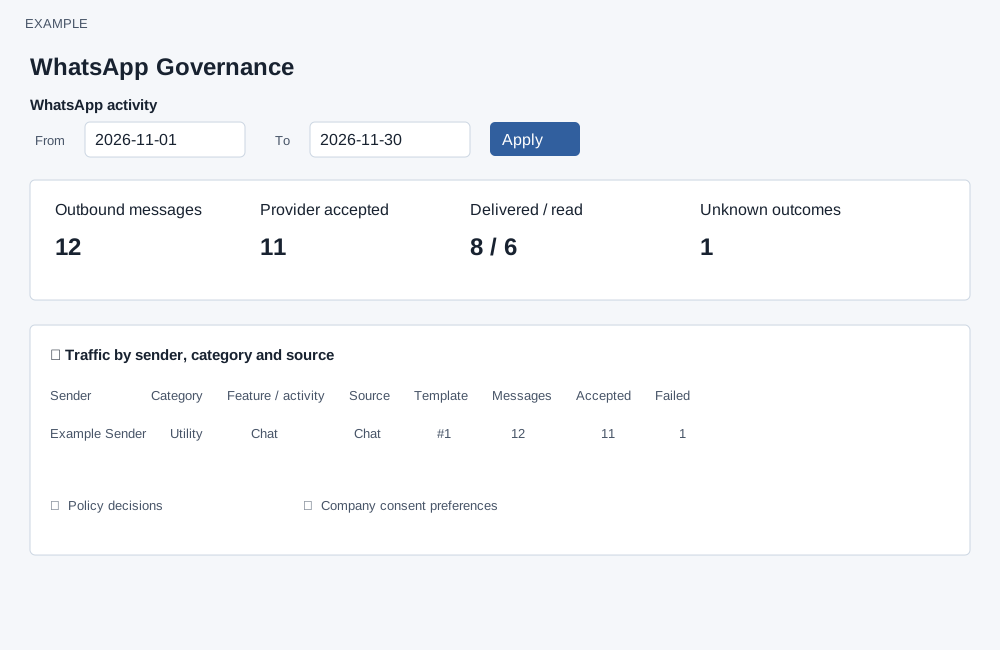
- Enter From and To dates and choose Apply. Review Sender, Category, Feature / activity, Source, Template, Messages, Accepted and Failed.
- For example, compare Utility and Marketing activity for the same date range, then investigate an unexpected failure with the relevant sender and template. Counts reflect the selected period and available data.
- Use Templates or WhatsApp Management to return to the related configuration. Export or share reports only after removing real customer and account information.
Report scope and sections
The default From date is 29 days before today and To is today; Apply submits the inclusive date range. A reversed range shows an error. The report includes observed native activity from each sender’s connection date, with no imported earlier history; numbers without a recorded connection date are excluded. The overview shows outbound messages, provider accepted (accepted, sent, delivered or read), delivered / read, unknown outcomes and estimated cost. The cost is a best-effort estimate, not a bill. The overview tile adds the returned cost-group amounts without separating currencies and uses the bounded cost result; if currencies differ or groups are omitted, the tile is not a meaningful total. Review the currency-specific rows instead.
Open and close the report sections to inspect Traffic by sender, category and source; Policy decisions; Company consent preferences; Capacity and Utility reserve; Delivery outcomes; Estimated Meta costs; and Number health timeline. Consent is company-wide and the report shows current preferences that took effect in the period after the first connection. The health timeline displays at most 20 events. If the report is unavailable, correct the date range or try later; messaging is unaffected. Manage numbers, Numbers and Templates are navigation links.
Use each section to answer a CRM question
| Section | Read the columns | How to use it |
|---|---|---|
| Traffic by sender, category and source | Sender and connection date identify the number. Category and purpose describe message intent. Feature/activity identifies the CRM feature and business context. Source identifies the originating configuration type; Template identifies its stored template. Messages counts outbound records; Accepted includes Accepted, Sent, Delivered and Read; Failed includes Failed, Rejected and Not sent. | Find which workflow, campaign or other feature is producing volume or failures. Acceptance is not the same as delivery. The visible grouped rows are bounded; adding them is not a substitute for the overview total. |
| Policy decisions | Reason, decision, feature/activity and decision count. | Investigate why activity was allowed, blocked, deferred or observed. Counts are decision records, not unique contacts or necessarily unique messages; observation can record a restriction without enforcing it. |
| Company consent preferences | Purpose, current preference state, recorded basis and preference count. The section uses the latest explicit event’s effective time. | Review current explicit WhatsApp preferences whose latest event took effect in the period. These preferences are company-wide, not owned by a sender. They are not a complete history of every consent change or proof that the whole audience opted in. |
| Capacity and Utility reserve | Marketing accepted, protected accepted, reserve percentage and observed count for each sender. Protected accepted includes Utility and Authentication. | Compare transactional and marketing activity. Reserve is the sender's current configured percentage; these counts are not a live remaining-capacity meter or evidence that reserve enforcement was active for every message. |
| Delivery outcomes | Provider event status, category, feature/activity and event count. | Inspect delivery feedback. A message can generate more than one event, for example Sent, Delivered and Read. Do not sum event counts as unique messages. |
| Estimated Meta costs | Destination market, provider category, estimate state and currency/amount. | Investigate volume with cost evidence. Unknown market or estimate state needs review; an absent estimate can contribute zero without proving a free message. Do not combine unlike currencies. Use the provider bill for payment reconciliation. |
| Number health timeline | Sender, event type, normalized state and event time. Status updated means the event updated the current status; Recorded only means it was retained without applying that update. | Relate a failure period to number health. At most 20 events are displayed. An event marked Recorded only is not evidence that the current sender status changed. |
Why sections for the same dates can differ
Traffic, overview and capacity use message creation time. Policy decisions use decision creation time; delivery outcomes use event recording time; costs use estimate calculation time. The health range uses receipt time but displays the provider's effective time when available. Therefore a message created before the selected range can receive a delivery or cost update within it. Message-based sections include observed native activity from each sender's connection date; earlier imported history is excluded.
Example: investigate a campaign
- Apply the campaign's date range. Check overview Outbound messages, Provider accepted, Delivered / read and Unknown outcomes.
- Expand Traffic and locate the campaign source, sender and template. If accepted volume is lower than messages, inspect failure and policy evidence rather than assuming all remaining messages failed.
- Use Policy decisions to identify a restriction and Delivery outcomes to inspect provider feedback. Compare event timing with message creation timing before reconciling totals.
- Check Number health timeline and the sender's Diagnostic if the issue concerns connection readiness. Review cost estimates separately from billing.
Empty tables mean no matching evidence was returned for that section and range. They do not prove that no WhatsApp messages were sent through another system or an unobserved path. This report offers navigation and filtering; it does not retry, cancel or send the listed activity.