WhatsApp Meta connection diagnostic
Review connection checks for a specific sender.
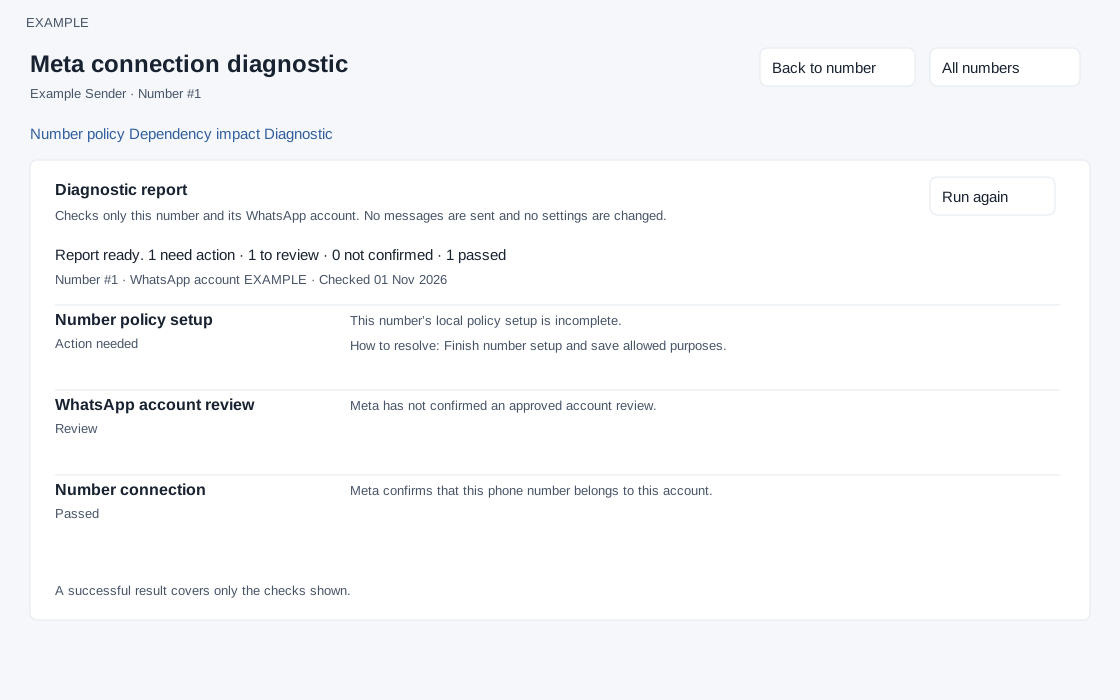
Open and prepare
- WhatsApp Management → sender → Diagnostic
- The link is displayed to users who can manage the sender.
Inspect the report
- Review the Diagnostic report and individual check results, including any reported errors. Return to Number policy or Dependency impact using the page links.
- Run again performs another check against the connection and may contact Meta; use it intentionally. If a check fails, review the displayed details and access status before changing settings.
How checks run
The diagnostic checks local policy and provider connectivity without sending messages or changing settings, according to the screen. The diagnostic requires permission to manage number policy and a sender belonging to the company. It starts automatically when opened; Run again retries after completion. Results are ordered Action needed, Not confirmed, Review, then Passed. Each result can include a description, suggested resolution, Meta code and support reference. The report shows sender/account context and check time when available. A failed request shows an error and Run again; a pass applies only to the available checks and their stated limits. Back to number and All numbers navigate without changing policy.
Read each diagnostic result
Action needed indicates a failed check; Not confirmed means the available response cannot establish the condition; Review flags a condition needing attention; Passed confirms only the stated check. The 18 named check types are conditional, not 18 guaranteed results in every run: identity failure can stop credential checks, and phone registration, verification and quality appear only when the number is found. Some checks appear only after account access and local setup are confirmed. Missing downstream results do not imply success.
| Check | Meaning | Next step when not passed |
|---|---|---|
| Number policy setup | Both the sender policy and company governance settings exist. | Back to number → Finish number setup; then select allowed purposes and save the policy. |
| Message purposes | A primary purpose other than Unclassified is configured. This does not establish consent or validate every allowed purpose. | Choose the appropriate primary and allowed purposes; enter a change reason and save. |
| Local sender availability | The local integration is active and lifecycle is Auto. | Review lifecycle and dependency impact. Paused, draining, retired or inactive status needs an intentional operational decision; a retired sender cannot be resumed here. |
| Meta account identity | A failure indicates missing or invalid stored account/number identifiers. | Ask the administrator to reconnect the intended number through Add number. |
| Integration credential | The configured integration credential is valid, unexpired and belongs to the configured app. | Ask the integration administrator to correct server configuration or credential access. Do not include credentials in a support report. |
| Token permissions | Checks WhatsApp management, WhatsApp messaging and business management permissions, including account-specific grants when returned. | Grant the missing permission or account access identified in the result. A permission pass is separate from the account-access check. |
| WhatsApp account access | The credential can read the selected business account. | Review the number's connection and account access with the Meta administrator. |
| Account administration | Meta accepted an administration read check. | Check provider business configuration and administration access. A pass does not pre-authorize a later setting change. |
| WhatsApp account review | Meta reports Approved. | Review the account's status and requested actions in WhatsApp Manager. |
| Marketing onboarding | Meta confirms marketing onboarding. | Complete the applicable onboarding and terms, then verify status in CRM marketing setup. |
| Marketing routing | Meta confirms protection from marketing Cloud API routing. | Resolve administration errors, then use Activate marketing routing in marketing setup. Activation affects the entire selected WhatsApp account. |
| Number connection | Meta lists this phone number under the selected business account. | The diagnostic reads at most three pages of up to 100 numbers. A complete list without the number is a failure. An incomplete or failed lookup is unconfirmed; resolve access or transient errors before reconnecting. |
| Phone registration | Meta reports Connected. | Complete registration or reconnection in WhatsApp Manager before sending. |
| Phone verification | Meta reports the phone code verification as Verified. | Complete the number verification steps in WhatsApp Manager. |
| Number quality | Green passes; Yellow or Red requires review; absent information is unconfirmed. | Review messaging quality and limits. Address audience or content problems before increasing traffic. |
| Incoming-message subscription | The configured app appears in the account's subscribed apps. | Ask the integration administrator to check the app subscription and callback settings. A pass does not test webhook delivery. |
| Number health | Available passes, Blocked fails, and Limited requires review. | Resolve the account, policy or payment restrictions displayed in WhatsApp Manager. |
| Meta billing | Checks available payment and restriction evidence. A pass does not verify balance or guarantee delivery. | Ask the billing administrator to review payment method and outstanding balance. Unconfirmed means insufficient exposed information, not necessarily an unpaid balance. |
Example: diagnose a missing incoming conversation
- Open Diagnostic for the intended support sender and wait for completion.
- Check credential, token permissions and account access first. Later checks can be unconfirmed when these fail.
- Read Number connection, Phone registration and Incoming-message subscription. Resolve the specific failure with the responsible administrator.
- Run again once the issue has been corrected. If subscription passes but incoming chats are still absent, ask the integration administrator to investigate webhook delivery; this diagnostic does not exercise it.
Keep the check time, result label, error code and support reference when requesting assistance. Exclude account identifiers and personal details from public screenshots. Do not repeatedly run the check while a request is pending; a timeout or incomplete provider response can leave checks unconfirmed.